<?xml version="1.0" encoding="utf-8"?><feed xmlns="http://www.w3.org/2005/Atom" ><generator uri="https://jekyllrb.com/" version="3.10.0">Jekyll</generator><link href="https://akashdubey.me/feed.xml" rel="self" type="application/atom+xml" /><link href="https://akashdubey.me/" rel="alternate" type="text/html" /><updated>2026-03-10T08:22:30-07:00</updated><id>https://akashdubey.me/feed.xml</id><title type="html">Akash Dubey</title><subtitle>I&apos;ve been working with code for over 10 years.</subtitle><author><name>Akash Dubey</name><email>akash.dubey@rutgers.edu</email></author><entry><title type="html">Programming through the 2024 Robotics Season</title><link href="https://akashdubey.me/posts/robotics-development/" rel="alternate" type="text/html" title="Programming through the 2024 Robotics Season" /><published>2024-04-03T00:00:00-07:00</published><updated>2024-04-03T00:00:00-07:00</updated><id>https://akashdubey.me/posts/robotics-chief</id><content type="html" xml:base="https://akashdubey.me/posts/robotics-development/"><![CDATA[<p>All of the programming related things we did in the 2024 robotics season, Crescendo.</p>

<p>All of this is taken from our Open Alliance page, which you can find <a href="https://www.chiefdelphi.com/t/frc-1257-parallel-universe-2024-build-thread-open-alliance/447080">here</a>. Throughout the season, I contributed heavily there.</p>

<h1 id="128-programming-update">1/28 Programming Update</h1>
<p>After picking a robot design, our programming team started thinking about how we wanted to organize our robot. Including how to tackle our new challenge of SWERVE! We also have to plan out driver control methods, vision, autos, and the works. This post will highlight everything our programmers have done so far.</p>

<p><a href="https://github.com/FRC1257/2024-Robot/">GitHub Repository</a></p>

<h2 id="software-library-decisions">Software Library Decisions</h2>

<h3 id="advantage-kit">Advantage Kit</h3>

<p>Recently, we created our <a href="https://github.com/FRC1257/2024-robot/tree/swerve">2024 robot code project</a>! We made the decision to use <a href="https://github.com/Mechanical-Advantage/AdvantageKit/tree/main">Advantage Kit</a> to help log data on our robot and improve the real and simulated separation of our code. We hope that this will help us debug problems in our code before we test it on the robot and better understand how our robot works by analyzing log files in <a href="https://github.com/Mechanical-Advantage/AdvantageScope">Advantage Scope</a>.</p>

<p>In addition, they also have some really good example projects, especially for <a href="https://github.com/Mechanical-Advantage/AdvantageKit/tree/main/example_projects/advanced_swerve_drive/src/main/java/frc/robot">advanced swerve drive</a>. So we decided to use their template code as the base of our project.</p>

<h3 id="photon-vision">Photon Vision</h3>

<p>Last season, our team used <a href="https://photonvision.org/">Photon Vision</a> to detect April Tags. We had code to combine the pose estimates from one camera to update our odometry. However, we didn’t end up using it very much.</p>

<p>This year we plan to use two coprocessors. One Raspberry Pi 4 from last year with one camera and a new Orange Pi 5 with two cameras. We will use two cameras for April Tag detection and one on the Orange Pi for <a href="https://docs.photonvision.org/en/latest/docs/objectDetection/about-object-detection.html">note detection</a>. Photon Vision makes it really easy to set up these vision measurements and use them in our code.</p>

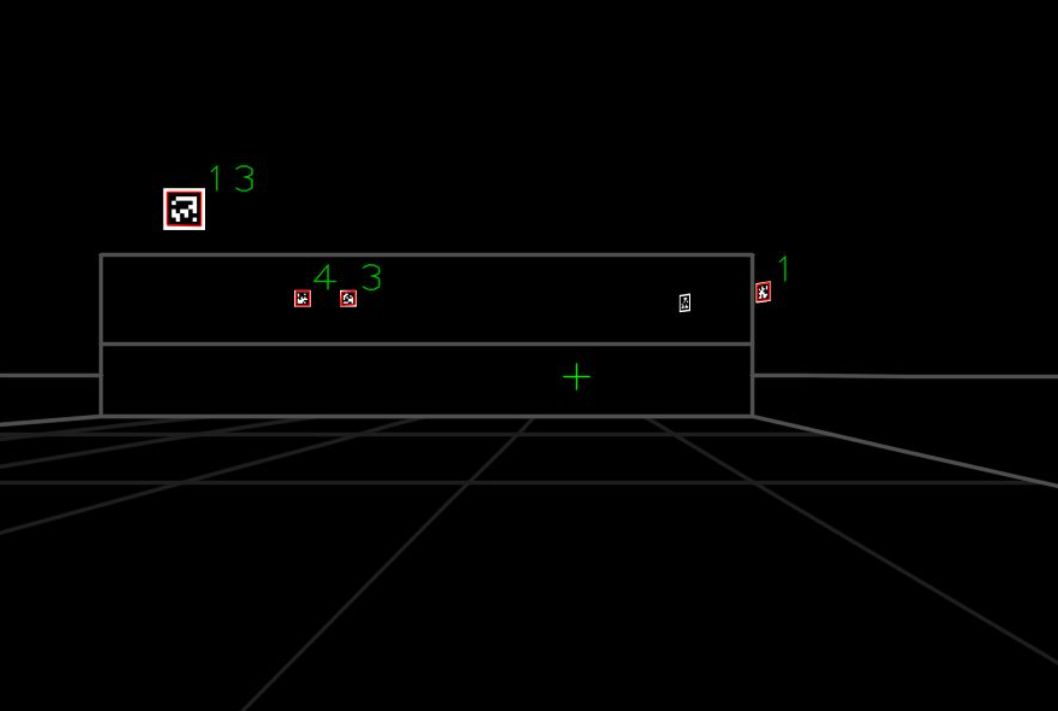
<p>The first thing that I worked on was incorporating vision into our project base. I started by using Photon Vision examples to create <a href="https://docs.photonvision.org/en/latest/docs/examples/simaimandrange.html">simulation</a> and <a href="https://docs.photonvision.org/en/latest/docs/programming/photonlib/robot-pose-estimator.html">real</a> IO classes in our <a href="https://github.com/FRC1257/2024-Robot/tree/master/src/main/java/frc/robot/subsystems/vision">vision subsystem</a>. Then I worked to add dual camera support. We use these values in the pose estimator built in to our drive subsystem. Here is a screenshot of what the simulated camera looks like. Below is a video showcasing vision and pose estimation working in tandem.</p>

<p><img src="/images/posts/frc24/black.png" alt="alt_text" title="image_tooltip" /></p>

<iframe src="https://www.youtube.com/embed/X5Xm3rrZEt4"></iframe>

<h3 id="path-planner">Path Planner</h3>

<p>#autonomous #pathplanner</p>

<p>Last season, our team created a <a href="https://github.com/FRC1257/2023-Robot/blob/master/src/main/java/frc/robot/commands/GenerateTrajedies.java">customizable auto system</a> using WPILib trajectories. This year, with swerve, we want to use a more powerful system to fully utilize the benefits of our new drivetrain. So we decided to use <a href="https://pathplanner.dev/home.html">Path Planner</a>, which was already integrated into our base project.</p>

<p>Path Planner has a nice <a href="https://github.com/mjansen4857/pathplanner">web UI</a> that we can use to create autos and run commands in between. It also has support for generating trajectories <a href="https://pathplanner.dev/pplib-create-a-path-on-the-fly.html">on the fly</a> which we can use to create another customizable auto system for this year. We think this might be really useful in higher levels of play along with our manually created autos. Below is an example of an auto running on the simulated robot.</p>

<iframe src="https://www.youtube.com/embed/KnJ286f669I"></iframe>

<h2 id="features">Features</h2>

<h3 id="advantage-scope">Advantage Scope</h3>

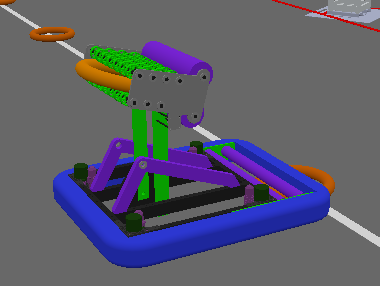
<p>To test the physical movements of our robot in simulation, we wanted to <a href="https://github.com/Mechanical-Advantage/AdvantageScope/blob/main/docs/CUSTOM-ASSETS.md">import our robot CAD</a> to <a href="https://github.com/Mechanical-Advantage/AdvantageScope">Advantage Scope</a>. I separated our robot CAD into drive base and pivot components to use in Advantage Scope. Here is the <a href="https://github.com/FRC1257/2024-Robot/tree/master/advantage_scope/Robot_AllenV1">folder</a> that we created to store our configuration and object files. Below is a picture of the robot in simulation. (the arm isn’t in the correct position but we hope to fix that later)</p>

<p><img src="/images/posts/frc24/sim.png" alt="alt_text" title="image_tooltip" /></p>

<p>Another thing we created was a custom Advantage Scope layout for our code. We decided to store this in our <a href="https://github.com/FRC1257/2024-Robot/tree/master/advantage_scope/">Advantage Scope folder</a> as well to allow for easy access for all our programmers.</p>

<h3 id="auto-aim">Auto Aim</h3>

<p>We worked on some rudimentary <a href="https://github.com/FRC1257/2024-Robot/blob/master/src/main/java/frc/robot/commands/DriveCommands.java">auto-aim code</a> for our drivetrain that controls the angle of our robot as we move around the field. It constantly tries to put the shooting end of our bot at the position of the speaker. It works with a PID controller connected to the robot’s angular speed. Here is a video of it in action.</p>

<iframe src="https://www.youtube.com/embed/Y1pcj-bU0sI"></iframe>

<h3 id="path-finding">Path Finding</h3>

<p>#pathing</p>

<p>Initially, we were having some trouble getting <a href="https://pathplanner.dev/pplib-pathfinding.html">path finding</a> with Path Planner working. Path finding allows us to move to positions on the field while avoiding obstacles. This would be useful for moving to specific points of the field like the AMP, SOURCE, or SPEAKER. Instead, we began by <a href="https://pathplanner.dev/pplib-create-a-path-on-the-fly.html">generating trajectories</a> to points. The problem with this is that it ignores obstacles on the field, so it can drive through walls and solid objects which is not something we wanted. These trajectories are more customizable than path finding, so we will definitely use them with manually created trajectories to create our customizable auto system.</p>

<p>However, we did end up getting path-finding working this week. The problem was that we were using an older version of the <code class="language-plaintext highlighter-rouge">LocalADStarAK.java</code> file. Once we updated <a href="https://gist.github.com/mjansen4857/a8024b55eb427184dbd10ae8923bd57d">that file</a>, we were all set. Below is a video of the robot path finding to the AMP and SOURCE.</p>

<iframe src="https://www.youtube.com/embed/oZoH1J_pXK4"></iframe>

<p>Here is a more complete video of our robot in simulation with all the things we can do.</p>

<iframe src="https://www.youtube.com/embed/pkk5lIfQLZY"></iframe>

<p>With this drive and vision code down, our team can build on top of this base to accomplish all of our goals.</p>

<h2 id="testing-swerve">Testing Swerve</h2>

<p>Once our drivetrain was built, we flashed all of our motor controllers and our roborio with the latest software. We also zeroed our absolute encoders for measuring the turn and ensured our motor controllers had the right IDs.</p>

<p>The first time we ran our code on the bot the turn motors were jittering and making all sorts of crunching noises. Clearly, something wasn’t working correctly. Thankfully we had a fallback option. We used the <a href="https://github.com/REVrobotics/MAXSwerve-Java-Template">REV MAXSwerve</a> template to test our robot and it worked!</p>

<p><a href="https://drive.google.com/file/d/1INTUDGdMCMWSMVrwqUqiTQ8VGbZaGMfb/view?usp=sharing">Video of it in action!</a></p>

<p>Thanks for making this edit Michael!</p>

<p>Later, we realized the Advantage Kit example code that we copied was meant for a different swerve module and the encoders the code was looking for were non-existent. So we brought the REV MAXSwerve code to our code and prepared to test it on the robot. We’ll test it next week to see if it works. It would really suck if it didn’t 😭.</p>

<h2 id="programming-subsystems">Programming Subsystems</h2>

<p>We’ve split up our team to work on the Pivot, Intake/Shooter, Ground Intake, Climb, and Trap?!?! mechanisms. Each group has 3-4 programmers on it and they will all contribute to their own subsystem branches in the code. Once they are done, we will merge everything together for our final robot code!</p>

<p>Currently, once we get the basic layout for our subsystems down, we plan to build on top with more advanced and autonomous features in different branches. Hopefully, the code for the subsystems will be done within a week or so and after that we will reconvene to talk about what exactly we want to do for autos. That’s when we’ll create some of our hard-coded Path Planner autos and think about what sort of customizable autos to add in the future.</p>

<p>In addition, we’ll also work together to figure out how to shoot while moving. Right now, we’re going to take it one step at a time, starting with the bare minimum going up to a fancy autonomous system.</p>

<h2 id="things-to-do">Things to do</h2>

<p>This week our programming team wants to:</p>

<ul>
  <li>Get our swerve bot working with our Advantage Kit code</li>
  <li>Set up Vision
    <ul>
      <li>Calibrate April Tag Detection</li>
      <li>Note Detection</li>
    </ul>
  </li>
  <li>Finish Subsystems</li>
  <li>Test Things we made in simulation
    <ul>
      <li>Auto-aim</li>
      <li>Path Finding</li>
      <li>Pose Estimation</li>
    </ul>
  </li>
  <li>Create Advantage Scope Layouts</li>
</ul>

<p>Bonus:</p>

<p>Here’s a video I made explaining swerve for our members</p>

<iframe src="https://www.youtube.com/embed/gwmCFI6-dKg"></iframe>

<h1 id="213-programming-update">2/13 Programming Update</h1>

<p><a href="https://chat.openai.com/share/656efc8e-6a4c-4f32-a55b-9cc657da75ad">TL;DR generated by ChatGPT</a>: We built subsystems like a pivot, intake, shooter, and LED control for our robot. Used PID loops, tested in simulation, and integrated controller commands. Created a GitHub repo for real logs. Developed a note-shooting visualizer and planned auto routes for our swerve drive. Future plans include finishing the robot, testing, vision tuning, and documentation. Check out our videos and code progress. Thanks for reading!</p>

<h2 id="making-all-our-subsystems">Making all our Subsystems</h2>

<h3 id="pivot">Pivot</h3>

<p>We created a <a href="https://github.com/FRC1257/2024-Robot/tree/pivot/src/main/java/frc/robot">branch for our pivot subsystem</a> which uses 4 NEOs following each other to move the entire mechanism. We added PID position and voltage control modes to this system. We also added some code to make the PID values <a href="https://github.com/FRC1257/2024-Robot/blob/pivot/src/main/java/frc/robot/util/LoggedTunableNumber.java">Tunable Numbers</a> which helps while testing. We also added some basic commands and bound them to controller inputs. In our code, we ran our robot in simulation to catch some of the bugs it had before. Below is a video of the robot running in simulation and showing our CAD move in Advantage Scope. It took a while for us to tune our robot <a href="https://github.com/FRC1257/2024-Robot/blob/pivot/advantage_scope/Robot_AllenV1/config.json">configuration</a> in Advantage Scope to look correct.</p>

<iframe src="https://www.youtube.com/embed/W6bo5JZr7Ow"></iframe>

<h3 id="intake--ground-intake">Intake / Ground Intake</h3>

<p>Programmatically, both of these subsystems are nearly identical. The only difference is that the <a href="https://github.com/FRC1257/2024-Robot/tree/intake/src/main/java/frc/robot">intake system</a> has a break beam sensor while the <a href="https://github.com/FRC1257/2024-Robot/tree/ground-intake/src/main/java/frc/robot">ground intake</a> does not. So, we decided to finish the intake first, then copy-paste the code and remove the break beam for our ground intake code. This allows the ground intake to work in tandem with the intake as commands are executed.</p>

<p>Some notable features are <a href="https://github.com/FRC1257/2024-Robot/blob/46f2baabf80722809a44ff3192bf4bf2669849e7/src/main/java/frc/robot/subsystems/Intake/IntakeIOSparkMax.java#L73">PID loop for velocity</a> and <a href="https://github.com/FRC1257/2024-Robot/blob/46f2baabf80722809a44ff3192bf4bf2669849e7/src/main/java/frc/robot/subsystems/Intake/Intake.java#L64">commands with the break beam</a> like intaking till it detects a note.</p>

<p>We tested these in sim, but didn’t record any videos of it. The only visual way of seeing if it was working was to use Advantage Scope to graph out the intake speed and setpoint.</p>

<p>Much of the code’s structure is based on our <a href="https://github.com/FRC1257/Virtual-Robot/">virtual 2023 robot</a>.</p>

<h3 id="shooter">Shooter</h3>

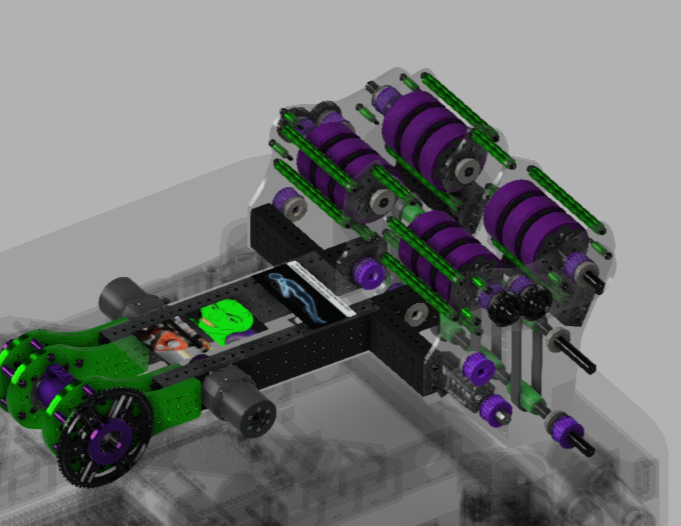
<p>Since we have a very similar shooter design to 6328, we are taking some inspiration from <a href="https://github.com/Mechanical-Advantage/RobotCode2024/tree/main/src/main/java/org/littletonrobotics/frc2024/subsystems/superstructure/flywheels">their shooter code</a>. We made sure to include velocity PID loops for both sides and create the relevant commands using it. Currently, we are working on some math to control the speed that our shooter needs to go and the angle of the arm to score shots in the speaker.</p>

<p><img src="/images/posts/frc24/shooter.png" alt="alt_text" title="image_tooltip" /></p>

<h3 id="led">LED</h3>

<p>We’re also going to have LEDs on our robot controlled by the <a href="https://www.revrobotics.com/rev-11-1105/">REV Blinkin</a>. We’ve never used these before, so we were super grateful to find this code with exactly what we were looking for:</p>

<p><a href="https://www.chiefdelphi.com/t/rev-blinkin-example-code/452871/4?u=akeboss">REV Example Code</a></p>

<p>We haven’t made any commands or anything yet to control our LEDs, but will do so in the future.</p>

<h2 id="putting-it-all-together">Putting it all together</h2>

<p>We put all of our subsystems together in the <a href="https://github.com/FRC1257/2024-Robot/network">super structure branch</a> to later combine with our swerve branch and bring in to master. Masterfully written post coming to explain our issues with swerve and how we fixed them.</p>

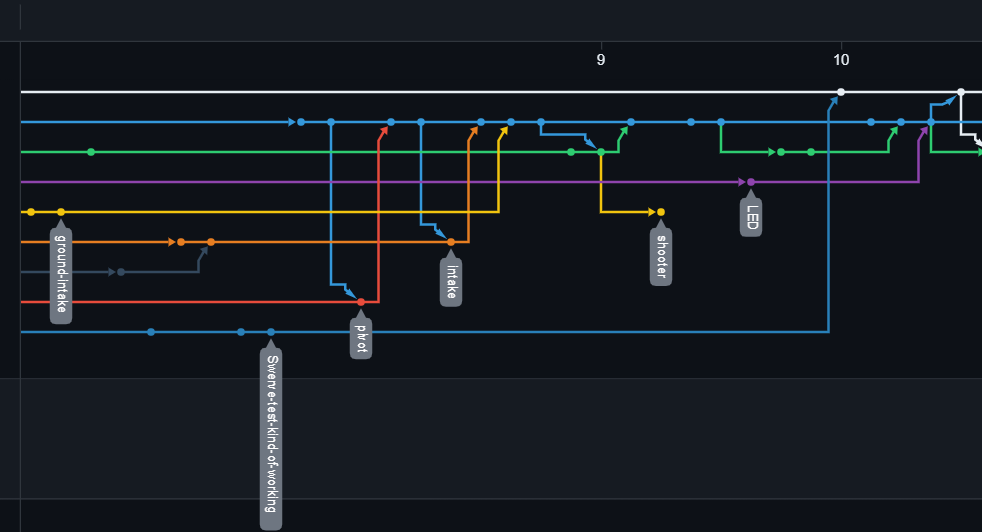
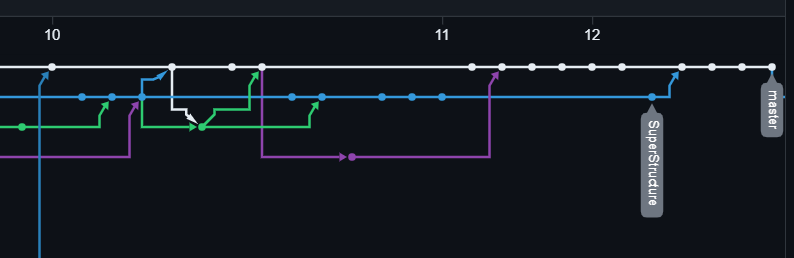
<p>Here’s a visual of our network graph so you can see the code being merged into the Super Structure branch (blue) and later master (white).</p>

<p><img src="/images/posts/frc24/gittt.png" alt="alt_text" title="image_tooltip" /></p>

<p><img src="/images/posts/frc24/gittmerged.png" alt="alt_text" title="image_tooltip" /></p>

<h2 id="other-extra-features">Other Extra Features</h2>

<h3 id="note-shooting-visualizer">Note Shooting Visualizer</h3>

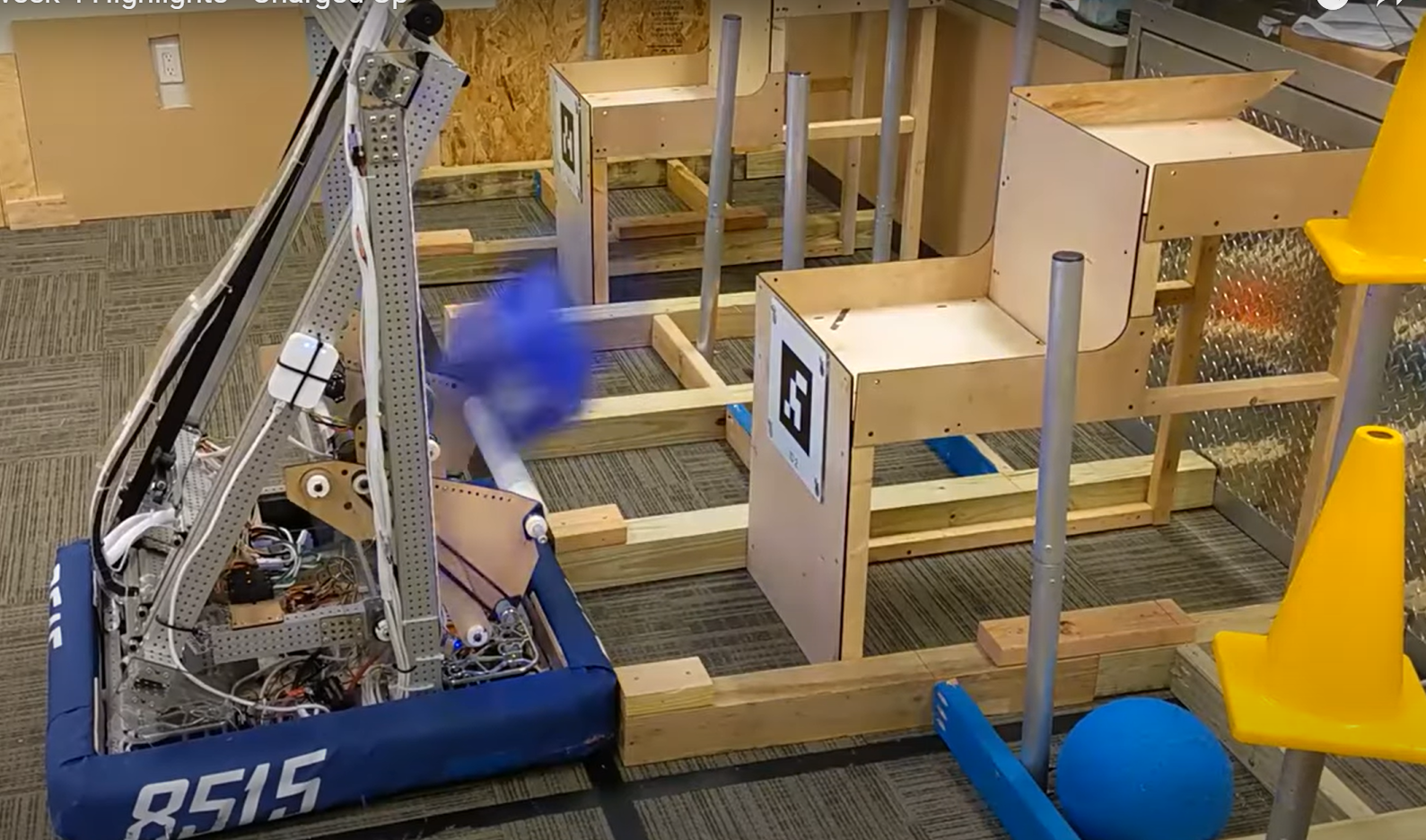
<p>Recently, Advantage Scope added support for <a href="https://www.chiefdelphi.com/t/advantagescope-2024-log-analysis-robot-telemetry-continued/442658/48?u=akeboss">3D Trajectories</a>, so we thought it would be cool to make a little note-shooting simulator for our robot. Currently, the speeds are hard-coded to move at a set speed when set to launch, so later we will incorporate it with our shooter mechanism to take the velocities from there to show. We added a small <a href="https://github.com/FRC1257/2024-Robot/tree/master/src/main/java/frc/robot/util/note">util section</a> to our code to store all this note visualization stuff. Another feature we need to add is to incorporate the robot’s speed into account for the note simulation.</p>

<p>Later on, unrelated to simulating shots, we also want to write some more code to simulate notes on the ground for our intake to pick up in simulation.</p>

<p>Here’s a video of it in action:</p>
<iframe src="https://www.youtube.com/embed/4srhygaGKlE"></iframe>

<p>Bonus:</p>

<p>Here’s a video of the trig being messed up in our simulation class.</p>
<iframe src="https://www.youtube.com/embed/UTBXmu_R084"></iframe>

<p>It was missing code to multiply the horizontal speed by the cosine of the pivot angle.</p>

<p>Here’s a video of it not working when we move the robot around. Also, the code to show the pivot component was also messed up.</p>

<iframe src="https://www.youtube.com/embed/1p_AlynLhpo"></iframe>

<p>The y value needed to be negated. For the arm component, the Pose3d needed to be at the origin of the field not at the position of the robot.</p>

<h3 id="controller-commands">Controller Commands</h3>

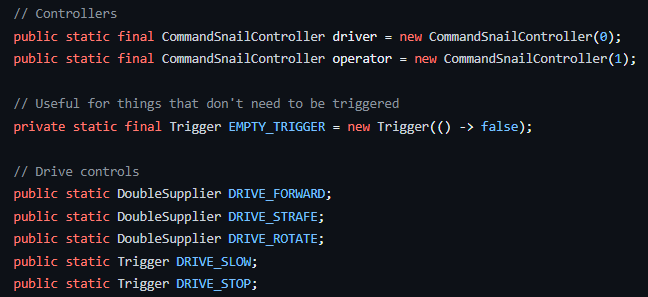
<p>We also added a new <a href="https://github.com/FRC1257/2024-Robot/blob/master/src/main/java/frc/robot/util/DriveControls.java">Drive Controls util class</a> to our code which will allow us to have different controller modes depending on the driver or operator of the robot. It works by storing our controller and the different inputs we might want from the controller as static variables that are accessed elsewhere.</p>

<p><img src="/images/posts/frc24/controller_commands.png" alt="alt_text" title="image_tooltip" /></p>

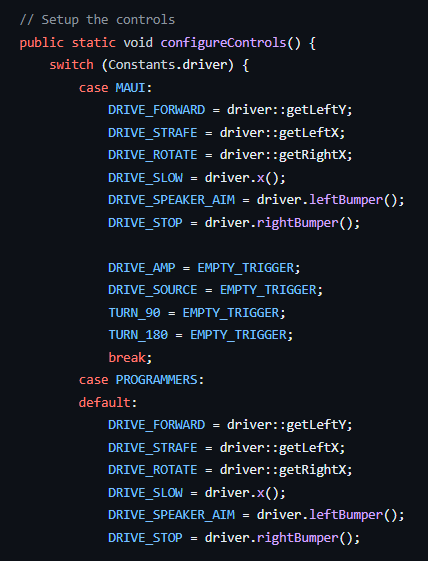
<p>Then we instantiate these controls depending on the driver or operator.</p>

<p><img src="/images/posts/frc24/configure.png" alt="alt_text" title="image_tooltip" /></p>

<p>We added this mainly because we might want to have different controller layouts when we are testing the robot or to customize the controls to what other drivers might want it to be set to.</p>

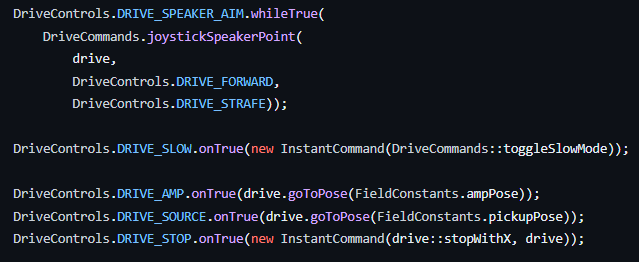
<p>Then we configure all our commands as normal.</p>

<p><img src="/images/posts/frc24/speaker_aim.png" alt="alt_text" title="image_tooltip" /></p>

<h3 id="storing-real-logs">Storing Real Logs</h3>

<p>Another addition we made was to create a GitHub repository to upload the real robot logs we get to keep them all in one place. Here it is</p>

<p><a href="https://github.com/FRC1257/2024-Logs">2024 Logs</a></p>

<h2 id="autos">Autos</h2>

<p>With all our subsystems done, we’ve started planning out auto routes. Since it’s our first year with swerve, we spent a while playing around with <a href="https://pathplanner.dev/pathplanner-gui.html">Path Planner </a>just to see what we could do with it. We knew that we wanted to have as many autos as possible, so for now we split up our group to try to make as many autos during our last meeting as we could. Here’s one example, the rest of our autos are in our robot code repo.</p>

<iframe src="https://www.youtube.com/embed/Ex8V-GmCdbE"></iframe>

<p>We made sure to use <a href="https://pathplanner.dev/gui-project-browser.html#manage-named-commands-and-linked-waypoints">linked waypoints</a> to make sure our paths remained the same everywhere if we changed one point. In addition, we also added some named commands to <a href="https://pathplanner.dev/gui-editing-paths-and-autos.html#event-markers">event markers</a> to run during these paths. These are all the commands we anticipate using for now.</p>

<p><img src="/images/posts/frc24/comms.png" alt="alt_text" title="image_tooltip" /></p>

<h2 id="road-ahead">Road Ahead</h2>

<h3 id="our-plan">Our plan</h3>

<ul>
  <li>Finish the Robot
    <ol>
      <li>Test Motors/Encoders/Sensors</li>
      <li>PID Constants and SysId</li>
      <li>Vision Tuning</li>
      <li>Run our Autos</li>
    </ol>
  </li>
  <li>
    <p>Shooting</p>

    <ol>
      <li>Shooting from anywhere on the field</li>
      <li>Shooting while moving</li>
    </ol>
  </li>
  <li>
    <p>Autos</p>

    <ol>
      <li>Work on a bunch of autos in Path Planner</li>
      <li>Work on customizable ones</li>
      <li>Note following command using vision</li>
    </ol>
  </li>
  <li>
    <p>Documentation</p>

    <ol>
      <li>Make some nice visuals with all our commands and autos</li>
      <li>Create and stick to a naming convention for our autos</li>
    </ol>
  </li>
</ul>

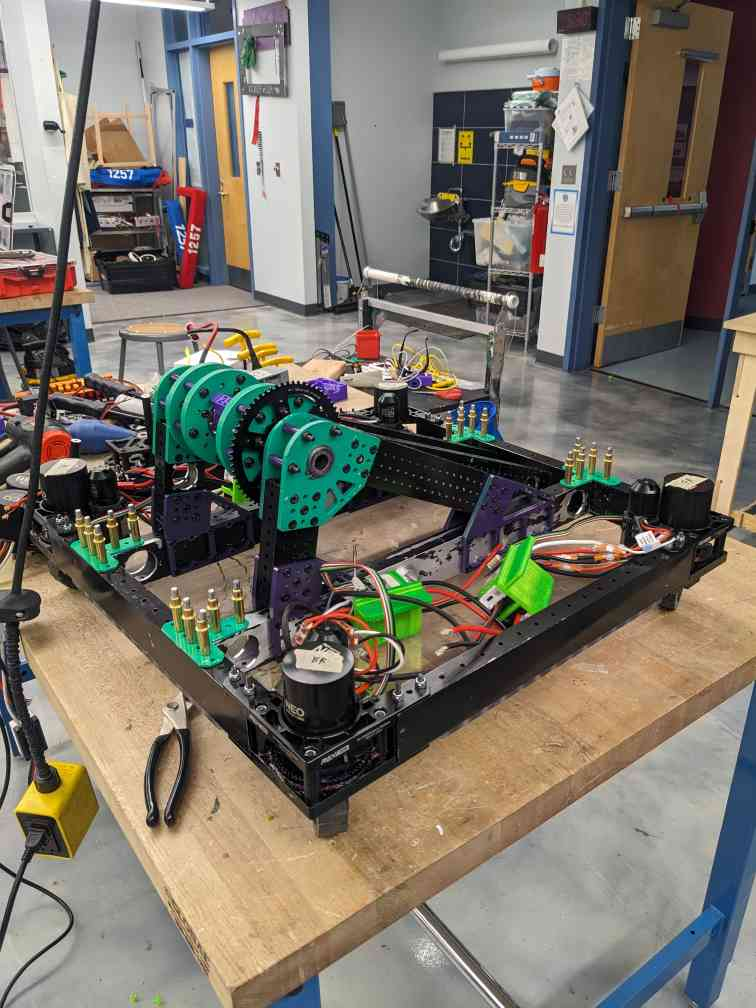
<p>Onward to the next week of build season! Here’s a little picture of what our robot looks like right now. Thanks for the picture Kevin!</p>

<p><img src="/images/posts/frc24/bot_prog.png" alt="alt_text" title="image_tooltip" /></p>

<p>Thanks for reading! Have a wonderful day!</p>

<h1 id="228-programming-update">2/28 Programming Update</h1>
<p>Hello!</p>

<p>Instead of me (Akash) writing the programming post for this week. I thought I would hand it off to our programming team to talk about instead! Hope you enjoy!</p>

<p><a href="https://chat.openai.com/share/1301dc22-eb39-4d8a-a530-22aef1e23fea">TL;DR generated by ChatGPT</a>:
Hey folks!</p>

<p>Our programming team has achieved significant milestones in robot development. They tackled shooter and pivot complexities, opting for a versatile lookup table approach. LED functionalities were implemented based on dynamic robot states, and a Note Shooting Visualizer class was crafted for simulation and tuning. Compound commands like autoScore and shootSpeaker were explained, showcasing efficient robotic actions. Vision code was enhanced to consider Pose estimates’ averages for improved accuracy. The team also designed multiple autonomous routines, including customizable ones through the Elastic dashboard. NoteChooser facilitates autonomous routine selection, while preparations for testing, PID tuning, vision optimization, and code cleanup are underway.</p>

<p>Cheers,
1257 Programming Subteam</p>

<h2 id="things-we-worked-on">Things we worked on</h2>
<h3 id="shooter-and-pivot">Shooter and Pivot</h3>
<p>Darrien, Tyler, and Sam</p>

<p>Shooter code, shoot anywhere, and shoot while moving</p>

<h4 id="shooting-while-moving">Shooting While Moving</h4>
<p>Recently, we’ve been trying to play around with all the above kinds of shooting commands and created one that can hopefully shoot from any position while stationary and moving. The command waits for the robot to turn towards the speaker, then uses the lookup table to determine the appropriate shooter speed and pivot arm angle to score.</p>

<p>Here’s <a href="https://github.com/FRC1257/2024-Robot/blob/ea8b40ac194a77f1de93b913e1a60e9ff37cc475/src/main/java/frc/robot/RobotContainer.java#L401">our code</a>. It doesn’t exactly work yet as we’ve seen in simulation, however, we’re going to fix up the problems to get it working soon.</p>

<iframe src="https://www.youtube.com/embed/pCzEHhQW0rU"></iframe>

<h4 id="lookup-table-rationale">Lookup Table Rationale:</h4>
<p>Instead of using <a href="https://www.desmos.com/calculator/sbktfvbnbm">a mathematical equation</a> to calculate angle and RPM, we decided to use a lookup table. Because real life physics are nonlinear and dynamic, we will inevitably need to adjust values to compensate. Compared to a single math equation, the lookup table allows us to adjust values very easily.</p>

<p>We were mainly inspired by <a href="https://www.chiefdelphi.com/t/frc-4481-team-rembrandts-2024-build-thread-open-alliance/441907/296">this post by Team Rembrandts</a>.</p>

<p>We also wrote a class to tune <a href="https://github.com/FRC1257/2024-Robot/blob/dev/src/main/java/frc/robot/util/misc/Lookup.java">our table</a> with <a href="https://github.com/FRC1257/2024-Robot/blob/dev/src/main/java/frc/robot/util/misc/LookupTuner.java">Logged Dashboard Numbers</a> to make testing easier.</p>

<p>We know that WPILib has its own built in <a href="https://github.wpilib.org/allwpilib/docs/release/java/edu/wpi/first/math/interpolation/InterpolatingDoubleTreeMap.html">InterpolatingDoubleTreeMap</a> and we plan to use it in the future.</p>

<h4 id="turnspeakerangle-command">TurnSpeakerAngle Command</h4>
<p>The command defines the speaker’s location and creates a vector between it and the robot’s current location. A <code class="language-plaintext highlighter-rouge">Rotation2d</code> method is then used to determine how far the robot must rotate to be ready to score into the speaker. Here is the code for it.</p>

<h4 id="shootwhilemoving-command">ShootWhileMoving Command</h4>
<p>The command runs the TurnSpeakerAngle command in parallel; This is necessary for the robot to shoot accurately and is a more efficient implementation as opposed to copying the previous command.</p>

<p>Every tick, the robot gets the ideal angle, sets the pivot arm PID accordingly, and runs the PID. The PID gets closer and closer to its setpoint, and when it is at the setpoint, the shooter runs at the ideal RPM. The ideal angle and RPM are derived from the getRPM and getAngle functions from before.</p>

<p>If interrupted, the command stops the pivot and shooter. The end condition for the command is for the pivot and shooter to reach their setpoint. An andThen is used to make sure the intake is available before the command is over.</p>

<h4 id="shootanywhere-prerequisite-functions">ShootAnywhere Prerequisite Functions:</h4>
<p>See <a href="https://github.com/FRC1257/2024-Robot/blob/ea8b40ac194a77f1de93b913e1a60e9ff37cc475/src/main/java/frc/robot/RobotContainer.java#L473">here</a> for these methods.</p>

<p><code class="language-plaintext highlighter-rouge">getEstimatedTransform</code></p>
<ul>
  <li>Using the current velocity, it predicts how far the robot will move over 20ms (one tick)</li>
</ul>

<p><code class="language-plaintext highlighter-rouge">getEstimatedPosition</code></p>
<ul>
  <li>Returns the estimated position in the next tick. It adds the estimated transform to the robot’s current position.</li>
</ul>

<p><code class="language-plaintext highlighter-rouge">getEstimatedDistance</code></p>
<ul>
  <li>Returns the distance between the speaker position and the estimated position.</li>
</ul>

<p><code class="language-plaintext highlighter-rouge">getAngle / getRPM</code></p>
<ul>
  <li>Uses the distance from getEstimatedDistance, inputs it into the lookup table, and returns the ideal Angle or RPM.</li>
</ul>

<h3 id="led-1">LED</h3>
<p>This <a href="https://github.com/FRC1257/2024-Robot/blob/led-commands/src/main/java/frc/robot/subsystems/LED/BlinkinLEDController.java">system</a> flashes LED different colors based on the state of the robot. The BlinkinLEDController has a bunch of static variables that describe the state of the robot</p>

<ul>
  <li>isEnabled: true if robot is enabled, false otherwise</li>
  <li>isEndgame: true if match time &lt; 30 seconds, false otherwise</li>
  <li>noteInIntake: true if there is a note in the intake, false otherwise</li>
  <li>shooting: true if the robot is currently shooting a note, false otherwise</li>
  <li>pivotArmDown: true if the pivot arm is down, false otherwise</li>
</ul>

<p>Unlike a subsystem, variables are updated in LEDPeriodic method in <a href="https://github.com/FRC1257/2024-Robot/blob/f366f90203d0c1f1e3e24279811e7ed15867f076/src/main/java/frc/robot/RobotContainer.java#L350">RobotContainer.java</a>, which runs periodically, and LEDs are updated in periodic method in BlinkinLEDController.java based on these variables</p>

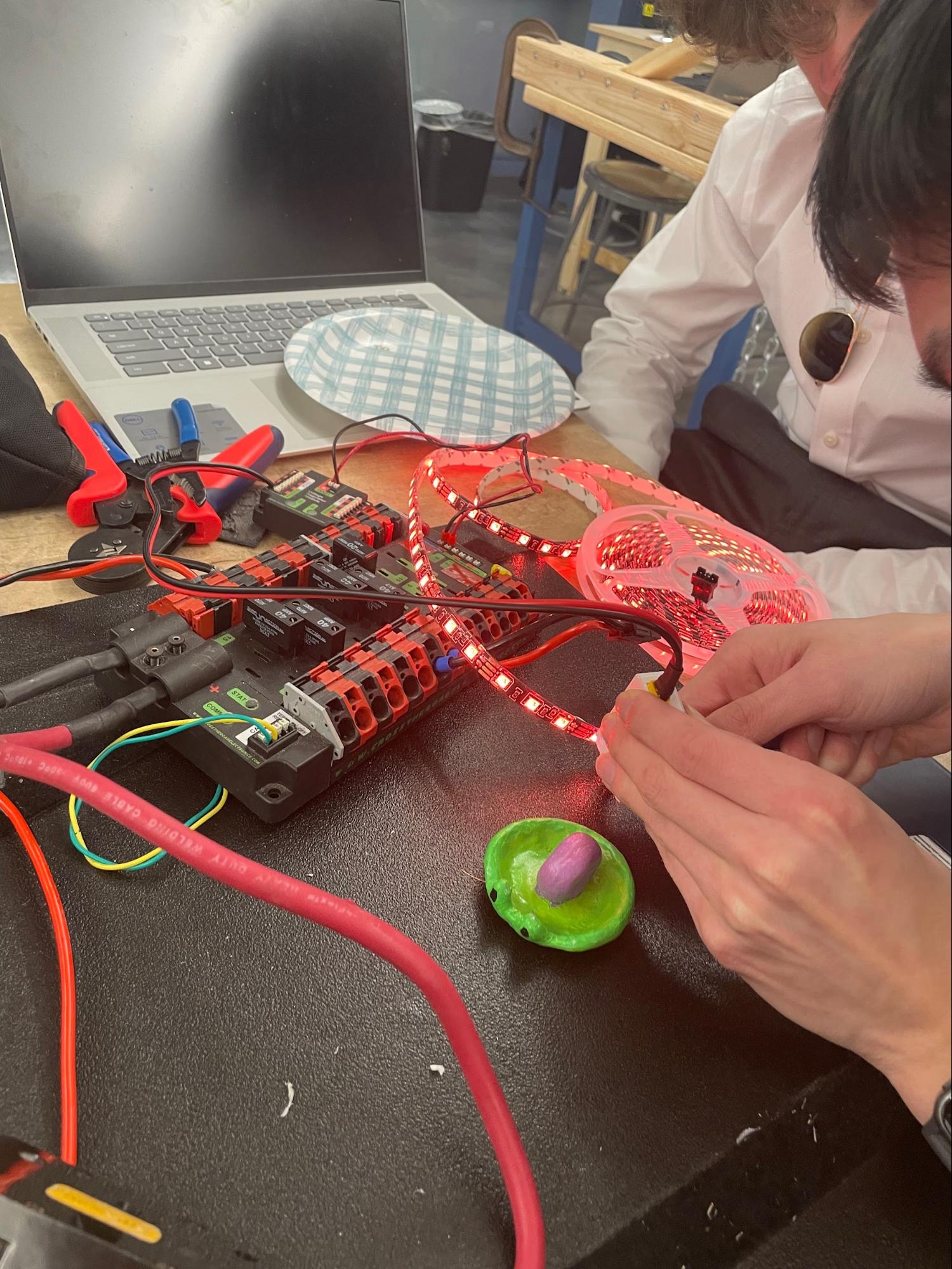
<p>Here’s a picture of us setting up the Blinkin controller and configuring colors.</p>

<p><img src="/images/posts/frc24/images/image3.jpg" alt="alt_text" title="image_tooltip" /></p>

<h3 id="note-shooting-visualizer-1">Note Shooting Visualizer</h3>
<p>The Note Visualizer class is designed to facilitate the analysis of, and subsequent manipulation of code used in shooting from various positions, and tuning of the aforementioned lookup table. It’s important to note that the Note Visualizer class is strictly for simulation purposes, and does not have any effect on the robots shooting during a match.</p>

<p><code class="language-plaintext highlighter-rouge">setRobotPoseSupplier</code></p>
<ul>
  <li>Sets the supplier values for robotPoseSupplier, leftSpeed, rightSpeed, and pivotAngle</li>
</ul>

<p><code class="language-plaintext highlighter-rouge">shoot</code></p>
<ul>
  <li>Simulates the action of shooting a note using a variety of closely associated classes and methods.</li>
</ul>

<h3 id="note-following">Note Following</h3>
<p>We also wrote some code to follow notes, however, we haven’t been able to test it on our robot yet. We have two different approaches: one that estimates the Pose2d of the note and <a href="https://github.com/FRC1257/2024-Robot/blob/39971a8f0a0333bb338dbd5637599f68cddeeedf/src/main/java/frc/robot/subsystems/drive/Drive.java#L418">creates a trajectory towards it</a> 1and another that just takes <a href="https://github.com/FRC1257/2024-Robot/blob/39971a8f0a0333bb338dbd5637599f68cddeeedf/src/main/java/frc/robot/commands/DriveCommands.java#L237">the angle to the note</a>.</p>

<h3 id="compound-commands">Compound Commands</h3>
<p>Carlos and Raghav</p>

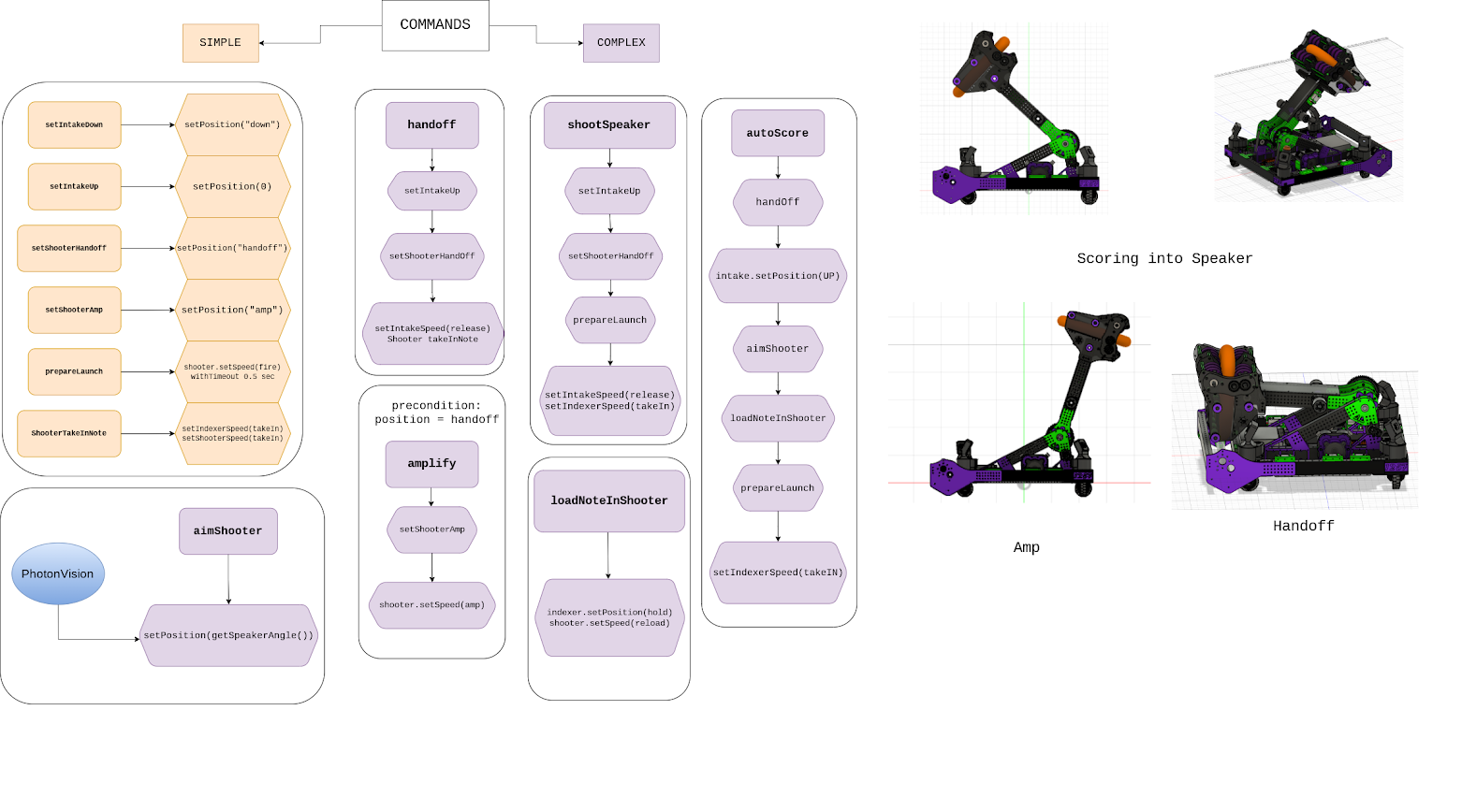
<p>Here’s an explanation of some of our compound commands and a nice diagram.</p>

<p><code class="language-plaintext highlighter-rouge">autoScore</code></p>
<ul>
  <li>Create a setpoint using PID for intake to go to</li>
  <li>Have the robot move to amp and intake go to setpoint at the same time</li>
  <li>Once the robot is ready, handoff happens and the note is released</li>
</ul>

<p><code class="language-plaintext highlighter-rouge">shootSpeaker</code></p>
<ul>
  <li>Arm moves to the position necessary to shoot note</li>
  <li>Set speeds for the shooter motors to shoot the note and then releases the note</li>
</ul>

<p><code class="language-plaintext highlighter-rouge">Handoff</code></p>
<ul>
  <li>For releasing note</li>
  <li>Set the speed of shooter motors and shoot out a note</li>
</ul>

<p><code class="language-plaintext highlighter-rouge">aimShooter</code></p>
<ul>
  <li>Uses PhotonVision and sets the position and angle needed to shoot note into speaker from anywhere on the field</li>
</ul>

<p><img src="/images/posts/frc24/images/image2.png" alt="alt_text" title="image_tooltip" /></p>

<h3 id="vision">Vision</h3>
<p>We also redid our vision code to take the <a href="https://github.com/FRC1257/2024-Robot/blob/ea8b40ac194a77f1de93b913e1a60e9ff37cc475/src/main/java/frc/robot/subsystems/vision/VisionIO.java#L53">average of our Pose estimates</a> and not just the “best” one. In simulation, the output looks slightly better however we won’t know till we test it.</p>

<h3 id="autos-1">Autos</h3>
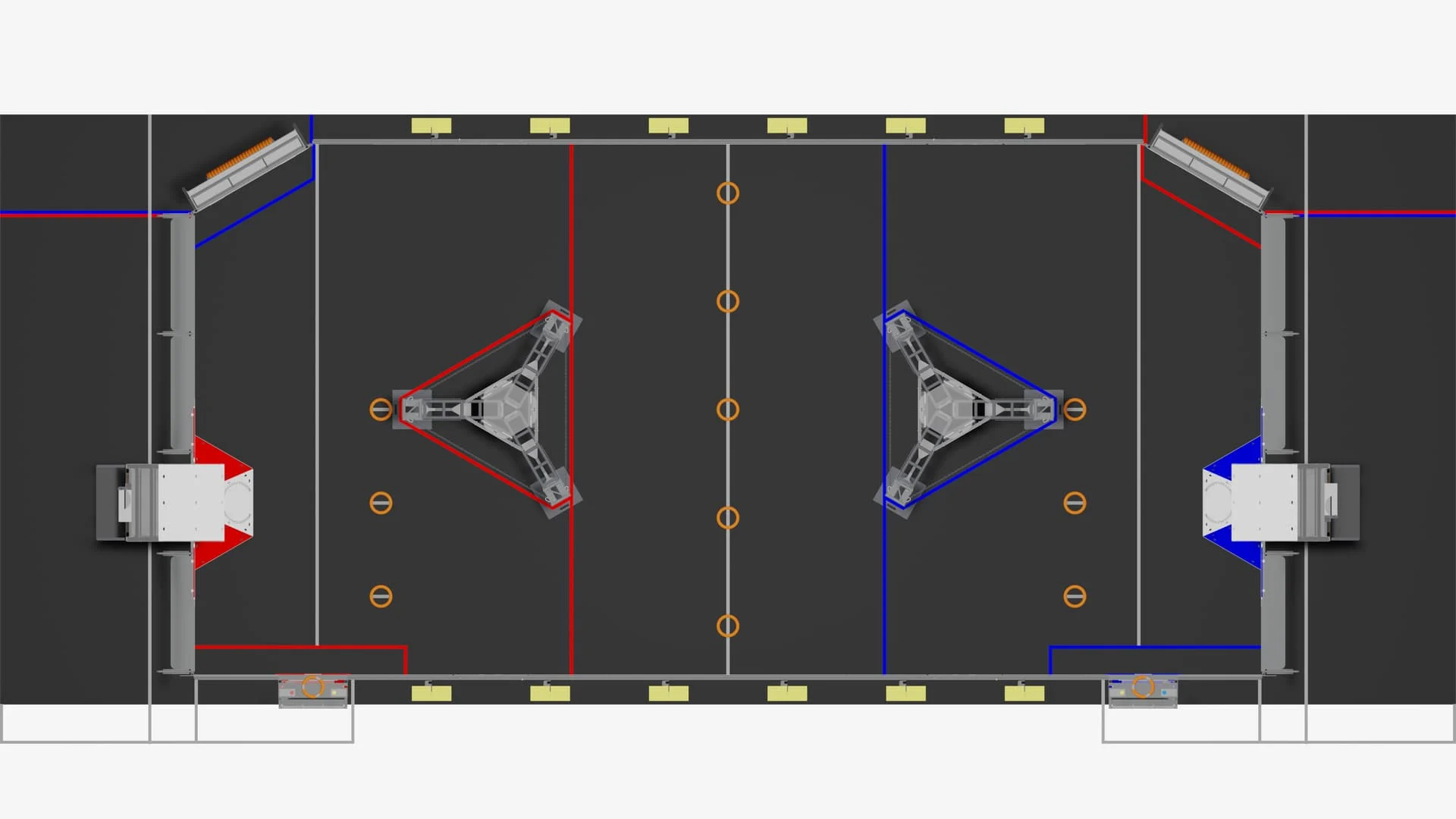
<p>Bowen, Claire, Jase, Kavi, and Mai</p>

<p>So many autos! Here’s some information about our autos!</p>

<p><img src="/images/posts/frc24/images/image4.png" alt="alt_text" title="image_tooltip" /></p>

<ul>
  <li>Naming convention:
    <ol>
      <li>s(1-3): signifies the starting position (top mid or bottom)</li>
      <li>n(1-8): signifies the location of each note</li>
      <li>sc(1-8): signifies the shooting location correlating with each note position</li>
    </ol>
  </li>
  <li>Types of autos
    <ol>
      <li>There are no 1 note autos as that is fairly simple</li>
      <li>2 Note, 3 Note, 4 Note, 5 Note, and 6 Note autos pick up that many notes and shoot in one autonomous round</li>
    </ol>
  </li>
  <li>How we made the autos (in steps)
    <ol>
      <li>Set 1 starting location of 3 possible (top middle or bottom)</li>
      <li>Call upon preset paths (paths typically go to a note location and then shoot)</li>
      <li>Make sure that the paths are smooth by copying the x and y coordinates of the ending positions to starting positions (could just guess and check)</li>
    </ol>
  </li>
  <li>Example: (4 Note Auto Top)
    <ul>
      <li><a href="https://drive.google.com/file/d/1X_mIqVcJiLMeSILMcZEiNqnDgYFSWrZd/view?usp=sharing">4 Note Auto Top.mp4 - Google Drive 1</a></li>
      <li>This auto picks up a total of 4 notes and starts at the first starting position (the top)</li>
    </ul>
  </li>
</ul>

<h3 id="customizable-autos">Customizable Autos</h3>
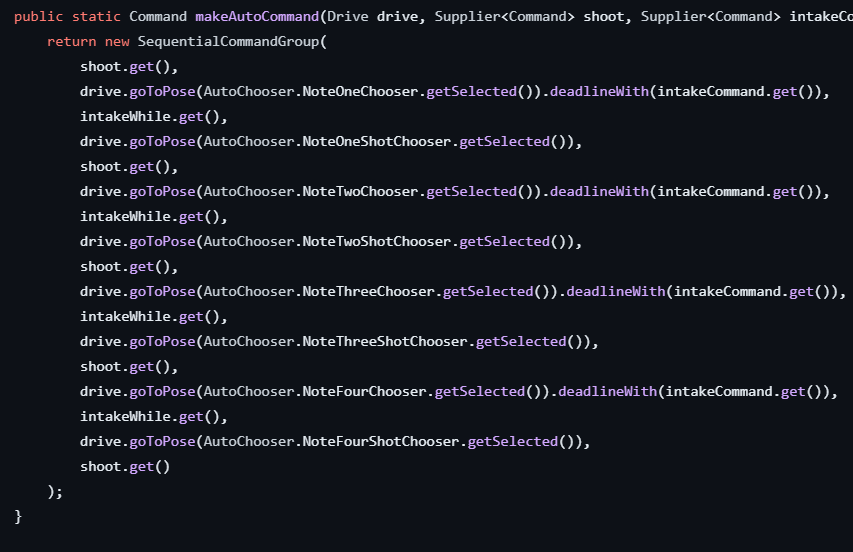
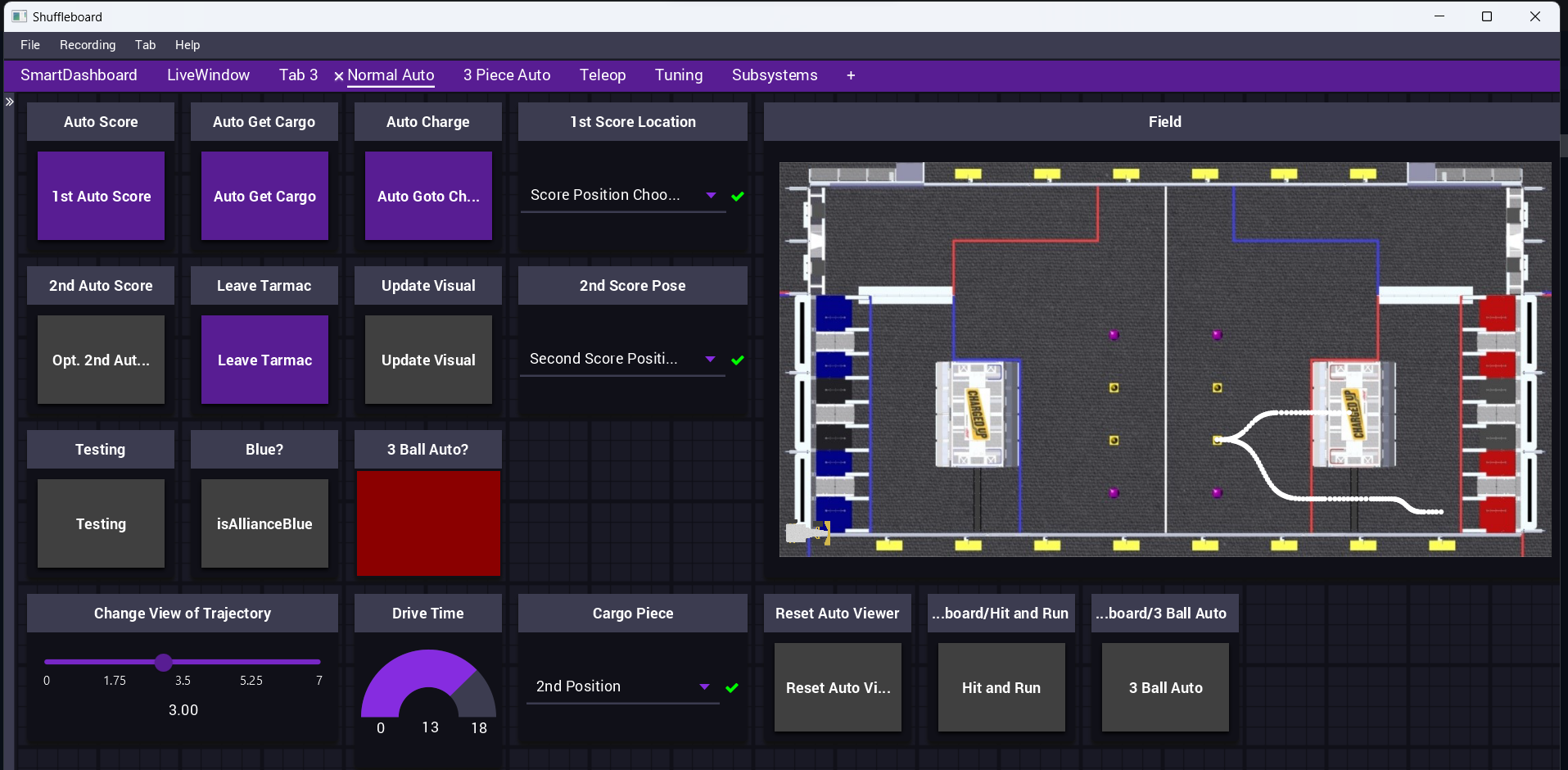
<p>This year we wanted to be able to perform any auto action on the field. Our customizable autos are facilitated by the drive team who select the note positions for our robot to pick up at and then where they should be scored. The <a href="https://github.com/FRC1257/2024-Robot/blob/dev/src/main/java/frc/robot/util/autonomous/MakeAutos.java">MakeAutos.java file</a> tells the robot to go to the note specified through our <a href="https://github.com/Gold872/elastic-dashboard">Elastic</a> dashboard (basically a nicer version of ShuffleBoard), then directs the robot to the specified shooting position and shoots the note. The code has the capability to run this action four times for up to five note custom autos. These are the methods used:</p>

<p>goToPose: uses path finding to go to a location (specified by Elastic)</p>

<p>getSelected: a method used to retrieve the location from the Network Table (basically what’s in the Elastic dashboard)</p>

<p>deadlineWith: makes the robot operate an action simultaneously with another</p>
<ul>
  <li>In this case it is to initiate the intake while the robot goes to the specified note</li>
</ul>

<p><img src="/images/posts/frc24/images/image6.png" alt="alt_text" title="image_tooltip" /></p>

<h3 id="notechooserautochooser">NoteChooser/AutoChooser</h3>
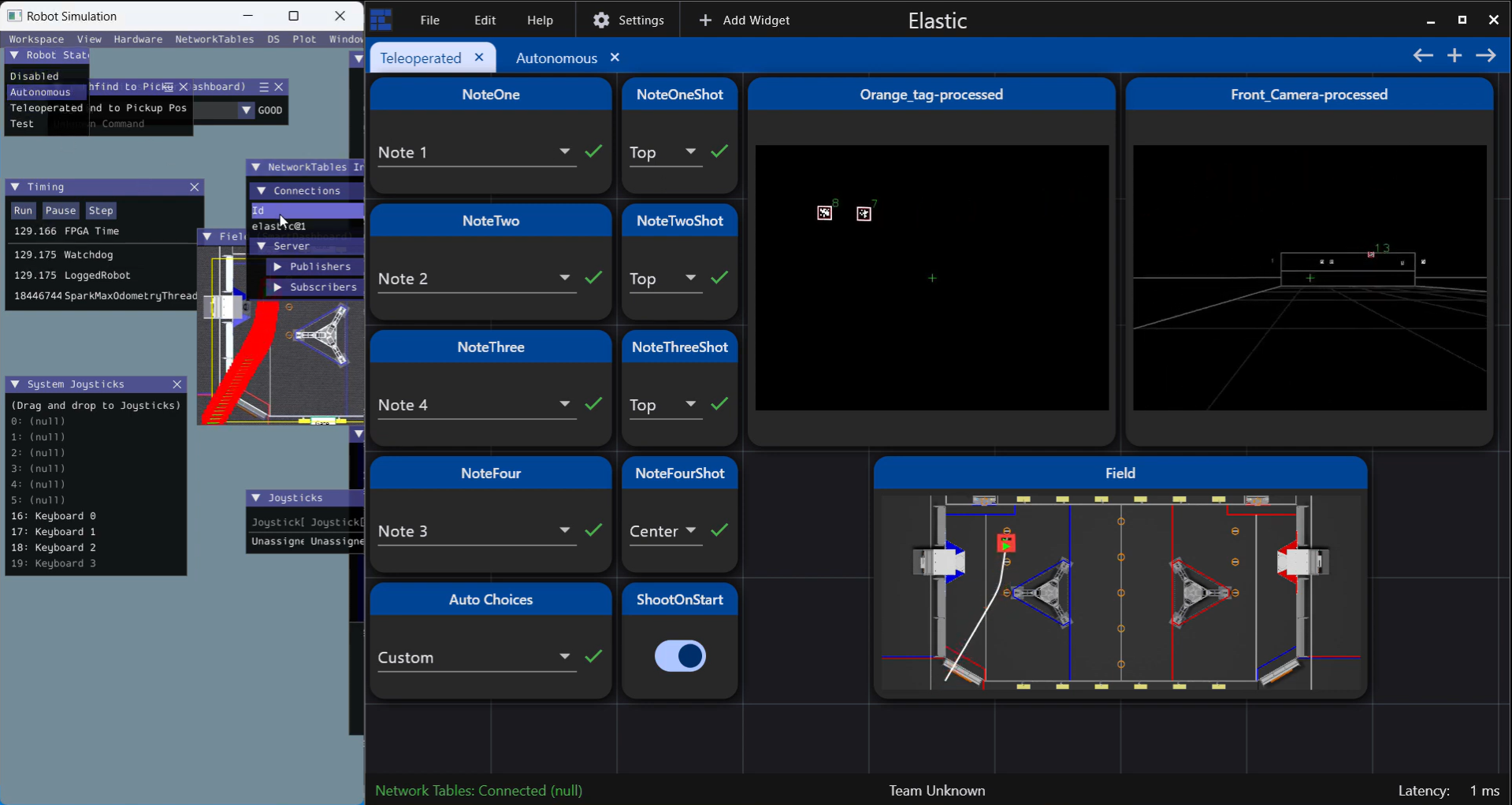
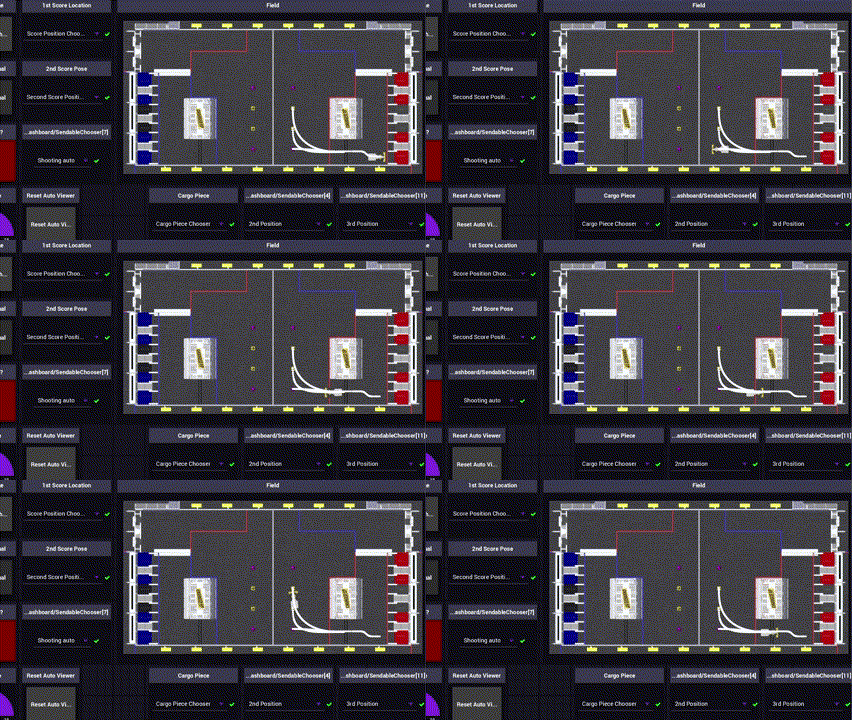
<p>NoteChooser uses the SendableChooser class to present a selection of options to our dashboard. For example, we may want to select between different autonomous routines. By putting every possible Command into a SendableChooser, we will have a list of different options on the programming laptop. We have different options for starting positions, set score positions, and set note positions. By doing this, we can make the autos more efficient and optimize the process for autonomous.</p>

<p><img src="/images/posts/frc24/images/image5.png" alt="alt_text" title="image_tooltip" /></p>

<p>This screenshot of a sim shows the different dropdowns that the NoteChooser created. In this example, the robot first intakes Note 1, then shoots it at the top. Next, it chooses Note 2, and shoots it at the top again, and so on so forth.</p>

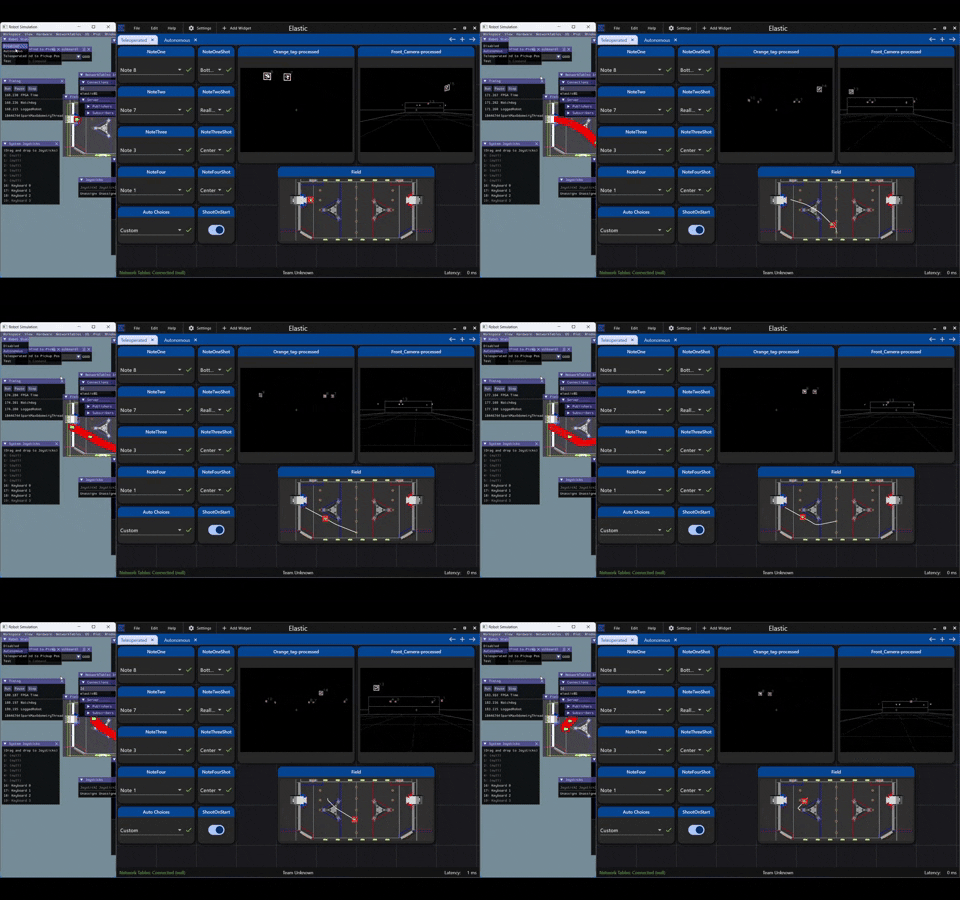
<p><img src="/images/posts/frc24/images/image1.gif" alt="alt_text" title="image_tooltip" /></p>

<p>This same process is displayed in this GIF, with different notes chosen.</p>

<p>(Note 8, Bottom; Note 7, Really Bottom; Note 3, Center; Note 1, Center) (4 Note Auto)</p>

<iframe src="https://www.youtube.com/embed/EwmC1FrXmVE"></iframe>

<p>We also added some code to <a href="https://github.com/FRC1257/2024-Robot/blob/dev/src/main/java/frc/robot/FieldConstants.java">flip our poses in Field Constants</a> to ensure that our code works on both sides of the field.</p>

<iframe src="https://www.youtube.com/embed/8-o_SCfyLoQ"></iframe>

<h2 id="road-ahead-1">Road Ahead</h2>
<h3 id="our-plan-1">Our plan</h3>
<ul>
  <li>Finish the Robot
    <ol>
      <li>Test Motors/Encoders/Sensors</li>
      <li>PID Constants and SysId</li>
      <li>Vision Tuning</li>
      <li>Run our Autos</li>
    </ol>
  </li>
  <li>Clean up our code
    <ol>
      <li>Remove Unused Imports</li>
      <li>Reformat Code</li>
      <li>Add Comments</li>
    </ol>
  </li>
  <li>Advanced Features
    <ol>
      <li>Custom Web Dashboard maybe</li>
      <li>Autonomous Teleop Cycling</li>
      <li>Improving our simulation code to include notes for vision and intaking</li>
    </ol>
  </li>
</ul>

<h1 id="41-season-update">4/1 Season Update</h1>
<p>Take a look at our new website!!!</p>

<p><a href="https://frc1257.org/">https://frc1257.org/</a></p>

<p><a href="https://chat.openai.com/share/23c30543-a8ae-4a4d-817d-0e2c997b3e22">TLDR Generated by ChatGPT</a>: It’s been quite a journey lately, with two competitions back-to-back and a myriad of challenges to navigate. At Seneca, despite our best efforts, we encountered issues with our swerve modules that hindered our performance. However, after reverting to the REV Max Swerve template, we saw significant improvements, marking a turning point in our competition experience. Moving on to Montgomery, we faced further hurdles with our vision system, intake aligners, and swerve driving, but with the help of fellow teams and CSAs, we tackled each obstacle head-on. Despite setbacks like periodic disconnections and mechanical failures, we persisted and made crucial repairs and improvements throughout the event. Looking ahead, we’re grateful for the support of our sponsors and teammates as we continue to refine our robot for future competitions, with DCMP on the horizon. Thanks for following along, and stay tuned for more updates!</p>

<h2 id="seneca"><a href="https://www.thebluealliance.com/event/2024njtab">Seneca</a></h2>

<p>Talk about driving around a bit before comp and some practice. Not too much though. No vision and no autos we want to test at comp</p>

<p>Before our first competition at Seneca, we only tested the basic subsystem movements on our robot. We tried driving around, running amp and speaker cycles, and intaking notes off the ground. We didn’t have any cameras on our bot so we couldn’t use the fancy auto-aim and auto code that we had planned. At Seneca, we hoped to progressively test new features and improve our robot. (in hindsight, this probably wasn’t a good idea)</p>

<h3 id="saturday">Saturday</h3>

<p>We ended up missing our first practice match since we needed to prepare our robot to pass inspection. Our reversible bumpers were fairly close to the limit when we were on the red alliance. After that, we were ready to run.</p>

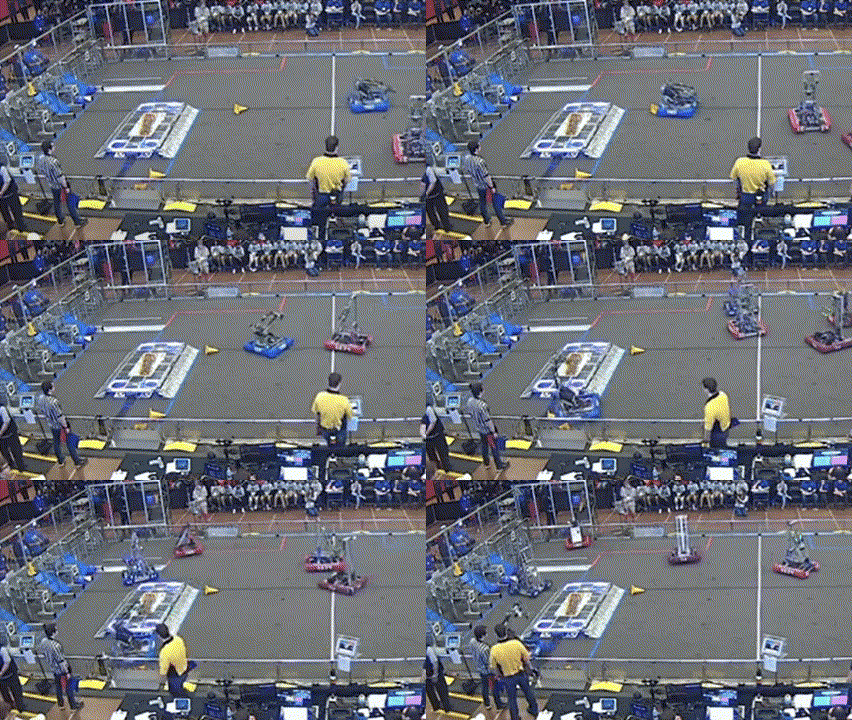
<p>Our <a href="https://www.thebluealliance.com/match/2024njtab_qm4">first match</a> was really bad. We didn’t move initially and it set the tone for the rest of the competition. Because something about our swerve modules was broken, our drivers literally couldn’t control the robot.</p>

<p><img src="/images/posts/frc24/comp/image1.gif" alt="alt_text" title="image_tooltip" /></p>

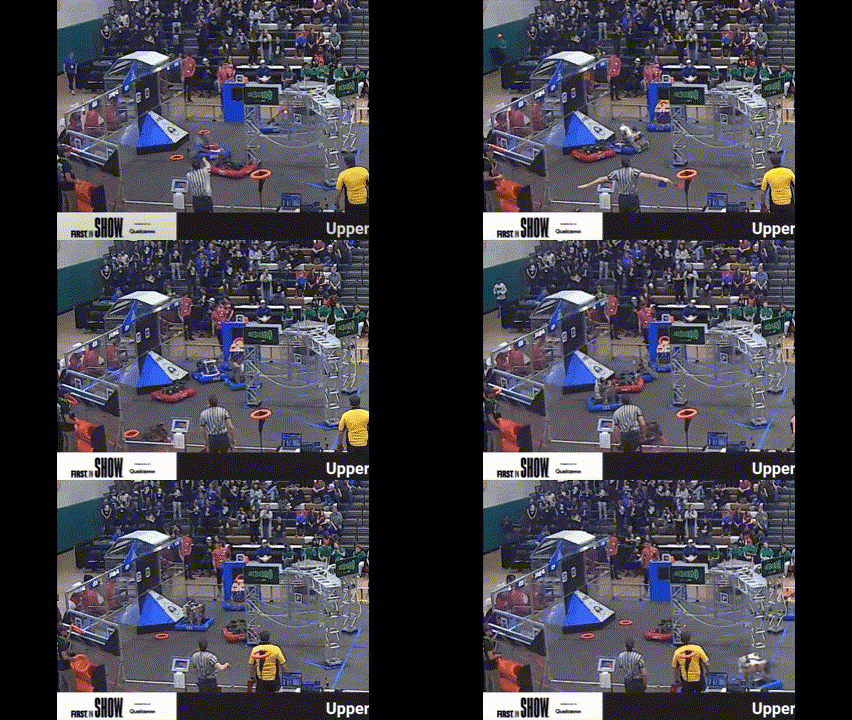
<p>The robot is dead on the field for the first part of the match then it comes to life but moves uncontrollably as we try to align with the amp.</p>

<p>Right after our first match, we went through our logs to figure out what was going wrong. We didn’t have enough time to fully analyze it but we attempted changing the code to fix it (in hindsight again this was a poor decision since our code had worked before and it introduced new untested changes to the robot). Since our swerve wasn’t working, we decided not to run our Path Planner trajectories at all and instead run our robot forward for 2 seconds using field relative drive. However, sometimes it went backward so we kept negating it in an attempt to make it go forward (this issue is eventually fixed but it was at Montgomery).</p>

<p>However, even as we try to run this auto swerve still bugs out. <a href="https://www.thebluealliance.com/match/2024njtab_qm20">https://www.thebluealliance.com/match/2024njtab_qm20</a></p>

<iframe src="https://www.youtube.com/embed/iKECzELTLfs"></iframe>

<p>Fast forward a few matches and we’re still struggling with this swerve issue. All our other subsystems are working fine.</p>

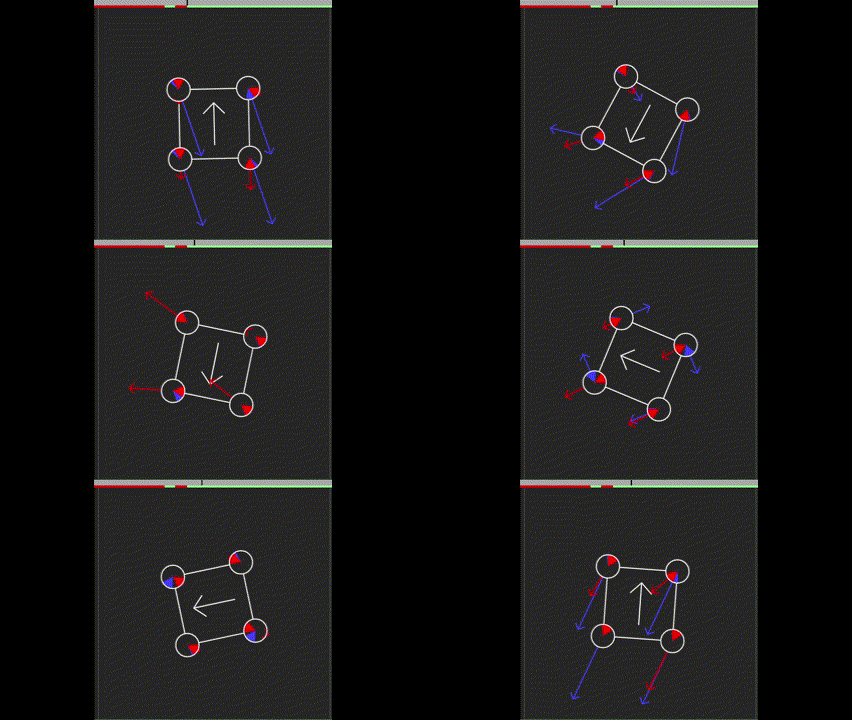
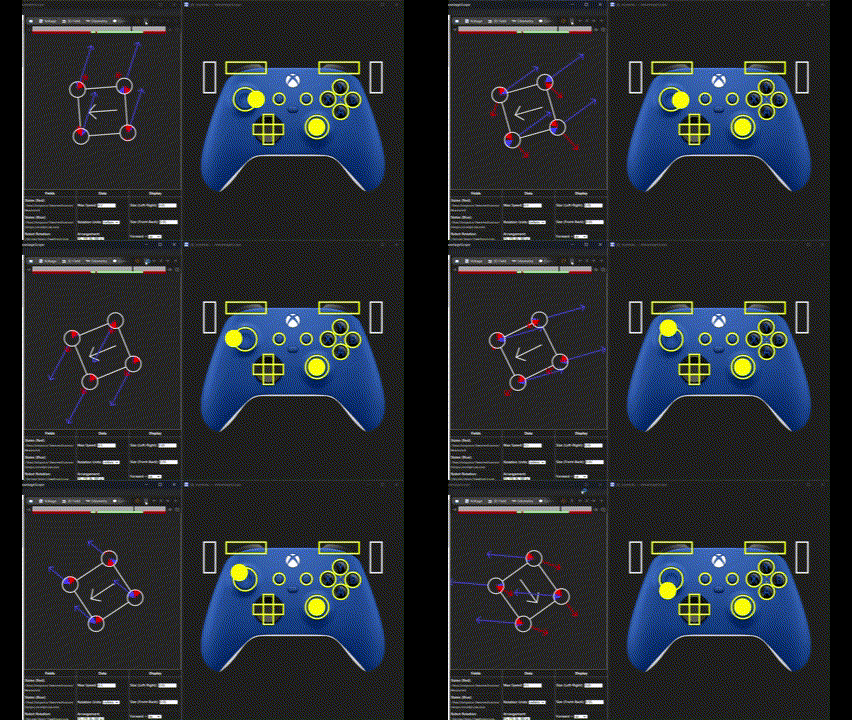
<p>As we frantically tried to fix the problem, we asked for help from all different sorts of teams. We also reserved a lot practice field time to test our robot, trying to pinpoint the exact cause of the issue. At the practice field, we realized that our gyro was repeatedly disconnecting over the course of the match. Seeing our logs, some of our team members joked that the gyro looked like a riemann sum 💀. Our command swerve states were waving around like they were the inflatable things at car dealerships and our robot could not match their oscillations, causing the robot to brown out over the course of the match. Clearly, something was wrong.</p>

<p><img src="/images/posts/frc24/comp/image2.gif" alt="alt_text" title="image_tooltip" /></p>

<p>Notice in this log that the joystick moves pretty smoothly but results in a lot of fast changes in the swerve modules.</p>

<p><img src="/images/posts/frc24/comp/image3.png" alt="alt_text" title="image_tooltip" /></p>

<p>This match’s log didn’t have the reinmann sum graph but still shows that the gyro wasn’t working. Our robot was moving around and spinning in the match, however, in the log, the gyro doesn’t go above 0.2 radians.</p>

<p>We tried a bunch of things like getting just robot relative drive working. But for some reason it wouldn’t work (in hindsight it should have worked since it doesnt need the angle so we thought it couldn’t be the gyro) We also tried a bunch of other suggestions like tuning our swerve PID and removing our Orange Pi, but these weren’t the source of our issue.</p>

<p>Thank you to all the teams at Seneca trying to help us out we really appreciate it!</p>

<h4 id="quals-33-the-turning-point">Quals 33 the turning point</h4>

<p>By now we thought it was all over for us, we couldn’t find what was going wrong, so we decided to revert to the REV Max Swerve template that we started with at the beginning of the season. After plugging in our swerve constants, we head out to the practice field and it worked!!! We were chilling!! The only issue was that it didn’t have any code to move our subsystems, but at least we could drive around robot relative. At the start of qualification 33, we didn’t expect anything to happen during auto but were delighted to see the WPILib example trajectory run beautifully on our robot! It really lifted our spirits and although we were a defense bot during the match we were on the up.</p>

<p><img src="/images/posts/frc24/comp/image4.gif" alt="alt_text" title="image_tooltip" /></p>

<p>In the minutes right after the match, we worked tirelessly to add our subsystems to this new version of the code, subsystem by subsystem. Honestly, it was some of the most stressful programming I’ve ever done. That night our entire programming team worked through the night and on the bus ride to add all of the PID controls and basic autos to our new version of the robot code.</p>

<p>Stories will be told about our courage and resistance while rewriting our entire codebase in a day. This is the branch that we created based on REV swerve with all our subsystems. It’s basically our same code base without Advantage Kit.</p>

<p><a href="https://github.com/FRC1257/2024-Robot/commits/CodeModifiedWithRev/">https://github.com/FRC1257/2024-Robot/commits/CodeModifiedWithRev/</a></p>

<p>In addition to this code, we also created another version of our code where we took our current Advantage Kit code and swapped out all the swerve code with what was in the REV Swerve template. We wanted to have this as an option so we could see our logs after every match. Our logs really helped us debug the issues we were having and we are thankful for Advantage Kit!</p>

<p><a href="https://github.com/FRC1257/2024-Robot/tree/SwerveNoAdvantage">https://github.com/FRC1257/2024-Robot/tree/SwerveNoAdvantage</a></p>

<h3 id="sunday">Sunday</h3>

<p>After rewriting our code, we went into the day unsure of what would happen when we went to test it. We went to the practice field to test our changes (which also added Path Planner and our subsystems), however, they didn’t work. We realized that the only other thing we changed was replacing the code for our gyro (since we weren’t using the one in the <a href="https://github.com/REVrobotics/MAXSwerve-Java-Template/">REV Swerve template</a>) to use our NavX. Now we knew for sure that our NavX was messed up. On a whim, we tried our original code, but we used a gyro angle of zero instead of the (inaccurate) data being outputted by our NavX and it worked! We didn’t have field-relative swerve but at least it was robot-relative and we could move around with our original code!</p>

<p>It turned out that the code was not the issue, so the programming team was a little sad to not use the code we worked so hard on in the night. But we were happy that we could run the version we developing and testing over the course fo the season.</p>

<p>We began asking around if any teams had any spare NavXs. In the process of doing so, we realized that the gyro we were running was over 12 years old 💀. There were no teams at Seneca with a spare NavX 1.0, however, thankfully a miracle happened and 365 the Miracle Workerz lent us their NavX 2.0. We put it on our robot and went on the practice field once more, and now we had field-oriented swerve! Our swerve issues were finally fixed!! Unfortunately, though it was a little too late, qualification matches were already over and our position was very low down since our robot wasn’t operable for most of the competition. Although we were fixed by the end, it was a dismal performance by our team.</p>

<p>During alliance selection, we ended up getting picked by Alliance 1 composed of 365 (the Miracle Workerz) and 316 (LUNATECS)!!! Our team was very excited to have gotten picked and was determined to start our comeback arc.</p>

<p>We were selected as a defense bot and we began working on a cheese-cake net (what we like to call the snail sail) to further block notes shot from other robots. Our drivers did a really nice job playing subwoofer defense and blocking robots from lining up and shooting. Although we had one slight hiccup that led us to the lower bracket, our robot was cruising through playoffs with no mechanical issues.</p>

<p><img src="/images/posts/frc24/comp/image5.gif" alt="alt_text" title="image_tooltip" /></p>

<p>Example of some subwoofer defense</p>

<p>Before our finals match, we saw that our robot had lost a lot of its pushing power. We flipped over our robot and saw that our wheel tread was basically gone. So before the match, we quickly replaced our wheels. Here’s a picture of what they looked like.</p>

<p><img src="/images/posts/frc24/comp/image6.jpg" alt="alt_text" title="image_tooltip" /></p>

<p>Old wheel vs new wheel comparison</p>

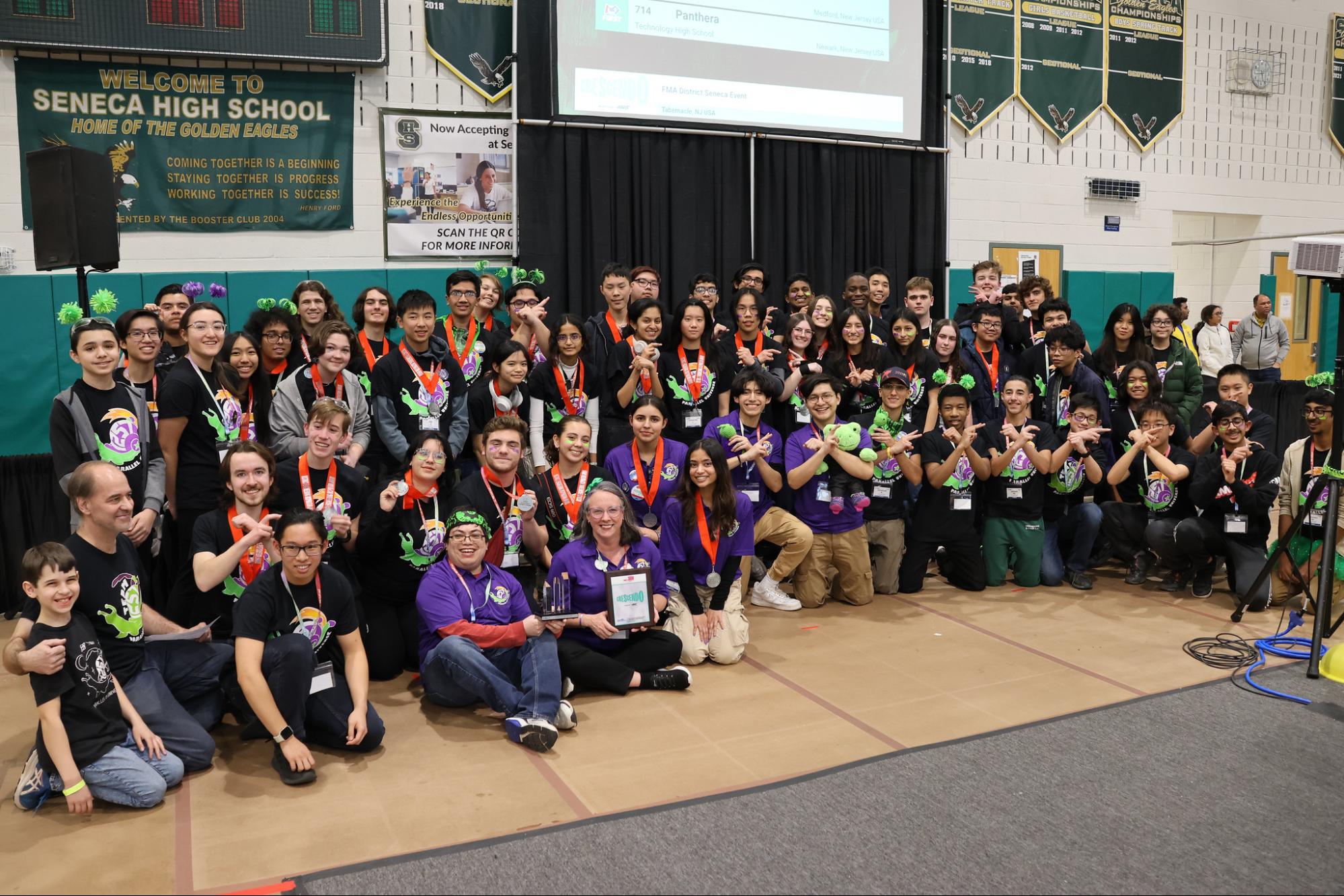
<p>We ended up winning and got our first blue banner in eight years!!! Thank you again to our alliance the Miracle Workerz and the Lunatecs we are so happy that we could do this with you!</p>

<p><img src="/images/posts/frc24/comp/image7.jpg" alt="alt_text" title="image_tooltip" /></p>

<p>We also got the Engineering Inspiration award!!! First time in 15 years! Huge congratulations to our documentation team for this big achievement! They’ve been putting in the work to rebuild us from the ground up this year!</p>

<p><img src="/images/posts/frc24/comp/image8.jpg" alt="alt_text" title="image_tooltip" /></p>

<h2 id="preparing-for-montgomery">Preparing for Montgomery</h2>

<p>Even though we were on the winning alliance, we didn’t do very well. Here are the things we were working on.</p>

<ul>
  <li>Beautify the wiring</li>
  <li>Move RoboRio location</li>
  <li>Add camera mounts</li>
  <li>Wire photoelectric sensor</li>
  <li>Wire Orange Pi again with buck converter</li>
  <li>Intake aligners</li>
  <li>Creating autos that our robot can do without shooting anywhere</li>
</ul>

<p>We mainly used this week to test the mechanical changes we made to the robot and focused on driver practice. We tested some basic autos but didn’t have time to get the vision and pose estimation things we needed on the robot.</p>

<h2 id="montgomery">Montgomery</h2>

<h3 id="saturday-1">Saturday</h3>

<p>When we arrived at Montgomery, we started with initially tuning vision. In our pit, we attempted to use the built-in calibrater in Photon Vision, but for some reason, it wasn’t working very well to detect tags. Also, it wasn’t properly updating our pose estimator with the vision estimates. We decided to use <a href="https://calibdb.net/">https://calibdb.net/</a> for all future calibrations which is recommended. We also decided not to use vision at this competition since it would take a while to tune and we were running into some mechanical problems that were slowing us down.</p>

<p>One of the new things we were trying for this competition was a set of note aligners for our intake. When we put it on for a match though, they ended up twisting and breaking, so we had to take them off the robot.</p>

<p>Another issue we had was swerve driving very slowly sometimes. We were thinking that this was an electrical issue, so we called over Kevin the CSA and he helped look through the rest of our logs to see what was wrong. In the end, it turned out to be an issue with our battery (if i remember correctly). We’re really thankful for Kevin helping us out through the rest fo the competition!</p>

<p><img src="/images/posts/frc24/comp/image9.gif" alt="alt_text" title="image_tooltip" /></p>

<p>In this swerve view, the blue arrow is where it should be pointing and red is where it is. You can see that the red is slow to catch up to the blue arrows. Also, the back left wheel is a little slower than the rest.</p>

<p>Another issue we faced was periodic disconnections in some of our matches. After troubleshooting we realized it was because our driver station laptop didn’t have much charge and Advantage Scope was also left running on it. The laptop was pulling 100% CPU so it physically couldn’t keep up with the robot. After we gave it some charge and closed out Advantage Scope and a bunch of other programs, the problem was fixed.</p>

<p>Later on, bearings started popping out of the shooter so our pit crew tried their best to make temporary repairs to it. We decided that this issue was happening because our shooter plates where made out of polycarb and not metal, so we decided to cut out new shooter plates out of metal to make sure that it didn’t happen again.</p>

<p>Another thing we noticed was that our bumper fabric was stuck in our wheels. This explains why the back left wheel was slower in some of our matches.</p>

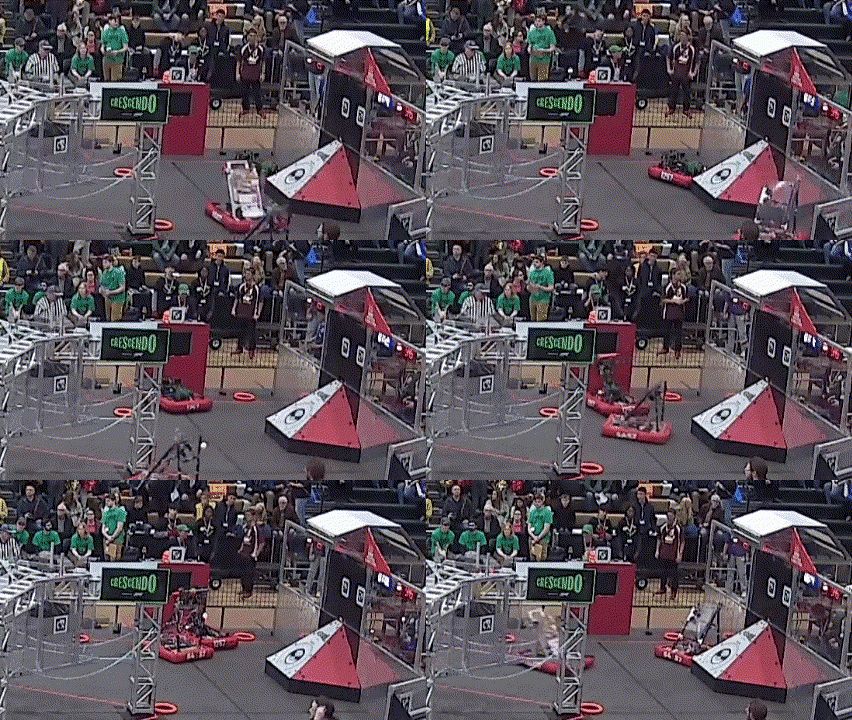
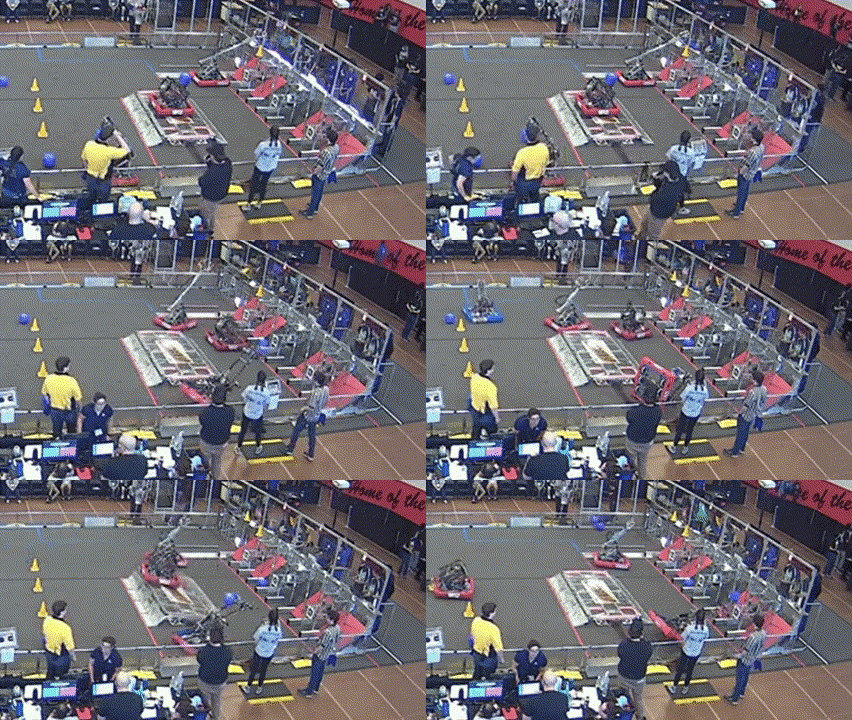
<p>Then in one of our matches; our robot turned into a sledgehammer.</p>

<p><img src="/images/posts/frc24/comp/image10.gif" alt="alt_text" title="image_tooltip" /></p>

<p>The arm mashed against the subwoofer in the auto and was unusable for the rest of the match.</p>

<p>After looking at the logs we realized our encoder wasn’t getting inputs. Later we also saw our photoelectric sensor wasn’t working. We tried changing our encoder to a different port and using a different encoder but it was still broken. By then it was the end of the day and we thought the best way to prepare for the next day would be to have a replacement ready. We took one of our old RoboRio 1s and took it home to test the DIO ports.</p>

<iframe src="https://www.youtube.com/embed/ZfNz0uv_pkM"></iframe>

<p>We got a spare RoboRio from 7587 and it worked! We tried testing the old RoboRio 2 with the same code that we ran on the replacement RoboRio 1 but it didn’t work. This means that there was a physical issue with our RoboRio 2. Apparently, this is a known issue with the RoboRio 2s</p>

<p>I don’t think this is the correct link (I’ll update it later), but it seems close to the issue in the post we were looking at</p>

<p><a href="https://www.chiefdelphi.com/t/roborio-2-pwm-has-no-power/459455">Chief Delphi Link</a></p>

<p>By the end, our robot was working pretty well and we were cycling amp fairly quickly. We ended up 19th. However, we didn’t get picked on an alliance, unfortunately. This individual performance was way better than our performance at Seneca and we were ready to continue refining our robot.</p>

<h2 id="whats-next">What’s next</h2>

<p>We want to thank all of our sponsors for being with us as we work really hard to improve our robot for our future competitions. Even though it’s been rough so far we’ve definitely learned a lot from our mistakes and gained valuable experience troubleshooting.</p>

<p>We plan on creating more technical videos and documentation to help other teams and our own future members once the season is over.</p>

<p>But our season is not over yet!!! We qualified to DCMP by the skin of our teeth!!! We’ve been working feverishly to 10x our robot’s performance in this time. Look out for another post with all the things we’ve been up to! We’ve been cooking 👀</p>

<p>Thanks for reading this huge post and have a nice day!</p>

<h1 id="43-dcmp-prep">4/3 DCMP Prep</h1>

<p>We’ve mainly been focusing on how best to improve our robot before we leave it for spring break. Our biggest focuses were:</p>

<ul>
  <li>Everything Functioning Mechanically</li>
  <li>Vision</li>
  <li>Aligners</li>
  <li>Autos</li>
</ul>

<p>It was crunch time for us, and being the team with the lowest EPA going into DCMP, it was cook or be cooked for us. Just in case, we’ve also been developing the Snail Sail which is basically a blocker that goes on the intake side of our robot.</p>

<h2 id="driver-practice">Driver Practice</h2>

<p>We ran full practice matches using the practice mode section of the driver station to emulate the strain the robot would go through on the field. We used one of our school’s computer labs to set up a practice area. Our drivers got a lot of practice cycling and we further refined our controls. We had some battery browning out issues since we were running old batteries, so we ordered new ones and we are good to go!</p>

<p><img src="/images/posts/frc24/dcmp/image1.gif" alt="alt_text" title="image_tooltip" /></p>

<p>(This footage is at 1.4x speed to make it short enough for a GIF)</p>

<h2 id="vision-1">Vision</h2>

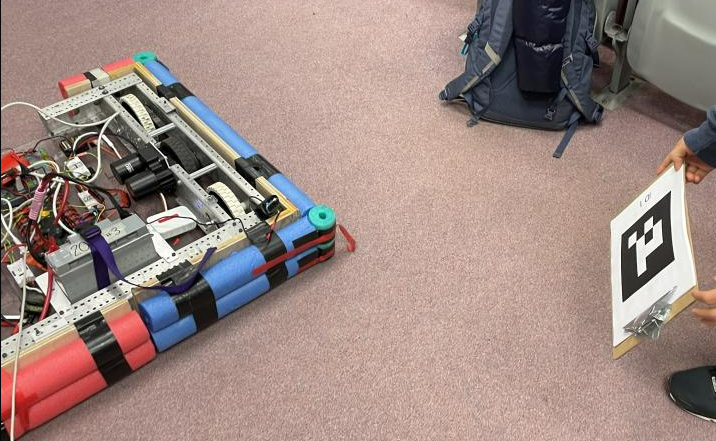
<p>After making sure that everything was mechanically sound on our robot, we mounted our three camera mounts and calibrated our cameras for Photon Vision! We knew vision would be very important if we wanted to shoot quicker, avoid defense, and use our advanced autonomous features. Honestly, our process of setting everything up was a little rushed but we ended up getting everything on the robot and tested.</p>

<p><a href="https://youtube.com/shorts/QtH8BUOnWjo?feature=share">Short</a></p>

<p>First, we made sure our cameras could detect april tags.</p>

<p>Then, we checked to see that these estimates were being added to our pose estimator. This took a while to debug since our original code for multi-cam photon vision took the average of all the estimates to make one combined vision estimate. The better way to do this is to loop through all the estimates and add everything to the pose estimator. That’s how we got this beautiful video.</p>

<p><a href="https://youtube.com/shorts/VtI-r6Wq43k?feature=share">Another Short</a></p>

<p>Then we tried auto aim and it worked beautifully (when it saw a tag, easy fix I think)!!! It was also running our shoot anywhere code (that was the angle I was talking about tuning)</p>

<iframe src="https://www.youtube.com/embed/9NluVRwwG6Q"></iframe>

<p>Speaking of tuning, we were able to tune our lookup table for shots 3-5 m away from the speaker, but we didn’t have time to do the ones close up. For now, our drivers will use the setpoints for close (that we know work), and we’ll tune it at DCMP.</p>

<h2 id="cooking">Cooking</h2>

<p>Inspired by another Open Alliance team, we decided to add Goblin Mode, or in our case, Turbo Mode to supercharge our defense. At the very least, with the snail sail on, we can be a solid defense bot.</p>

<p><a href="https://www.chiefdelphi.com/t/frc-1155-the-sciborgs-2024-build-thread-open-alliance/441531/51">https://www.chiefdelphi.com/t/frc-1155-the-sciborgs-2024-build-thread-open-alliance/441531/51</a></p>

<h3 id="custom-autos">Custom Autos</h3>

<p>Another thing we we’re working on was our custom auto system that <a href="https://www.chiefdelphi.com/t/frc-1257-parallel-universe-2024-build-thread-open-alliance/447080/18?u=akeboss">we developed earlier in the season</a>. With working vision and pose estimation, our robot will know where it is and be able to create its own paths.</p>

<p>The first addition we added was <a href="https://github.com/FRC1257/2024-Robot/blob/e82ce3560adabeb341b7a0cb99118f4b12cc8d4f/src/main/java/frc/robot/util/autonomous/MakeAutos.java#L38">some code</a> to check if there was a note in the robot before driving to the shooting position. Since we don’t have a camera for note detection yet, this should allow us to save time if the robot doesn’t have a note to score and move on to the next one.</p>

<p>It scores only if has note.</p>

<p><img src="/images/posts/frc24/dcmp/image2.png" alt="alt_text" title="image_tooltip" /></p>

<p>Here’s a video of it in action</p>

<iframe src="https://www.youtube.com/embed/gplZdlSoHBk"></iframe>

<p>The next addition was to <a href="https://github.com/FRC1257/2024-Robot/commit/e82ce3560adabeb341b7a0cb99118f4b12cc8d4f">add dynamic obstacles</a> on the field for our robot to avoid in auto. We wanted this so we could tell our pathfinder to avoid certain sections of the field entirely where other robots may be running our autos. This is a fairly new feature in Path Planner, but we tested it in simulation and theoretically, it will work fine.</p>

<p><a href="https://www.chiefdelphi.com/t/pathplanner-2024-beta/442364/359?u=akeboss">https://www.chiefdelphi.com/t/pathplanner-2024-beta/442364/359?u=akeboss</a></p>

<p>Here’s a video demonstration of this.</p>

<iframe src="https://www.youtube.com/embed/tlve1WyNt1w"></iframe>

<h1 id="technical-documentation">Technical Documentation</h1>

<p>We’ve also been working on creating a video series about programming for our future members and the community! It’s still a work in progress but will be updated regularly.</p>

<p><a href="https://www.youtube.com/watch?v=_05BV_G8byY&amp;list=PLUniOkSvUS6qEUThVFekGeq427MZpcC5I">Playlist</a></p>

<h2 id="videos-i-made">Videos I Made</h2>
<iframe src="https://www.youtube.com/embed/nBBPKs8JCAI"></iframe>
<iframe src="https://www.youtube.com/embed/VMRwvzphNx4"></iframe>
<iframe src="https://www.youtube.com/embed/gwmCFI6-dKg?si=YhrIWDYBbVUnsje4" title="YouTube video player" frameborder="0" allow="accelerometer; autoplay; clipboard-write; encrypted-media; gyroscope; picture-in-picture; web-share" referrerpolicy="strict-origin-when-cross-origin" allowfullscreen=""></iframe>

<p>Robotics has been so fun this year! It’s been my pleasure to work with such a wonderful team for four years!</p>]]></content><author><name>Akash Dubey</name><email>akash.dubey@rutgers.edu</email></author><category term="programming" /><category term="robotics" /><summary type="html"><![CDATA[All of the programming related things we did in the 2024 robotics season, Crescendo.]]></summary><media:thumbnail xmlns:media="http://search.yahoo.com/mrss/" url="https://akashdubey.me/images/posts/robotics-programming-hero.png" /><media:content medium="image" url="https://akashdubey.me/images/posts/robotics-programming-hero.png" xmlns:media="http://search.yahoo.com/mrss/" /></entry><entry><title type="html">Doing Things!</title><link href="https://akashdubey.me/posts/second-post/" rel="alternate" type="text/html" title="Doing Things!" /><published>2023-08-09T00:00:00-07:00</published><updated>2023-08-09T00:00:00-07:00</updated><id>https://akashdubey.me/posts/doing-things</id><content type="html" xml:base="https://akashdubey.me/posts/second-post/"><![CDATA[<p>So far this summer, I’ve been looking at a bunch of things on my to-do list. Among them are looking for colleges to apply to, thinking about things to write about, and learning new things. More importantly, I’ve thought a bit about the future and realized that I might not have enough time to make all the projects I want to.</p>

<h2 id="project-ideas">Project Ideas</h2>

<p>Here are a bunch of the ideas that I began coding but haven’t finished yet. I’m not sure if I’ll ever finish them, but I hope I do. I think they’re pretty cool.</p>

<ul>
  <li>Parody Lyric Generator
    <ul>
      <li>This has already been done, but I think I can do it better</li>
    </ul>
  </li>
  <li>FRC Charged Up Game Simulation
    <ul>
      <li>I want to build a simulation to get some practice with the algorithms that I will use on our real robot.</li>
      <li>I also want to train a neural network to play the game. I think it would be cool to see how well it does.</li>
    </ul>
  </li>
  <li><a href="https://engaging-data.com/digitsgame/">Digits</a> Solver
    <ul>
      <li>I’m not sure what the name of this game is, but it has 9 cards with different numbers. You need to make an expression with some of the cards to equal one of the numbers on the grid. I feel like making a solver for this game would be interesting, especially optimizing it.</li>
    </ul>
  </li>
  <li>AR Library
    <ul>
      <li>This is a project I am working on with a friend to make an AR viewer for any PDF online. I’ve never made an AR app before, so I think it would be a good learning experience.</li>
    </ul>
  </li>
  <li>Smart Robot Car
    <ul>
      <li>In the back of my mind, I also want to make a car with a camera which basically serves as a mobile Alexa. I know this will be hard, but it’s a cool idea.</li>
    </ul>
  </li>
</ul>

<h2 id="life">Life</h2>

<p>Nothing much has really happened recently. I’ve tried juggling all the things I have to do as best I can.
Kinda unrelated, but I hit my first boundary in a cricket game last Saturday! I was also not out! So I did my job superbly.</p>

<p>I’m not sure what this blog is gonna turn into. It doesn’t take very long to blog, but I just need to remember to stick with it.</p>

<h2 id="random-arduino-stuff">Random Arduino Stuff</h2>

<p>So the other day I got some <a href="https://www.google.com/search?q=esp8266&amp;oq=esp8266&amp;aqs=chrome..69i61j69i57j69i59l3j69i60l3.3779j0j7&amp;sourceid=chrome&amp;ie=UTF-8">ESP8266s</a> and honestly these things are better than the Arduino Uno. They’re smaller, cheaper, and have wifi. Now that I have them, I’ve fallen in love with them. Since I have 3 of them, I can also make more projects without having to reuse them now.</p>

<h3 id="lighting-an-led-but-with-a-twist">Lighting an LED but with a twist</h3>

<p>My first project, as I do with any new board, was to light an LED. Once I had the basic code working, I decided to use the Wifi capability of my new toy, I mean board. With the help of ChatGPT, I made a simple website to control the state of the LED, which worked surprisingly well.</p>

<p>Here’s the code</p>

<div class="language-cpp highlighter-rouge"><div class="highlight"><pre class="highlight"><code><span class="c1">// import modules</span>
<span class="cp">#include</span> <span class="cpf">&lt;ESP8266WiFi.h&gt;</span><span class="cp">
#include</span> <span class="cpf">&lt;ESP8266WebServer.h&gt;</span><span class="cp">
</span>
<span class="cp">#define STASSID "Wouldn't you like to know"
#define STAPSK "a good thing I'm not using my real password"
</span>
<span class="k">const</span> <span class="kt">int</span> <span class="n">ledPin</span> <span class="o">=</span> <span class="n">D2</span><span class="p">;</span>

<span class="n">ESP8266WebServer</span> <span class="nf">server</span><span class="p">(</span><span class="mi">80</span><span class="p">);</span>

<span class="c1">// the webpage</span>
<span class="kt">void</span> <span class="nf">handleRoot</span><span class="p">()</span> <span class="p">{</span>
  <span class="n">String</span> <span class="n">html</span> <span class="o">=</span> <span class="s">"&lt;html&gt;&lt;body&gt;"</span><span class="p">;</span>
  <span class="n">html</span> <span class="o">+=</span> <span class="s">"&lt;h1&gt;Control LED&lt;/h1&gt;"</span><span class="p">;</span>
  <span class="n">html</span> <span class="o">+=</span> <span class="s">"&lt;p&gt;Click the button to toggle the LED:&lt;/p&gt;"</span><span class="p">;</span>
  <span class="n">html</span> <span class="o">+=</span> <span class="s">"&lt;form action='/toggle' method='POST'&gt;&lt;input type='submit' value='Toggle LED'&gt;&lt;/form&gt;"</span><span class="p">;</span>
  <span class="n">html</span> <span class="o">+=</span> <span class="s">"LED is now "</span> <span class="o">+</span> <span class="n">String</span><span class="p">(</span><span class="n">digitalRead</span><span class="p">(</span><span class="n">ledPin</span><span class="p">)</span> <span class="o">?</span> <span class="s">"ON"</span> <span class="o">:</span> <span class="s">"OFF"</span><span class="p">);</span>
  <span class="n">html</span> <span class="o">+=</span> <span class="s">"&lt;/body&gt;&lt;/html&gt;"</span><span class="p">;</span>
  <span class="n">server</span><span class="p">.</span><span class="n">send</span><span class="p">(</span><span class="mi">200</span><span class="p">,</span> <span class="s">"text/html"</span><span class="p">,</span> <span class="n">html</span><span class="p">);</span>
<span class="p">}</span>

<span class="c1">// handle toggle request</span>
<span class="kt">void</span> <span class="n">handleToggle</span><span class="p">()</span> <span class="p">{</span>
  <span class="k">static</span> <span class="kt">bool</span> <span class="n">ledState</span> <span class="o">=</span> <span class="nb">false</span><span class="p">;</span>
  <span class="n">ledState</span> <span class="o">=</span> <span class="o">!</span><span class="n">ledState</span><span class="p">;</span>
  <span class="n">digitalWrite</span><span class="p">(</span><span class="n">ledPin</span><span class="p">,</span> <span class="n">ledState</span> <span class="o">?</span> <span class="n">HIGH</span> <span class="o">:</span> <span class="n">LOW</span><span class="p">);</span>
  <span class="n">handleRoot</span><span class="p">();</span>
<span class="p">}</span>

<span class="kt">void</span> <span class="n">setup</span><span class="p">()</span> <span class="p">{</span>
  <span class="c1">// configure LED</span>
  <span class="n">pinMode</span><span class="p">(</span><span class="n">ledPin</span><span class="p">,</span> <span class="n">OUTPUT</span><span class="p">);</span>
  <span class="n">digitalWrite</span><span class="p">(</span><span class="n">ledPin</span><span class="p">,</span> <span class="n">LOW</span><span class="p">);</span>

  <span class="n">Serial</span><span class="p">.</span><span class="n">begin</span><span class="p">(</span><span class="mi">115200</span><span class="p">);</span>

  <span class="c1">// connect to wifi</span>
  <span class="n">WiFi</span><span class="p">.</span><span class="n">begin</span><span class="p">(</span><span class="n">STASSID</span><span class="p">,</span> <span class="n">STAPSK</span><span class="p">);</span>

  <span class="k">while</span> <span class="p">(</span><span class="n">WiFi</span><span class="p">.</span><span class="n">status</span><span class="p">()</span> <span class="o">!=</span> <span class="n">WL_CONNECTED</span><span class="p">)</span> <span class="p">{</span>
    <span class="c1">// keep trying to connect if not connected</span>
    <span class="n">delay</span><span class="p">(</span><span class="mi">1000</span><span class="p">);</span>
    <span class="n">Serial</span><span class="p">.</span><span class="n">println</span><span class="p">(</span><span class="s">"Connecting to WiFi..."</span><span class="p">);</span>
  <span class="p">}</span>

  <span class="n">Serial</span><span class="p">.</span><span class="n">println</span><span class="p">(</span><span class="s">"WiFi connected"</span><span class="p">);</span>
  <span class="n">Serial</span><span class="p">.</span><span class="n">print</span><span class="p">(</span><span class="s">"Local IP: "</span><span class="p">);</span>
  <span class="n">Serial</span><span class="p">.</span><span class="n">println</span><span class="p">(</span><span class="n">WiFi</span><span class="p">.</span><span class="n">localIP</span><span class="p">());</span>

  <span class="c1">// configure server</span>
  <span class="n">server</span><span class="p">.</span><span class="n">on</span><span class="p">(</span><span class="s">"/"</span><span class="p">,</span> <span class="n">handleRoot</span><span class="p">);</span>
  <span class="n">server</span><span class="p">.</span><span class="n">on</span><span class="p">(</span><span class="s">"/toggle"</span><span class="p">,</span> <span class="n">HTTP_POST</span><span class="p">,</span> <span class="n">handleToggle</span><span class="p">);</span>
  <span class="n">server</span><span class="p">.</span><span class="n">begin</span><span class="p">();</span>
<span class="p">}</span>

<span class="kt">void</span> <span class="n">loop</span><span class="p">()</span> <span class="p">{</span>
  <span class="n">server</span><span class="p">.</span><span class="n">handleClient</span><span class="p">();</span>
<span class="p">}</span>
</code></pre></div></div>

<h3 id="making-a-clock">Making a Clock</h3>
<p>Along with the microcontrollers, I also get a nice LED array. So I decided to make a clock to test it out. I also used a buzzer to serve as an alarm. I built a clock using my Arduino and a real time clock module before but it was a pain to set up and didn’t look as nice as the LED array.</p>

<p>Here’s the code</p>

<div class="language-cpp highlighter-rouge"><div class="highlight"><pre class="highlight"><code><span class="c1">// Including the required Arduino libraries</span>
<span class="cp">#include</span> <span class="cpf">&lt;MD_Parola.h&gt;</span><span class="cp">
#include</span> <span class="cpf">&lt;MD_MAX72xx.h&gt;</span><span class="cp">
#include</span> <span class="cpf">&lt;SPI.h&gt;</span><span class="cp">
#include</span> <span class="cpf">&lt;ESP8266WiFi.h&gt;</span><span class="cp">
#include</span> <span class="cpf">&lt;WiFiUdp.h&gt;</span><span class="cp">
#include</span> <span class="cpf">&lt;string&gt;</span><span class="cp">
</span>
<span class="cp">#include</span> <span class="cpf">&lt;NTPClient.h&gt;</span><span class="c1">  // Include NTPClient library</span><span class="cp">
#include</span> <span class="cpf">&lt;TimeLib.h&gt;</span><span class="cp">
</span>
<span class="c1">// Uncomment according to your hardware type</span>
<span class="cp">#define HARDWARE_TYPE MD_MAX72XX::FC16_HW
</span><span class="c1">//#define HARDWARE_TYPE MD_MAX72XX::GENERIC_HW</span>

<span class="c1">// Defining size, and output pins</span>
<span class="cp">#define MAX_DEVICES 4
#define CS_PIN D8
</span>
<span class="k">const</span> <span class="kt">char</span> <span class="o">*</span><span class="n">ssid</span> <span class="o">=</span> <span class="s">"Im not careless"</span><span class="p">;</span>
<span class="k">const</span> <span class="kt">char</span> <span class="o">*</span><span class="n">password</span> <span class="o">=</span> <span class="s">"hi"</span><span class="p">;</span>

<span class="n">WiFiUDP</span> <span class="n">ntpUDP</span><span class="p">;</span>
<span class="n">NTPClient</span> <span class="nf">timeClient</span><span class="p">(</span><span class="n">ntpUDP</span><span class="p">,</span> <span class="s">"time.nist.gov"</span><span class="p">,</span> <span class="mi">3600</span><span class="p">,</span> <span class="mi">60000</span><span class="p">);</span>
<span class="kt">char</span> <span class="n">Time</span><span class="p">[]</span> <span class="o">=</span> <span class="s">"00:00"</span><span class="p">;</span>
<span class="kt">char</span> <span class="n">Date</span><span class="p">[]</span> <span class="o">=</span> <span class="s">"00/00"</span><span class="p">;</span>
<span class="cm">/* int month_codes[] = [0, 3, 3, 6, 1, 4, 6, 2, 5, 0, 3, 5];
 */</span> <span class="c1">// I was playing around with using something to calculate the day of the week, but I didn't end up using it</span>
<span class="n">byte</span> <span class="n">last_second</span><span class="p">,</span> <span class="n">second_</span><span class="p">,</span> <span class="n">minute_</span><span class="p">,</span> <span class="n">hour_</span><span class="p">,</span> <span class="n">day_</span><span class="p">,</span> <span class="n">month_</span><span class="p">;</span>
<span class="kt">int</span> <span class="n">year_</span><span class="p">;</span>

<span class="kt">bool</span> <span class="n">sec</span> <span class="o">=</span> <span class="nb">false</span><span class="p">;</span>

<span class="c1">// Create a new instance of the MD_Parola class with hardware SPI connection</span>
<span class="n">MD_Parola</span> <span class="n">myDisplay</span> <span class="o">=</span> <span class="n">MD_Parola</span><span class="p">(</span><span class="n">HARDWARE_TYPE</span><span class="p">,</span> <span class="n">CS_PIN</span><span class="p">,</span> <span class="n">MAX_DEVICES</span><span class="p">);</span>

<span class="kt">void</span> <span class="nf">setup</span><span class="p">()</span> <span class="p">{</span>
  <span class="n">pinMode</span><span class="p">(</span><span class="n">D0</span><span class="p">,</span> <span class="n">OUTPUT</span><span class="p">);</span>
  <span class="n">Serial</span><span class="p">.</span><span class="n">begin</span><span class="p">(</span><span class="mi">9600</span><span class="p">);</span>
  <span class="c1">// Intialize the object</span>
  <span class="n">myDisplay</span><span class="p">.</span><span class="n">begin</span><span class="p">();</span>

  <span class="c1">// Set the intensity (brightness) of the display (0-15)</span>
  <span class="n">myDisplay</span><span class="p">.</span><span class="n">setIntensity</span><span class="p">(</span><span class="mi">0</span><span class="p">);</span>

  <span class="c1">// Clear the display</span>
  <span class="n">myDisplay</span><span class="p">.</span><span class="n">displayClear</span><span class="p">();</span>
  <span class="n">myDisplay</span><span class="p">.</span><span class="n">setTextAlignment</span><span class="p">(</span><span class="n">PA_CENTER</span><span class="p">);</span>
  <span class="n">myDisplay</span><span class="p">.</span><span class="n">print</span><span class="p">(</span><span class="s">"Booting..."</span><span class="p">);</span>
  <span class="c1">// myDisplay.displayScroll("Friday August 3, 2023. 8:37 pm :)", PA_CENTER, PA_SCROLL_LEFT, 50);</span>
  <span class="n">WiFi</span><span class="p">.</span><span class="n">begin</span><span class="p">(</span><span class="n">ssid</span><span class="p">,</span> <span class="n">password</span><span class="p">);</span>

  <span class="n">Serial</span><span class="p">.</span><span class="n">print</span><span class="p">(</span><span class="s">"Connecting."</span><span class="p">);</span>
  <span class="k">while</span> <span class="p">(</span><span class="n">WiFi</span><span class="p">.</span><span class="n">status</span><span class="p">()</span> <span class="o">!=</span> <span class="n">WL_CONNECTED</span><span class="p">)</span> <span class="p">{</span>
    <span class="n">digitalWrite</span><span class="p">(</span><span class="n">D0</span><span class="p">,</span> <span class="n">HIGH</span><span class="p">);</span>
    <span class="n">delay</span><span class="p">(</span><span class="mi">450</span><span class="p">);</span>
    <span class="n">Serial</span><span class="p">.</span><span class="n">print</span><span class="p">(</span><span class="s">"."</span><span class="p">);</span>
    <span class="n">digitalWrite</span><span class="p">(</span><span class="n">D0</span><span class="p">,</span> <span class="n">LOW</span><span class="p">);</span>
    <span class="n">delay</span><span class="p">(</span><span class="mi">50</span><span class="p">);</span>
  <span class="p">}</span>
  <span class="n">Serial</span><span class="p">.</span><span class="n">println</span><span class="p">(</span><span class="s">"connected"</span><span class="p">);</span>
  <span class="n">myDisplay</span><span class="p">.</span><span class="n">setTextAlignment</span><span class="p">(</span><span class="n">PA_CENTER</span><span class="p">);</span>
  <span class="n">myDisplay</span><span class="p">.</span><span class="n">print</span><span class="p">(</span><span class="s">"Start..."</span><span class="p">);</span>
  <span class="n">timeClient</span><span class="p">.</span><span class="n">begin</span><span class="p">();</span>
<span class="p">}</span>

<span class="kt">void</span> <span class="n">loop</span><span class="p">()</span> <span class="p">{</span>
  <span class="cm">/* if (myDisplay.displayAnimate()) {
    myDisplay.displayScroll("Get out of bed loser!! &lt;o _ o&gt; ", PA_CENTER, PA_SCROLL_LEFT, 30);
		myDisplay.displayReset();
	} */</span> <span class="c1">// testing out valid emoticons lol</span>
  <span class="n">timeClient</span><span class="p">.</span><span class="n">update</span><span class="p">();</span>
  <span class="kt">unsigned</span> <span class="kt">long</span> <span class="n">unix_epoch</span> <span class="o">=</span> <span class="n">timeClient</span><span class="p">.</span><span class="n">getEpochTime</span><span class="p">();</span>  <span class="c1">// Get Unix epoch time from the NTP server</span>

  <span class="n">second_</span> <span class="o">=</span> <span class="n">second</span><span class="p">(</span><span class="n">unix_epoch</span><span class="p">);</span>
  <span class="k">if</span> <span class="p">(</span><span class="n">last_second</span> <span class="o">!=</span> <span class="n">second_</span><span class="p">)</span> <span class="p">{</span>
    <span class="n">minute_</span> <span class="o">=</span> <span class="n">minute</span><span class="p">(</span><span class="n">unix_epoch</span><span class="p">);</span>
    <span class="c1">// fix the hour</span>
    <span class="k">if</span> <span class="p">(</span><span class="n">hour</span><span class="p">(</span><span class="n">unix_epoch</span><span class="p">)</span> <span class="o">-</span> <span class="mi">5</span> <span class="o">&lt;</span> <span class="mi">0</span><span class="p">)</span> <span class="p">{</span>
      <span class="n">hour_</span> <span class="o">=</span> <span class="p">(</span><span class="n">hour</span><span class="p">(</span><span class="n">unix_epoch</span><span class="p">)</span> <span class="o">+</span> <span class="mi">7</span><span class="p">)</span> <span class="o">%</span> <span class="mi">12</span><span class="p">;</span>
    <span class="p">}</span> <span class="k">else</span> <span class="p">{</span>
      <span class="n">hour_</span> <span class="o">=</span> <span class="p">(</span><span class="n">hour</span><span class="p">(</span><span class="n">unix_epoch</span><span class="p">)</span> <span class="o">-</span> <span class="mi">5</span><span class="p">)</span> <span class="o">%</span> <span class="mi">12</span><span class="p">;</span>
    <span class="p">}</span>

    <span class="n">day_</span> <span class="o">=</span> <span class="n">day</span><span class="p">(</span><span class="n">unix_epoch</span><span class="p">);</span>
    <span class="n">month_</span> <span class="o">=</span> <span class="n">month</span><span class="p">(</span><span class="n">unix_epoch</span><span class="p">);</span>
    <span class="n">year_</span> <span class="o">=</span> <span class="n">year</span><span class="p">(</span><span class="n">unix_epoch</span><span class="p">);</span>

    <span class="c1">// dont want hour 0</span>
    <span class="k">if</span> <span class="p">(</span><span class="n">hour_</span> <span class="o">==</span> <span class="mi">0</span><span class="p">)</span> <span class="p">{</span>
      <span class="n">hour_</span> <span class="o">=</span> <span class="mi">12</span><span class="p">;</span>
    <span class="p">}</span>

    <span class="kt">int</span> <span class="n">hour_num</span> <span class="o">=</span> <span class="p">(</span><span class="n">hour</span><span class="p">(</span><span class="n">unix_epoch</span><span class="p">)</span> <span class="o">+</span> <span class="mi">19</span><span class="p">)</span> <span class="o">%</span> <span class="mi">24</span><span class="p">;</span>
    <span class="c1">// make it brighter at specific times</span>
    <span class="k">if</span> <span class="p">((</span><span class="n">hour_num</span> <span class="o">&gt;=</span> <span class="mi">8</span> <span class="o">&amp;&amp;</span> <span class="n">hour_num</span> <span class="o">&lt;=</span> <span class="mi">10</span><span class="p">)</span> <span class="o">||</span> <span class="p">(</span><span class="n">hour_num</span> <span class="o">&gt;=</span> <span class="mi">17</span> <span class="o">&amp;&amp;</span> <span class="n">hour_num</span> <span class="o">&lt;=</span> <span class="mi">21</span><span class="p">))</span> <span class="p">{</span>
      <span class="n">myDisplay</span><span class="p">.</span><span class="n">setIntensity</span><span class="p">(</span><span class="mi">5</span><span class="p">);</span>
    <span class="p">}</span> <span class="k">else</span> <span class="p">{</span>
      <span class="n">myDisplay</span><span class="p">.</span><span class="n">setIntensity</span><span class="p">(</span><span class="mi">0</span><span class="p">);</span>
    <span class="p">}</span>

    <span class="n">Serial</span><span class="p">.</span><span class="n">println</span><span class="p">(</span><span class="n">hour_num</span><span class="p">);</span>

    <span class="c1">// alarms</span>
    <span class="k">if</span> <span class="p">(</span><span class="n">hour_num</span> <span class="o">==</span> <span class="mi">12</span> <span class="o">&amp;&amp;</span> <span class="n">minute_</span> <span class="o">==</span> <span class="mi">57</span><span class="p">)</span> <span class="p">{</span>
      <span class="n">digitalWrite</span><span class="p">(</span><span class="n">D0</span><span class="p">,</span> <span class="n">sec</span><span class="p">);</span>
    <span class="p">}</span> <span class="k">else</span> <span class="k">if</span> <span class="p">(</span><span class="n">hour_num</span> <span class="o">==</span> <span class="mi">8</span> <span class="o">&amp;&amp;</span> <span class="n">minute_</span> <span class="o">==</span> <span class="mi">0</span><span class="p">)</span> <span class="p">{</span>
      <span class="n">digitalWrite</span><span class="p">(</span><span class="n">D0</span><span class="p">,</span> <span class="n">sec</span><span class="p">);</span>
    <span class="p">}</span> <span class="k">else</span> <span class="k">if</span> <span class="p">(</span><span class="n">hour_num</span> <span class="o">==</span> <span class="mi">8</span> <span class="o">&amp;&amp;</span> <span class="n">minute_</span> <span class="o">==</span> <span class="mi">5</span><span class="p">)</span> <span class="p">{</span>
      <span class="n">digitalWrite</span><span class="p">(</span><span class="n">D0</span><span class="p">,</span> <span class="n">sec</span><span class="p">);</span>
    <span class="p">}</span> <span class="k">else</span> <span class="p">{</span>
      <span class="n">digitalWrite</span><span class="p">(</span><span class="n">D0</span><span class="p">,</span> <span class="n">LOW</span><span class="p">);</span>
    <span class="p">}</span>

    <span class="c1">// Time[7] = second_ % 10 + 48;</span>
    <span class="c1">// Time[6] = second_ / 10 + 48;</span>
    <span class="n">Time</span><span class="p">[</span><span class="mi">4</span><span class="p">]</span> <span class="o">=</span> <span class="n">minute_</span> <span class="o">%</span> <span class="mi">10</span> <span class="o">+</span> <span class="mi">48</span><span class="p">;</span>
    <span class="n">Time</span><span class="p">[</span><span class="mi">3</span><span class="p">]</span> <span class="o">=</span> <span class="n">minute_</span> <span class="o">/</span> <span class="mi">10</span> <span class="o">+</span> <span class="mi">48</span><span class="p">;</span>
    <span class="n">Time</span><span class="p">[</span><span class="mi">2</span><span class="p">]</span> <span class="o">=</span> <span class="n">sec</span> <span class="o">?</span> <span class="sc">':'</span> <span class="o">:</span> <span class="sc">' '</span><span class="p">;</span>
    <span class="n">Time</span><span class="p">[</span><span class="mi">1</span><span class="p">]</span> <span class="o">=</span> <span class="n">hour_</span> <span class="o">%</span> <span class="mi">10</span> <span class="o">+</span> <span class="mi">48</span><span class="p">;</span>
    <span class="n">Time</span><span class="p">[</span><span class="mi">0</span><span class="p">]</span> <span class="o">=</span> <span class="n">hour_</span> <span class="o">/</span> <span class="mi">10</span> <span class="o">+</span> <span class="mi">48</span><span class="p">;</span>


    <span class="c1">// Display time and date on the 16x2 LCD</span>
    <span class="n">myDisplay</span><span class="p">.</span><span class="n">setTextAlignment</span><span class="p">(</span><span class="n">PA_CENTER</span><span class="p">);</span>
    <span class="n">myDisplay</span><span class="p">.</span><span class="n">displayClear</span><span class="p">();</span>
    <span class="k">if</span> <span class="p">(</span><span class="n">Time</span><span class="p">[</span><span class="mi">0</span><span class="p">]</span> <span class="o">==</span> <span class="sc">'0'</span><span class="p">)</span> <span class="p">{</span>
        <span class="c1">// I don't like it with the leading 0, so I made a new array to store the time without it</span>
      <span class="kt">char</span> <span class="n">timeSlice</span><span class="p">[]</span> <span class="o">=</span> <span class="s">"0:00"</span><span class="p">;</span>

      <span class="c1">// Copy the characters from the Time array to the new array</span>
      <span class="k">for</span> <span class="p">(</span><span class="kt">int</span> <span class="n">i</span> <span class="o">=</span> <span class="mi">0</span><span class="p">;</span> <span class="n">i</span> <span class="o">&lt;</span> <span class="mi">4</span><span class="p">;</span> <span class="n">i</span><span class="o">++</span><span class="p">)</span> <span class="p">{</span>
        <span class="n">timeSlice</span><span class="p">[</span><span class="n">i</span><span class="p">]</span> <span class="o">=</span> <span class="n">Time</span><span class="p">[</span><span class="n">i</span> <span class="o">+</span> <span class="mi">1</span><span class="p">];</span>  <span class="c1">// Start from index 1 in Time array and copy to timeSlice</span>
      <span class="p">}</span>
      <span class="n">Serial</span><span class="p">.</span><span class="n">println</span><span class="p">(</span><span class="n">timeSlice</span><span class="p">);</span>
      <span class="n">myDisplay</span><span class="p">.</span><span class="n">print</span><span class="p">(</span><span class="n">timeSlice</span><span class="p">);</span>
    <span class="p">}</span> <span class="k">else</span> <span class="p">{</span>
      <span class="n">myDisplay</span><span class="p">.</span><span class="n">print</span><span class="p">(</span><span class="n">Time</span><span class="p">);</span>
    <span class="p">}</span>

    <span class="cm">/* year_code = (year_ % 100 + year / 4) % 7;
    byte day_of_week = (year_code + month_code + century_code + date_num - leap_year) % 7; */</span>
    <span class="n">sec</span> <span class="o">=</span> <span class="o">!</span><span class="n">sec</span><span class="p">;</span>
    <span class="n">last_second</span> <span class="o">=</span> <span class="n">second_</span><span class="p">;</span>
  <span class="p">}</span>

  <span class="n">delay</span><span class="p">(</span><span class="mi">200</span><span class="p">);</span>
  <span class="c1">// testing</span>

  <span class="c1">// myDisplay.setTextAlignment(PA_LEFT);</span>
  <span class="c1">// myDisplay.print("Left");</span>
  <span class="c1">// delay(2000);</span>

  <span class="cm">/*myDisplay.setTextAlignment(PA_CENTER);
	myDisplay.print("Archu");
	delay(2000); */</span>

  <span class="c1">// myDisplay.setTextAlignment(PA_RIGHT);</span>
  <span class="c1">// myDisplay.print("Right");</span>
  <span class="c1">// delay(2000);</span>

  <span class="c1">// myDisplay.setTextAlignment(PA_CENTER);</span>
  <span class="c1">// myDisplay.setInvert(true);</span>
  <span class="c1">// myDisplay.print("Invert");</span>
  <span class="c1">// delay(2000);</span>

  <span class="c1">// myDisplay.setInvert(false);</span>
  <span class="c1">// myDisplay.print(1234);</span>
  <span class="c1">// delay(2000);</span>
<span class="p">}</span>
</code></pre></div></div>

<h3 id="creating-a-better-roku-remote">Creating a better Roku Remote</h3>
<p>Another project I’ve wanted to make was a better version of a Roku remote. I thought that using a joystick instead of a keypad would be a better way to control it (turns out it probably wasn’t a good idea). Before, I used an Arduino connected to my PC with pyFirmata to read the joystick and use the laptop’s Wifi to control the Roku, but that was pretty janky and wasn’t as mobile as I wanted. With the ESP8266, I had a Wifi connection on board!</p>

<p>However, the one drawback of the ESP8266 was that it only had one analog pin and my joystick needed 2, one for x and one for y. After some searching, I found the solution: multiplexing! All I needed was an integrated circuit that would take multiple analog inputs, and using digital inputs given to it from the microcontroller, send out a single signal with the requested pin. I spent 30 minutes wiring up the circuit based on a tutorial I found, but it didn’t work. It turns out I had a motor integrated circuit.🤦How was I supposed to know that I needed a multiplexing integrated circuit?!?! They all look the same! Thankfully, I found another tutorial with someone doing the same thing as me with perhaps a jankier solution. <a href="https://hackaday.io/project/8435-2-analog-inputs-for-esp8266-without-multiplexer">His solution</a> was to take the analog signals, connect them to a digital pin, and set the pins to low whenever the other pin was requested. I thought this would set my circuit on fire, but it ended up working fine. I thought it was a smart solution to the problem.</p>

<p>Once I had everything wired, programming was relatively straightforward. After breaking my TV for a couple of minutes by using <code class="language-plaintext highlighter-rouge">keyDown</code> instead of <code class="language-plaintext highlighter-rouge">keyPress</code>, I was on my way. After using the joystick for a couple of minutes, I soon discovered why TVs don’t generally use joysticks: they’re impossible to control! When I wanted to transition from going to the right to the left, sometimes it would trigger the up button. This could be corrected by changing the threshold for activation, but I think this problem would have persisted regardless. I didn’t have a physical case for the remote, so maybe I could have used physical limits. I feel like with some good engineering and a lot of testing, a joystick could be a good alternative to a keypad, but I don’t think I’ll be doing that anytime soon. I kinda gave up on the project after that.</p>

<p>Here’s the code for the project:</p>
<div class="language-c++ highlighter-rouge"><div class="highlight"><pre class="highlight"><code><span class="cp">#include</span> <span class="cpf">&lt;ESP8266WiFi.h&gt;</span><span class="cp">
#include</span> <span class="cpf">&lt;ESP8266HTTPClient.h&gt;</span><span class="cp">
#include</span> <span class="cpf">&lt;WiFiClient.h&gt;</span><span class="cp">
</span>
<span class="cp">#define X_PIN D1
#define Y_PIN D2
</span>
<span class="kt">char</span> <span class="n">ssid</span><span class="p">[]</span> <span class="o">=</span> <span class="s">"You-thought"</span><span class="p">;</span>
<span class="kt">char</span> <span class="n">pass</span><span class="p">[]</span> <span class="o">=</span> <span class="s">"no-way-jose"</span><span class="p">;</span>

<span class="n">String</span> <span class="n">roku</span> <span class="o">=</span> <span class="s">"192.168.1.162"</span><span class="p">;</span>

<span class="n">HTTPClient</span> <span class="n">http</span><span class="p">;</span>

<span class="kt">bool</span> <span class="n">isRightButtonDown</span> <span class="o">=</span> <span class="nb">false</span><span class="p">;</span>
<span class="kt">bool</span> <span class="n">isLeftButtonDown</span> <span class="o">=</span> <span class="nb">false</span><span class="p">;</span>
<span class="kt">bool</span> <span class="n">isUpButtonDown</span> <span class="o">=</span> <span class="nb">false</span><span class="p">;</span>
<span class="kt">bool</span> <span class="n">isDownButtonDown</span> <span class="o">=</span> <span class="nb">false</span><span class="p">;</span>
<span class="kt">bool</span> <span class="n">isSelectButtonDown</span> <span class="o">=</span> <span class="nb">false</span><span class="p">;</span>

<span class="kt">void</span> <span class="nf">setup</span><span class="p">()</span> <span class="p">{</span>
  <span class="c1">//Deifne output pins for Mux</span>
  <span class="n">pinMode</span><span class="p">(</span><span class="n">A0</span><span class="p">,</span> <span class="n">INPUT</span><span class="p">);</span>
  <span class="n">pinMode</span><span class="p">(</span><span class="n">D3</span><span class="p">,</span> <span class="n">INPUT</span><span class="p">);</span>
  <span class="n">Serial</span><span class="p">.</span><span class="n">begin</span><span class="p">(</span><span class="mi">9600</span><span class="p">);</span>

    <span class="cm">/* Explicitly set the ESP8266 to be a WiFi-client, otherwise, it by default,
     would try to act as both a client and an access-point and could cause
     network-issues with your other WiFi-devices on your WiFi-network. */</span>
  <span class="n">WiFi</span><span class="p">.</span><span class="n">mode</span><span class="p">(</span><span class="n">WIFI_STA</span><span class="p">);</span>
  <span class="n">WiFi</span><span class="p">.</span><span class="n">begin</span><span class="p">(</span><span class="n">ssid</span><span class="p">,</span> <span class="n">pass</span><span class="p">);</span>

  <span class="k">while</span> <span class="p">(</span><span class="n">WiFi</span><span class="p">.</span><span class="n">status</span><span class="p">()</span> <span class="o">!=</span> <span class="n">WL_CONNECTED</span><span class="p">)</span> <span class="p">{</span>
    <span class="n">delay</span><span class="p">(</span><span class="mi">500</span><span class="p">);</span>
    <span class="n">Serial</span><span class="p">.</span><span class="n">print</span><span class="p">(</span><span class="s">"."</span><span class="p">);</span>
  <span class="p">}</span>

  <span class="n">Serial</span><span class="p">.</span><span class="n">println</span><span class="p">(</span><span class="s">""</span><span class="p">);</span>
  <span class="n">Serial</span><span class="p">.</span><span class="n">println</span><span class="p">(</span><span class="s">"WiFi connected"</span><span class="p">);</span>
  <span class="n">Serial</span><span class="p">.</span><span class="n">println</span><span class="p">(</span><span class="s">"IP address: "</span><span class="p">);</span>
  <span class="n">Serial</span><span class="p">.</span><span class="n">println</span><span class="p">(</span><span class="n">WiFi</span><span class="p">.</span><span class="n">localIP</span><span class="p">());</span>

<span class="p">}</span>

<span class="kt">void</span> <span class="n">buttonPress</span><span class="p">(</span><span class="n">String</span> <span class="n">button</span><span class="p">)</span> <span class="p">{</span>
  <span class="n">digitalWrite</span><span class="p">(</span><span class="n">D0</span><span class="p">,</span> <span class="n">HIGH</span><span class="p">);</span>
  <span class="n">WiFiClient</span> <span class="n">client</span><span class="p">;</span>
  <span class="n">Serial</span><span class="p">.</span><span class="n">println</span><span class="p">(</span><span class="s">"Sending command "</span> <span class="o">+</span> <span class="n">button</span><span class="p">);</span>
  
  <span class="n">String</span> <span class="n">url</span> <span class="o">=</span> <span class="s">"http://"</span> <span class="o">+</span> <span class="n">roku</span> <span class="o">+</span> <span class="s">":8060/"</span> <span class="o">+</span> <span class="n">button</span><span class="p">;</span>
  <span class="n">http</span><span class="p">.</span><span class="n">begin</span><span class="p">(</span><span class="n">client</span><span class="p">,</span> <span class="n">url</span><span class="p">);</span>
  <span class="n">http</span><span class="p">.</span><span class="n">POST</span><span class="p">(</span><span class="s">""</span><span class="p">);</span>
  <span class="n">http</span><span class="p">.</span><span class="n">end</span><span class="p">();</span>
  <span class="n">digitalWrite</span><span class="p">(</span><span class="n">D0</span><span class="p">,</span> <span class="n">LOW</span><span class="p">);</span>
<span class="p">}</span>


<span class="kt">void</span> <span class="n">buttonKeyDown</span><span class="p">(</span><span class="n">String</span> <span class="n">button</span><span class="p">)</span> <span class="p">{</span>
  <span class="k">if</span> <span class="p">(</span><span class="n">button</span> <span class="o">==</span> <span class="s">"right"</span> <span class="o">&amp;&amp;</span> <span class="o">!</span><span class="n">isRightButtonDown</span><span class="p">)</span> <span class="p">{</span>
    <span class="n">buttonPress</span><span class="p">(</span><span class="s">"keydown/right"</span><span class="p">);</span>
    <span class="n">isRightButtonDown</span> <span class="o">=</span> <span class="nb">true</span><span class="p">;</span>
  <span class="p">}</span> <span class="k">else</span> <span class="k">if</span> <span class="p">(</span><span class="n">button</span> <span class="o">==</span> <span class="s">"left"</span> <span class="o">&amp;&amp;</span> <span class="o">!</span><span class="n">isLeftButtonDown</span><span class="p">)</span> <span class="p">{</span>
    <span class="n">buttonPress</span><span class="p">(</span><span class="s">"keydown/left"</span><span class="p">);</span>
    <span class="n">isLeftButtonDown</span> <span class="o">=</span> <span class="nb">true</span><span class="p">;</span>
  <span class="p">}</span> <span class="k">else</span> <span class="k">if</span> <span class="p">(</span><span class="n">button</span> <span class="o">==</span> <span class="s">"up"</span> <span class="o">&amp;&amp;</span> <span class="o">!</span><span class="n">isUpButtonDown</span><span class="p">)</span> <span class="p">{</span>
    <span class="n">buttonPress</span><span class="p">(</span><span class="s">"keydown/up"</span><span class="p">);</span>
    <span class="n">isUpButtonDown</span> <span class="o">=</span> <span class="nb">true</span><span class="p">;</span>
  <span class="p">}</span> <span class="k">else</span> <span class="k">if</span> <span class="p">(</span><span class="n">button</span> <span class="o">==</span> <span class="s">"down"</span> <span class="o">&amp;&amp;</span> <span class="o">!</span><span class="n">isDownButtonDown</span><span class="p">)</span> <span class="p">{</span>
    <span class="n">buttonPress</span><span class="p">(</span><span class="s">"keydown/down"</span><span class="p">);</span>
    <span class="n">isDownButtonDown</span> <span class="o">=</span> <span class="nb">true</span><span class="p">;</span>
  <span class="p">}</span> <span class="k">else</span> <span class="k">if</span> <span class="p">(</span><span class="n">button</span> <span class="o">==</span> <span class="s">"select"</span> <span class="o">&amp;&amp;</span> <span class="o">!</span><span class="n">isSelectButtonDown</span><span class="p">)</span> <span class="p">{</span>
    <span class="n">isSelectButtonDown</span> <span class="o">=</span> <span class="nb">true</span><span class="p">;</span>
  <span class="p">}</span>
<span class="p">}</span>

<span class="kt">void</span> <span class="n">buttonKeyUp</span><span class="p">(</span><span class="n">String</span> <span class="n">button</span><span class="p">)</span> <span class="p">{</span>
  <span class="k">if</span> <span class="p">(</span><span class="n">button</span> <span class="o">==</span> <span class="s">"right"</span> <span class="o">&amp;&amp;</span> <span class="n">isRightButtonDown</span><span class="p">)</span> <span class="p">{</span>
    <span class="n">buttonPress</span><span class="p">(</span><span class="s">"keyup/right"</span><span class="p">);</span>
    <span class="n">isRightButtonDown</span> <span class="o">=</span> <span class="nb">false</span><span class="p">;</span>
  <span class="p">}</span> <span class="k">else</span> <span class="k">if</span> <span class="p">(</span><span class="n">button</span> <span class="o">==</span> <span class="s">"left"</span> <span class="o">&amp;&amp;</span> <span class="n">isLeftButtonDown</span><span class="p">)</span> <span class="p">{</span>
    <span class="n">buttonPress</span><span class="p">(</span><span class="s">"keyup/left"</span><span class="p">);</span>
    <span class="n">isLeftButtonDown</span> <span class="o">=</span> <span class="nb">false</span><span class="p">;</span>
  <span class="p">}</span> <span class="k">else</span> <span class="k">if</span> <span class="p">(</span><span class="n">button</span> <span class="o">==</span> <span class="s">"up"</span> <span class="o">&amp;&amp;</span> <span class="n">isUpButtonDown</span><span class="p">)</span> <span class="p">{</span>
    <span class="n">buttonPress</span><span class="p">(</span><span class="s">"keyup/up"</span><span class="p">);</span>
    <span class="n">isUpButtonDown</span> <span class="o">=</span> <span class="nb">false</span><span class="p">;</span>
  <span class="p">}</span> <span class="k">else</span> <span class="k">if</span> <span class="p">(</span><span class="n">button</span> <span class="o">==</span> <span class="s">"down"</span> <span class="o">&amp;&amp;</span> <span class="n">isDownButtonDown</span><span class="p">)</span> <span class="p">{</span>
    <span class="n">buttonPress</span><span class="p">(</span><span class="s">"keyup/down"</span><span class="p">);</span>
    <span class="n">isDownButtonDown</span> <span class="o">=</span> <span class="nb">false</span><span class="p">;</span>
  <span class="p">}</span> <span class="k">else</span> <span class="k">if</span> <span class="p">(</span><span class="n">button</span> <span class="o">==</span> <span class="s">"select"</span> <span class="o">&amp;&amp;</span> <span class="n">isSelectButtonDown</span><span class="p">)</span> <span class="p">{</span>
    <span class="n">buttonPress</span><span class="p">(</span><span class="s">"keypress/select"</span><span class="p">);</span>
    <span class="n">isSelectButtonDown</span> <span class="o">=</span> <span class="nb">false</span><span class="p">;</span>
  <span class="p">}</span>
<span class="p">}</span>

<span class="kt">float</span> <span class="n">getX</span><span class="p">()</span> <span class="p">{</span>
  <span class="n">pinMode</span><span class="p">(</span><span class="n">X_PIN</span><span class="p">,</span> <span class="n">INPUT</span><span class="p">);</span>
  <span class="n">pinMode</span><span class="p">(</span><span class="n">Y_PIN</span><span class="p">,</span> <span class="n">OUTPUT</span><span class="p">);</span>
  <span class="n">digitalWrite</span><span class="p">(</span><span class="n">Y_PIN</span><span class="p">,</span> <span class="n">LOW</span><span class="p">);</span>
  <span class="n">delay</span><span class="p">(</span><span class="mi">1</span><span class="p">);</span>
  <span class="k">return</span> <span class="n">analogRead</span><span class="p">(</span><span class="n">A0</span><span class="p">);</span>
<span class="p">}</span>

<span class="kt">float</span> <span class="n">getY</span><span class="p">()</span> <span class="p">{</span>
  <span class="n">pinMode</span><span class="p">(</span><span class="n">Y_PIN</span><span class="p">,</span> <span class="n">INPUT</span><span class="p">);</span>
  <span class="n">pinMode</span><span class="p">(</span><span class="n">X_PIN</span><span class="p">,</span> <span class="n">OUTPUT</span><span class="p">);</span>
  <span class="n">digitalWrite</span><span class="p">(</span><span class="n">X_PIN</span><span class="p">,</span> <span class="n">LOW</span><span class="p">);</span>
  <span class="n">delay</span><span class="p">(</span><span class="mi">1</span><span class="p">);</span>
  <span class="k">return</span> <span class="n">analogRead</span><span class="p">(</span><span class="n">A0</span><span class="p">);</span>
<span class="p">}</span>

<span class="kt">void</span> <span class="n">handleJoystick</span><span class="p">()</span> <span class="p">{</span>
  <span class="kt">float</span> <span class="n">x</span> <span class="o">=</span> <span class="n">getX</span><span class="p">();</span>
  <span class="kt">float</span> <span class="n">y</span> <span class="o">=</span> <span class="n">getY</span><span class="p">();</span>

  <span class="c1">// Check for corners</span>
  <span class="k">if</span> <span class="p">(</span><span class="n">x</span> <span class="o">&lt;</span> <span class="mi">20</span> <span class="o">&amp;&amp;</span> <span class="n">y</span> <span class="o">&lt;</span> <span class="mi">20</span><span class="p">)</span> <span class="p">{</span>
    <span class="c1">// buttonPress("keypress/instantreplay");</span>
    <span class="k">return</span><span class="p">;</span>
  <span class="p">}</span> <span class="k">else</span> <span class="k">if</span> <span class="p">(</span><span class="n">x</span> <span class="o">&gt;</span> <span class="mi">350</span> <span class="o">&amp;&amp;</span> <span class="n">y</span> <span class="o">&lt;</span> <span class="mi">20</span><span class="p">)</span> <span class="p">{</span>
    <span class="c1">// buttonPress("keypress/info");</span>
    <span class="k">return</span><span class="p">;</span>
  <span class="p">}</span> <span class="k">else</span> <span class="k">if</span> <span class="p">(</span><span class="n">x</span> <span class="o">&lt;</span> <span class="mi">20</span> <span class="o">&amp;&amp;</span> <span class="n">y</span> <span class="o">&gt;</span> <span class="mi">350</span><span class="p">)</span> <span class="p">{</span>
    <span class="c1">// buttonPress("keypress/back");</span>
    <span class="k">return</span><span class="p">;</span>
  <span class="p">}</span> <span class="k">else</span> <span class="k">if</span> <span class="p">(</span><span class="n">x</span> <span class="o">&gt;</span> <span class="mi">350</span> <span class="o">&amp;&amp;</span> <span class="n">y</span> <span class="o">&gt;</span> <span class="mi">350</span><span class="p">)</span> <span class="p">{</span>
    <span class="c1">// buttonPress("keypress/home");</span>
    <span class="k">return</span><span class="p">;</span>
  <span class="p">}</span>

  <span class="k">if</span> <span class="p">(</span><span class="n">x</span> <span class="o">&gt;</span> <span class="mi">340</span><span class="p">)</span> <span class="p">{</span>
    <span class="n">buttonKeyDown</span><span class="p">(</span><span class="s">"right"</span><span class="p">);</span>
  <span class="p">}</span> <span class="k">else</span> <span class="k">if</span> <span class="p">(</span><span class="n">x</span> <span class="o">&lt;</span> <span class="mi">60</span><span class="p">)</span> <span class="p">{</span>
    <span class="n">buttonKeyDown</span><span class="p">(</span><span class="s">"left"</span><span class="p">);</span>
  <span class="p">}</span> <span class="k">else</span> <span class="p">{</span>
    <span class="n">buttonKeyUp</span><span class="p">(</span><span class="s">"right"</span><span class="p">);</span>
    <span class="n">buttonKeyUp</span><span class="p">(</span><span class="s">"left"</span><span class="p">);</span>
  <span class="p">}</span>

  <span class="k">if</span> <span class="p">(</span><span class="n">y</span> <span class="o">&gt;</span> <span class="mi">340</span><span class="p">)</span> <span class="p">{</span>
    <span class="n">buttonKeyDown</span><span class="p">(</span><span class="s">"up"</span><span class="p">);</span>
  <span class="p">}</span> <span class="k">else</span> <span class="k">if</span> <span class="p">(</span><span class="n">y</span> <span class="o">&lt;</span> <span class="mi">60</span><span class="p">)</span> <span class="p">{</span>
    <span class="n">buttonKeyDown</span><span class="p">(</span><span class="s">"down"</span><span class="p">);</span>
  <span class="p">}</span> <span class="k">else</span> <span class="p">{</span>
    <span class="n">buttonKeyUp</span><span class="p">(</span><span class="s">"up"</span><span class="p">);</span>
    <span class="n">buttonKeyUp</span><span class="p">(</span><span class="s">"down"</span><span class="p">);</span>
  <span class="p">}</span>

  <span class="k">if</span> <span class="p">(</span><span class="n">digitalRead</span><span class="p">(</span><span class="n">D3</span><span class="p">)</span> <span class="o">==</span> <span class="n">LOW</span><span class="p">)</span> <span class="p">{</span>
    <span class="n">buttonKeyDown</span><span class="p">(</span><span class="s">"select"</span><span class="p">);</span>
  <span class="p">}</span> <span class="k">else</span> <span class="p">{</span>
    <span class="n">buttonKeyUp</span><span class="p">(</span><span class="s">"select"</span><span class="p">);</span>
  <span class="p">}</span>

  <span class="k">return</span><span class="p">;</span>
<span class="p">}</span>

<span class="kt">void</span> <span class="n">loop</span><span class="p">()</span> <span class="p">{</span>
  <span class="n">handleJoystick</span><span class="p">();</span>
  <span class="n">delay</span><span class="p">(</span><span class="mi">20</span><span class="p">);</span>
<span class="p">}</span>
</code></pre></div></div>

<h2 id="conclusion">Conclusion</h2>
<p>Overall, these projects have been nice. I learned a lot about the ESP8266 and how to use it. I also learned a lot about how to use the Arduino IDE. I think I could have done a better job with the joystick, but I think I’ll leave that for another day. I’m happy with these projects and look forward to making more in the future!</p>

<p>Also, the reason that I have the code here is because I thought that they weren’t big enough projects to warrant their own repositories. I also didn’t want to make a repository for each project because I didn’t want to clutter my GitHub. I still wanted to remember these projects, so I decided to put them here.</p>]]></content><author><name>Akash Dubey</name><email>akash.dubey@rutgers.edu</email></author><category term="Programming" /><category term="cool posts" /><category term="life" /><category term="programming" /><category term="Arduino" /><summary type="html"><![CDATA[So far this summer, I’ve been looking at a bunch of things on my to-do list. Among them are looking for colleges to apply to, thinking about things to write about, and learning new things. More importantly, I’ve thought a bit about the future and realized that I might not have enough time to make all the projects I want to.]]></summary><media:thumbnail xmlns:media="http://search.yahoo.com/mrss/" url="https://akashdubey.me/images/posts/doing-things-hero.png" /><media:content medium="image" url="https://akashdubey.me/images/posts/doing-things-hero.png" xmlns:media="http://search.yahoo.com/mrss/" /></entry><entry><title type="html">First Post!</title><link href="https://akashdubey.me/posts/first-post/" rel="alternate" type="text/html" title="First Post!" /><published>2023-07-17T00:00:00-07:00</published><updated>2023-07-17T00:00:00-07:00</updated><id>https://akashdubey.me/posts/blog-post-1</id><content type="html" xml:base="https://akashdubey.me/posts/first-post/"><![CDATA[<p>Welcome to my first post! On this blog, I will share the things I am working on and the things that I am doing in my life. I will also share some of my thoughts on things that I find interesting. I hope you enjoy reading my posts!</p>

<h1 id="how-has-life-been-going">How has life been going?</h1>
<p>Currently, I’m in the summer before my senior year of high school. I’ve had a lot of things on my mind to do. I made a huge list! But it’s hard to be as productive as I thought I would be. Here’s a bunch of things I’ve been doing:</p>

<h2 id="learning-things">Learning Things</h2>
<p>Finish up yeah idk if I’ll get time for this</p>

<h2 id="responsibilities">Responsibilities</h2>
<p>Finish up</p>

<h2 id="college">College</h2>
<p>Since I’m gonna be applying to college in the fall, I needed to fill out brag sheets for my recommenders over the summer so they could begin writing. For my teacher brag sheets, I wrote around 6 pages. For my counselor’s, I wrote 16 pages!! I have never had to write this much about myself before. I’m not sure if I portrayed myself in the best way I could have. I feel like I have a nice personality, but I’m not sure how to share that with others. As I gained more experience answering these sorts of questions, I rediscovered the writing idea of show-not-tell. I think these sorts of stories are the best way to learn about people’s personalities, but there also so hard to remember! I wish I began blogging early, maybe it would have helped with this. I’m just glad that I’m done with them: they took me too long.</p>

<p>Along with these brag sheets, I also need to finalize my college list. I have a list of 20 colleges that I’m interested in, but I need to narrow it down to 10. I’m not sure how to do this. I know that I want to go to a school that has a nice community and a focus on academics. I also want to go to a school that has a nice location. I’ve been looking at college websites and virtual visits, but they all seem to say the same thing lol. IRL College visits are a lot better, especially the ones where you can talk to actual students working on something (thanks Olin!). I’ll eventually figure something out.</p>

<h1 id="how-was-today">How was today?</h1>
<p>Today, I went to the DMV to get my learner’s permit and take my knowledge test. I woke up at 6 in the morning to study for my knowledge test: I really didn’t want to retake it. Thankfully, I passed! Honestly, filling out the forms (and refilling them twice) and waiting in line took way longer than the actual test. I was in the DMV for 2 hours! I’m glad I got it done though. I’m excited to start practicing driving. After I ate lunch today, I fell asleep for 1.5 hours lol.</p>

<p>Last week, on July 11th, it was my birthday! So this weekend, I decided to play laser tag with a group of friends to celebrate. Honestly, I kinda planned it last minute and could have organized it better, but it was really fun! I really popped off just like the last time I went. In one game, I got a 17 kill streak and didn’t die! My KDR (kill death rate) for this session was 6 and boosted my average to 4!! I had a lot of fun, and I think they had fun too. After laser tag, we went to a nearby park and played some random games. First we played cricket (we stopped ‘cause we were launching the ball too far) and then we played wall-ball, just like old times. We spent the rest of the time just talking and chilling. I’m glad I got to see them again and hope to meet them more in the summer.</p>]]></content><author><name>Akash Dubey</name><email>akash.dubey@rutgers.edu</email></author><category term="cool posts" /><category term="life" /><category term="driving" /><summary type="html"><![CDATA[Welcome to my first post! On this blog, I will share the things I am working on and the things that I am doing in my life. I will also share some of my thoughts on things that I find interesting. I hope you enjoy reading my posts!]]></summary><media:thumbnail xmlns:media="http://search.yahoo.com/mrss/" url="https://akashdubey.me/images/posts/first-post-hero.png" /><media:content medium="image" url="https://akashdubey.me/images/posts/first-post-hero.png" xmlns:media="http://search.yahoo.com/mrss/" /></entry><entry><title type="html">Junior Year Reflection</title><link href="https://akashdubey.me/posts/junior-reflection/" rel="alternate" type="text/html" title="Junior Year Reflection" /><published>2023-06-20T00:00:00-07:00</published><updated>2023-06-20T00:00:00-07:00</updated><id>https://akashdubey.me/posts/junior</id><content type="html" xml:base="https://akashdubey.me/posts/junior-reflection/"><![CDATA[<p>A collection of my thoughts on my junior year of high school as well as some notable projects.</p>

<h2 id="junior-year-reflection">Junior Year Reflection</h2>
<p>Honestly, I began doing a lot more things this year. Here’s a list. Maybe I’ll write a reflection later</p>

<ul>
  <li>Skipped into AP Physics and studied for SAT</li>
  <li>Took a larger role in Math League and Robotics</li>
  <li>Took the AMC 12 and did comp. math stuff</li>
  <li>Organized math league</li>
  <li>Took the SAT again and finished!</li>
  <li>FED Challenge</li>
  <li>FBLA</li>
  <li>Organized Robotics</li>
  <li>Started doing ESL</li>
  <li>Start of Robotics Season</li>
  <li>Midterms</li>
  <li>End of Robotics Season</li>
  <li>AP Exams</li>
  <li>ARML</li>
  <li>Finals</li>
  <li>Thinking about after 12th grade</li>
</ul>

<h3 id="classes">Classes</h3>
<ul>
  <li>US History II</li>
  <li>AP Physics C: Mechanics</li>
  <li>Spanish IV</li>
  <li>AP Macro/Microeconomics</li>
  <li>Modern American Literature</li>
  <li>Gym/Health</li>
  <li>Multivariable Calculus / Linear Algebra</li>
  <li>AP Computer Science A</li>
</ul>

<h2 id="us-history-ii">US History II</h2>
<h3 id="reflection">Reflection</h3>
<p>Looking back on my experience in the US History II class, I can confidently say that it has been one of the most interesting and engaging courses I have taken. The combination of a new teacher Mr. Gigl, innovative class activities, and engaging assignments made this class a standout experience that truly opened my mind to the modern world and the historical context in which it has developed.</p>

<p>Mr. Gigl, who brought a fresh perspective to the class, was the catalyst for my interest in the course. He encouraged us to think critically about history and its implications for the present, creating a dynamic learning environment that fostered open discussion and reflection. His passion for the history was obvious, especially about pirates, and he challenged us to think beyond the traditional textbook narratives and explore the diverse voices and perspectives that shape historical events.</p>

<p>The class activities were equally innovative, designed to enhance our understanding of the material and stimulate our curiosity. Our class didn’t use a textbook and we learned about history by analyzing primary sources with different perspectives for history.</p>

<p>The journals and current events assignments were another highlight of the course. These assignments required me to think critically about the historical context of current events and reflect on their implications for the present and future. This approach enabled me to see history as a living, evolving entity that shapes our understanding of the world and influences our decision-making.</p>

<p>Through this class, I developed a new perspective on history and its role in shaping our understanding of the modern world. I learned to think like a historian, questioning traditional narratives and considering the complexities and nuances that shape historical events. This course opened my mind to new perspectives and helped me understand the importance of critical thinking and analysis in understanding our past, present, and future.</p>

<h3 id="projects">Projects</h3>
<p>I really enjoyed doing current events and journal assignments for this class. Here is my third current events assignment about protests in China over the Zero-COVID policy. These current events were particularly interesting to me and they forced me to listen to more news to complete these assignments. Out of my many journal entries this year, I think my robotics journal was my favorite because it had more of a story being narrated. It also gave me the chance to self-reflect on the season and make new plans for our second competition. I think this journal has definitely made me consider journaling more in the future.</p>

<p>Below is my group’s final project which we did about the national debt.</p>

<iframe width="100%" height="500px" src="https://docs.google.com/document/d/e/2PACX-1vR1i2UYieFcdeX_FYFb0xY6tFjavwz_IC8xADmbQaePbr0okE-SDS13oSMWEvEppFkRm0CWnGiXPZW8/pub?embedded=true"></iframe>

<iframe src="https://drive.google.com/file/d/17Wnq4FQ5FkSZd_aOOh5EolnMpyo2VDHq/preview" width="100%" height="500px" allow="autoplay"></iframe>

<h2 id="ap-physics-c-mechanics">AP Physics C: Mechanics</h2>
<h3 id="reflection-1">Reflection</h3>
<p>Over the summer, I took the physics advancement exam and advanced out of physics. AP Physics C Mechanics was the next course in sequence and as the year started, I was looking forward to taking this course. This class, however, didn’t have as much calculus as I was expecting, and for good reason. Most of the formulas used in physics are derived using calculus, so you don’t always need to use calculus to solve a problem if you remember the formula. This class felt like a review of the physics I learned over the summer with some additional topics here and there, like deriving moments of inertia with calculus. I really enjoyed this class with Mr. Raquet since he was able to fill in some gaps and misconceptions I had. I also enjoyed doing labs in physics class. I just think watching things move around in a lab is a lot more fun than watching a reaction change color like in chemistry.</p>

<p>These are some labs that I did with my lab partner Brian Shi, one of my good friends from middle school.</p>

<p>Also I got a 5 on the AP exam.</p>

<h3 id="projects-1">Projects</h3>
<iframe width="100%" height="500px" src="https://docs.google.com/document/d/e/2PACX-1vS9eDofX8t9Se2X6maaGhVsdJfG3VOYxYyXocpmJG0Mpv4Ekk2LiKOrUmUyOoJU9hwbqYS2xk4M19GL/pub?embedded=true"></iframe>
<iframe width="100%" height="500px" src="https://docs.google.com/document/d/e/2PACX-1vRWgwvjGCCHk6xMpX7YuMWERprlih--MgUCHBRW9b3UrsYJtUWG7SFJsNq5Z4RdhkLMbKipBgxBTrLq/pub?embedded=true"></iframe>

<h2 id="spanish-iv">Spanish IV</h2>
<h3 id="reflection-2">Reflection</h3>
<p>This year I had a good review of Spanish with this class. This wasn’t my favorite class in the world, but it gave me a lot of opportunities to practice my Spanish in discussions. I really liked the questions that Mr. Alicea asked us since they were open ended and about things that I was interested in. Aside from the many short stories and films that we did in class, we also had a TED talk project (TBD) that I found interesting. Mr. Alicea is also fond of Latin American music covers, so I also learned a lot more about Latin American music in general. I also discovered my favorite Spanish song A Dios Le Pido. Attached below are the script to my TED talk and the song A Dios Le Pido.</p>

<iframe src="https://docs.google.com/presentation/d/e/2PACX-1vRZIss3R6kvr_lj68R3M9pOkfh_HrizOLlqA8aB2R2hU3wxNn7nah01RQOB99PGSRxs9B1twt15QI9Y/embed?start=true&amp;loop=true&amp;delayms=3000" frameborder="0" width="100%" height="749" allowfullscreen="true" mozallowfullscreen="true" webkitallowfullscreen="true"></iframe>
<iframe width="560" height="315" src="https://www.youtube.com/embed/kMIaYXxLnUA?si=4rty0u6Gkl5Rb38I" title="YouTube video player" frameborder="0" allow="accelerometer; autoplay; clipboard-write; encrypted-media; gyroscope; picture-in-picture; web-share" referrerpolicy="strict-origin-when-cross-origin" allowfullscreen=""></iframe>

<h2 id="ap-macromicroeconomics">AP Macro/Microeconomics</h2>
<h3 id="reflection-3">Reflection</h3>
<p>Throughout the course, I discovered that I had an affinity for the subject matter, which made the class relatively easy for me. However, this allowed me to explore additional ways to contribute to the learning community and enhance my own learning experience.</p>

<p>One of the aspects that stood out during my time in this class was the cycle of self-study, note-taking, and testing. The structure of this approach allowed me to reinforce my understanding of the material through active engagement. Furthermore, it encouraged me to delve deeper into the subject, searching for resources beyond the textbook and classroom lectures. As a result, I often found myself going beyond the requirements of the course and exploring additional economic theories and real-world applications. I particularly enjoyed the mathematical side of economics. An integral part of my experience in this class was the opportunity to assist my classmates. Recognizing that I had a strong grasp of the concepts, I made it a point to help my peers understand complex topics or clarify any doubts they had. Collaborating with my classmates not only solidified my own understanding of the subject matter but also allowed me to develop valuable communication and leadership skills. It was truly rewarding to witness my classmates’ progress and witness the positive impact of my efforts on their learning journey.</p>

<p>Furthermore, during the second half of the year when we delved into macroeconomics, I discovered a new note-taking strategy that greatly enhanced my learning experience. I started using Obsidian, a knowledge management tool, to organize my notes, ideas, and resources. This software enabled me to create an interconnected web of knowledge, linking relevant concepts, articles, and real-world examples. The visual representation of interconnected ideas facilitated a deeper understanding of the subject matter and allowed me to easily navigate through complex economic theories. Utilizing Obsidian significantly improved my efficiency in studying and retaining information.</p>

<p>Also I got 5s on the AP exams.</p>

<h3 id="projects-2">Projects</h3>
<p>Here are the notes that I created for this class. During unit 3, I was first learning how to use Obsidian so I’d say my best notes are in unit 4.</p>

<iframe src="https://drive.google.com/file/d/1no-Sq5H92HuA-Pch1prjDfmLlN44gFpH/preview" width="100%" height="500px" allow="autoplay"></iframe>
<iframe src="https://drive.google.com/file/d/1HEL5e_PhdEI-7yU5NCwaJ9g0UBp9euD3/preview" width="100%" height="500px" allow="autoplay"></iframe>
<iframe src="https://drive.google.com/file/d/1aQ57LFxttQCNWG4lttyGAUW4gW4ZSJBj/preview" width="100%" height="500px" allow="autoplay"></iframe>
<iframe src="https://docs.google.com/presentation/d/e/2PACX-1vTMrRhGchODuog_Vvpelo1XnCPB5KrPIH3EAnCmbROYfyCZ8fmqYmK7apDTVbsvGQWat1sFlli-DuMs/embed?start=true&amp;loop=true&amp;delayms=3000" frameborder="0" width="100%" allowfullscreen="true" mozallowfullscreen="true" webkitallowfullscreen="true"></iframe>

<h2 id="modern-american-literature">Modern American Literature</h2>
<h3 id="reflection-4">Reflection</h3>
<p>This year in English, we read To Kill a Mockingbird, The Catcher in the Rye, and The Streetcar Named Desire, along with excerpts from The Sun Also Rises and various poems.  These pieces of literature opened my mind to modern ideas. In addition, I learned more about essay and creative writing in this class. The SAT words I learned in this class also helped out when I took the SAT in December. Here is my part of a presentation on To Kill a Mockingbird that I did along with a group of classmates. In addition, we also wrote a research paper in this class that I am very proud of. That project forced me to learn all about patent law and the protections that algorithms and machine learning models have.</p>

<h3 id="projects-3">Projects</h3>
<iframe src="https://docs.google.com/presentation/d/e/2PACX-1vT0uAex4ASolANeKEk4YKISaD8HyUtNvtj4r69Xn9NhfxYtr4iWPsRyMKn9axQl1eqZmnzLgs483gXF/embed?start=true&amp;loop=true&amp;delayms=3000" frameborder="0" width="100%" height="569" allowfullscreen="true" mozallowfullscreen="true" webkitallowfullscreen="true"></iframe>

<iframe src="https://docs.google.com/document/d/e/2PACX-1vRID3xKiY1oSW7by-U4xsOFOQQQAxYRX1zYwmztH1O1kqYbZpw7tYDpoVPYlhLEN_zqj3QBkvlOA4dQ/pub?embedded=true"></iframe>
<iframe src="https://docs.google.com/presentation/d/e/2PACX-1vRZsPPwRe482ukePHBcBsm_gT1podKiANdSl6mH_GBoKz1HilXb3c2BVvnWJKHjpE8ebRNhp99BC-a_/embed?start=true&amp;loop=true&amp;delayms=3000" frameborder="0" width="100%" height="569" allowfullscreen="true" mozallowfullscreen="true" webkitallowfullscreen="true"></iframe>

<h2 id="gymhealth">Gym/Health</h2>
<h3 id="reflection-5">Reflection</h3>
<p>Frisbee, Fitness, Project Adventure, and CPR</p>

<p>At the beginning of this year, our gym class began by having an ultimate frisbee tournament with around 50 other kids during our gym block. That was honestly really fun and I enjoyed the competitive nature of the sport. I became really good at throwing a frisbee long and straight which turned out to be useful later on in the year when I played for fun. After that, we began our fitness unit in which we learned more about all the different exercises that are possible in the gym. Then we began our project adventure unit. I was particularly excited for this unit because I wanted to climb the many things that our school offers. One of the first things I climbed was the group climb pictured to the left. After that, I also climbed the firecracker which I am very proud of. Finally, in the last marking period, we began our health unit which included a CPR certification for us. Below is a presentation about Linda Darnell I made to show what needs to be done for burn victims.</p>

<h2 id="multivariable-calculus--linear-algebra">Multivariable Calculus / Linear Algebra</h2>
<h3 id="reflection-6">Reflection</h3>
<p>This math class with Mr. Wiesser has been my favorite math class that I have ever taken. The combination of new, mind-bending material in the form of multivariable calculus and linear algebra intrigued me. I understood the basic concept of the integral and derivative in my first few years of calculus, but multivariable took it to the next level by applying it in different ways that revealed interesting relationships within the math. As we were going deeper and deeper into the course, the previously confusing concepts became clearer and clearer. This increasing level of understanding was really satisfying for me in both multivariable and linear algebra. At the very least, I learned about how math builds on itself and how simple concepts can be taken to the extreme to learn interesting things.</p>

<p>Like my Calculus class last year, this class also has a final project (that I haven’t done yet). Below I will attach my final project once I do it.</p>

<p>Here is a sheet with some of the things we learned in Multivariable Calculus. To its right is the cover of the linear algebra textbook. Honestly, I really liked this textbook since it didn’t require an understanding of advanced math beforehand to understand; this made it relatively straightforward to understand the topics within.</p>

<h3 id="projects-4">Projects</h3>
<iframe src="https://docs.google.com/presentation/d/e/2PACX-1vS7LhsX3laChZnJAkE171gg6brVR9EJZI_p4WrVXHegd624cX1lI1SJLb445Xr5DiocZfZ5hbt7CM0b/embed?start=true&amp;loop=true&amp;delayms=3000" frameborder="0" width="100%" height="749" allowfullscreen="true" mozallowfullscreen="true" webkitallowfullscreen="true"></iframe>

<iframe src="https://docs.google.com/presentation/d/e/2PACX-1vSHtuf_7_dnRUwZizbBIyPzbQ4SooNAfhGROkuNDyQ8fqJwwIJDtvVxPxWyNwg9bJzUsE4wHQEQlhCu/embed?start=true&amp;loop=true&amp;delayms=3000" frameborder="0" width="100%" height="749" allowfullscreen="true" mozallowfullscreen="true" webkitallowfullscreen="true"></iframe>

<iframe width="560" height="315" src="https://www.youtube.com/embed/zUtOl0kochI?si=BE_502dYaopfjSXa" title="YouTube video player" frameborder="0" allow="accelerometer; autoplay; clipboard-write; encrypted-media; gyroscope; picture-in-picture; web-share" referrerpolicy="strict-origin-when-cross-origin" allowfullscreen=""></iframe>

<h2 id="ap-computer-science-a">AP Computer Science A</h2>
<h3 id="reflection-7">Reflection</h3>
<p>Throughout my time in AP Computer Science A, I was surrounded by my eager fellow IT track classmates. As a student who already excelled in this subject, I was really happy to share my knowledge and help my peers with any questions they had. Our great teacher, Dr. Wiener played a pivotal role in fostering an environment of collaboration and growth. With a deep understanding of Java and programming in general along with a passion for teaching, he always provided us with interesting labs and tests. Through his teaching, I gained a deeper understanding of the nuances of Java and the best ways to explain them to others (this turned out to be helpful in robotics where it is my job to teach members). This class not only broadened my technical skills but also taught me the importance of helping classmates.</p>

<p>Also I got a 5 on the AP exam.</p>

<h3 id="projects-5">Projects</h3>
<p>Here are a bunch of labs that I did for my class to learn more about java. The people siting around me used my programs as examples of what they needed to do as well.</p>

<iframe frameborder="0" width="100%" height="500px" src="https://replit.com/@AkashDubey/SequenceIntegers?embed=true"></iframe>
<iframe frameborder="0" width="100%" height="500px" src="https://replit.com/@AkashDubey/HighLow?embed=true"></iframe>
<iframe frameborder="0" width="100%" height="500px" src="https://replit.com/@AkashDubey/2DArrayLab?embed=true"></iframe>]]></content><author><name>Akash Dubey</name><email>akash.dubey@rutgers.edu</email></author><category term="life" /><category term="school" /><summary type="html"><![CDATA[A collection of my thoughts on my junior year of high school as well as some notable projects.]]></summary><media:thumbnail xmlns:media="http://search.yahoo.com/mrss/" url="https://akashdubey.me/images/posts/junior-reflection-hero.png" /><media:content medium="image" url="https://akashdubey.me/images/posts/junior-reflection-hero.png" xmlns:media="http://search.yahoo.com/mrss/" /></entry><entry><title type="html">Robotics Journal</title><link href="https://akashdubey.me/posts/robotics-journal/" rel="alternate" type="text/html" title="Robotics Journal" /><published>2023-03-21T00:00:00-07:00</published><updated>2023-03-21T00:00:00-07:00</updated><id>https://akashdubey.me/posts/robotics-journal</id><content type="html" xml:base="https://akashdubey.me/posts/robotics-journal/"><![CDATA[<p>Journal of the things we did in the Charged Up Robotics Season.</p>

<h1 id="32123---build-season">3/21/23 - Build Season</h1>
<p>Initial Design for the robot
<img src="/images/posts/robotics/image13.png" /></p>

<h2 id="build-season">Build Season</h2>
<p>We began designing the robot as soon as the <a href="https://www.youtube.com/watch?v=0zpflsYc4PA">game for this year</a> was released in January. Eventually, we came up with the design pictured above which features an elevator that extends outward to the side and is connected to a pivot arm that rotates allowing the claw to eject a piece to score. We also designed an intake at the front which would pick up cones and cubes from off the ground to feed into the claw. Designing the robot in CAD took a few weeks and eventually, the build subteam began building the robot. Our initial hard deadline for the robot build was March 1st, but eventually, it became clear that we wouldn’t be able to finish it in time. The team began spending a lot more time on the robot with a couple of Saturday sessions and more extended meetings late at night. Despite this additional time, we still weren’t able to finish building the robot the week before the competition (the week before was 3/13). Faced with delays, the build subteam decided to drop the intake for this competition and focus on making the elevator, pivot arm, and pivot wrist.</p>

<p>Still, the robot was only mechanically completed the day before the competition, Thursday 3/16. On that same day, the electronics subteam began its first work on the robot and finished wiring it. This wiring process was done in haste and there was not enough time to test all the code features that we wanted to add to the robot, so the team decided that moving each component manually with the controller would be good enough. When the robot was first turned on, it didn’t move; here’s a really <a href="https://drive.google.com/file/d/10MjgqrIf4_iwp8_K9jkk-W64uzm9BV-n/view?usp=share_link">awkward video</a> of that happening.  Eventually, we got the <a href="https://drive.google.com/file/d/1ZF-Gdotd2PZkRgkY6OZpi7yf4FR1tIcU/view?usp=sharing">drivetrain working</a> and the elevator moved. But there was some sort of issue that was preventing the rest of the robot from moving. We had an emergency meeting on Friday to attempt to solve this issue, but we couldn’t. The next day, we had our first competition at Robbinsville.</p>

<h2 id="programmings-build-season">Programming’s Build Season</h2>
<p>I am the co-vice captain of the programming subteam, so I am responsible for all of the robot’s code. I knew from the very beginning (October 24th) that managing the people on my subteam would be the hardest part of the job. Honestly, robotics programming is pretty easy, but teaching other people so it becomes easy for them is hard. I started by creating a huge document with all the resources that would ever be needed for programming the robot <a href="https://docs.google.com/document/d/1KaAQCZHfttFZk9dY0amIj057UGiLFXdztHYZKqD3VwI/edit#heading=h.8op83lvrsd9">Programming Resources</a>. Our team already has a website with <a href="https://frc1257.github.io/robotics-training/#/">documentation</a>, but I just needed a place to gather information together. (Side note During the offseason I plan to update the website with everything we learned. It’s important to keep info in the same place)</p>

<p><img src="/images/posts/robotics/image11.png" /></p>

<p>As soon as the build subteam created the design for the robot, I began planning out what we would need to do for this season. Here’s a doc I made to plan out the basic subsystems we wanted to program <a href="https://docs.google.com/document/d/1bjx53oYOKt6_3epfSJThbfDca2tzqah9jR-95VM3sKE/edit?usp=sharing">Subsystem Guide</a> also perhaps the most useful thing has been the TODO list I made to guide us through our objectives for each meeting <a href="https://docs.google.com/document/d/1TSDPyOiz-I9v3jUPU4W0HA2auuR9z_ARn48d7Ad-H44/edit?usp=sharing">Programming TODO List</a>. We got all the programming done fairly quickly. Above is a graph of the changes we made</p>

<p>We basically finished everything by the end of February, but we had to wait for build to finish the robot. But coding the basic subsystems wasn’t all that we were doing, those are pretty easy. Here’s an example of what the meat of the claw subsystem looks like.</p>

<p><img src="/images/posts/robotics/image6.png" /></p>

<p>We also worked on creating advanced autonomous routines for our robot to follow during the start of a match. We wanted to make a fully customizable program to allow us to choose anything we wanted to do. Here is an example of what we made. As you can see, there are many buttons you can press to change the trajectory of the robot. There are also a bunch of dropdown menus to select starting positions.</p>

<p><img src="/images/posts/robotics/image1.png" /></p>

<p>In addition to this, we also worked on using a Raspberry Pi and two cameras to get our robot’s position on the field. Knowing the robot’s position on the field is useful because it helps it follow the trajectories we tell it to. Also, we can use the position for driver convenience features like commands to align to a scoring location or pick-up place. This is a picture of what the robot sees.</p>

<p><img src="/images/posts/robotics/image8.png" />
<img src="/images/posts/robotics/image12.png" /></p>

<p>Also, this was kinda on the side, but I also helped make this <a href="https://akeboss-tech.github.io/BootstrapStrategyApp/">website</a> for our strategy subteam and this <a href="https://replit.com/@AkashDubey/StratScanner">script</a> to read the QR Codes the site generated.</p>

<h1 id="32423---reality-check">3/24/23 - Reality Check</h1>
<p>Robbinsville
——-</p>

<p>When we got to Robbinsville, we did not have a working robot. We tried everything to get our robot working in the two hours we had before our first real match. We also had some practice matches scheduled before our first match. When we first examined the robot, we noticed that there were a lot of electronics problems. In our code, we could see that there were CAN errors which meant that the motors weren’t connected properly. As soon as we got to the competition, we asked the CSAs (idk what it stands for but they are adults who help teams) to help us out.</p>

<p><img src="/images/posts/robotics/image9.png" /></p>

<p>When it came time for our first practice matches, we still weren’t ready to compete, so we decided to skip them. It was at this point that I realized that our robotics team had messed up pretty badly and we would only be able to scavenge for a chance of attending our Mid-Atlantic District level competition. After skipping our practice matches, we were finally able to get our robot “working.” It wasn’t really working because our drivers didn’t have the limits in the software that they needed. The problem wasn’t that we didn’t have the code (we did plus a lot more that we didn’t get to run), but that we didn’t have enough time to test to see what the <abbr title="Encoders are by far the most common method for measuring rotational motion in FRC®, and for good reason - they are cheap, easy-to-use, and reliable.">encoder</abbr> limits would be at the max. Because of this, we couldn’t get the elevator moving because the drivers didn’t want to break it again (which is valid). Above is a clip from our first match. We are the bot in blue and, as you can see, our robot can move and our pivot arm is moving properly, but our pivot wrist is flopping around too much.</p>

<p><img src="/images/posts/robotics/image5.gif" /></p>

<p>Then again, there is not much we could have done with a working elevator, pivot arm, and pivot wrist anyway. Our claw physically couldn’t pick up any cubes or cones. This was clearly a problem and we kinda experienced more general misfortune throughout the event which relegated us to last place on the first day.</p>

<p>Here’s a video of our robot flipping over and then righting itself.</p>

<p><img src="/images/posts/robotics/image4.gif" /></p>

<p>We were having balance problems so we decided to add a simple counterweight to the robot to fix this issue. Initially, the build team put a bag of Allen keys on the bot as a counterweight, but in one of our later matches, the bag opened and released the keys onto the field. This is not allowed and our robot was disabled for the remainder of the match. There was this one CSA that thought our robot failing like that was the funniest thing in the world so he “shit posted” us on Reddit. Eventually, he deleted the post and his account. This was pretty funny though and this is why we decided to name our robot Allen.</p>

<p>At the end of the day, we finished in last place and there was seemingly nothing we can do to fix it. But on Sunday, somehow we won 2 matches and gained 2 places. So we didn’t finish in last!! Also, we helped out another team at the event and we won the <abbr title="Gracious professionals learn and compete like crazy, but treat one another with respect and kindness in the process. They avoid treating anyone like losers. No chest thumping tough talk, but no sticky-sweet platitudes either. Knowledge, competition, and empathy are comfortably blended.">Gracious Professionalism award</abbr>.</p>

<h1 id="32523---the-comeback-the-aftermath-of-robbinsville">3/25/23 - The Comeback (the aftermath of Robbinsville)</h1>
<p>The New Plan
——-
Since our robot flopped so badly, we realized that the team needed to make the robot simpler and more reliable. We decided to remove the Pivot Wrist subsystem and re-wire the entire robot. We also had the idea of adding an intake that can shoot cubes. This will allow us to score more points on the low and mid level. Here’s an image of what cube shooting looks like.</p>

<p><img src="/images/posts/robotics/image3.png" /></p>

<p>As soon as we came back from our first competition, we got a deserved earful from our coach, Mrs. Cook, about the things that needed to change in order to get our robot working. The first thing was setting harder deadlines for the build subteam. We need a working robot by 3/25/2023 or we won’t be going to our next competition, which is 4/1/23. Our coach told us that the magnet principal had talked to her about our performance and gave our coach the ability to not attend the next competition if she wanted to. This is a hard deadline and it will definitely make the build team work faster so we get time to test. 
The thing is, we thought that we would be able to come to school on Saturday to work on the robot, but because Magnet will be cleaning up after the relay event they won’t allow us to work there. So we have lost a day on our schedule and the deadline has been updated to affect this. The build subteam gets another day but we lose another day of testing. The only subteam it really hurts is programming. And if we can’t get everything done in time, there will be a repeat of what happened last time.</p>

<h2 id="whats-next-for-programming">What’s next for Programming</h2>
<p>I’m trying to do all I can in order to be prepared for when we get the robot. For one, we need to revise our autos to add cube shooting functionality and add the changes from our previous competition. Here’s an example of it speed up at 2x speed. We will eventually need to tune these so that they are going fast enough on the real bot.</p>

<p><img src="/images/posts/robotics/image10.gif" /></p>

<p>Honestly, we already had all the code that we needed done but we are just making slight adjustments to account for the changes being made to the robot. We can’t really test to see if everything works and moves autonomously until we get the robot to test with. We are going to need to tune PID values for our subsystems to do this. Other than that, we just need to make sure the drivers know how to use everything.</p>

<p><img src="/images/posts/robotics/image2.png" /></p>

<p>I could have written a lot more about this, but I think this journal is fine. I don’t need to make it too long. I kinda see that it might be hard to follow this because I forgot to define certain things, but I think it is a pretty good journal which has all the things I did for robotics.</p>]]></content><author><name>Akash Dubey</name><email>akash.dubey@rutgers.edu</email></author><category term="journal" /><category term="robotics" /><summary type="html"><![CDATA[Journal of the things we did in the Charged Up Robotics Season.]]></summary><media:thumbnail xmlns:media="http://search.yahoo.com/mrss/" url="https://akashdubey.me/images/posts/robotics-journal-hero.png" /><media:content medium="image" url="https://akashdubey.me/images/posts/robotics-journal-hero.png" xmlns:media="http://search.yahoo.com/mrss/" /></entry><entry><title type="html">December Journal</title><link href="https://akashdubey.me/posts/december-journal/" rel="alternate" type="text/html" title="December Journal" /><published>2022-12-17T00:00:00-08:00</published><updated>2022-12-17T00:00:00-08:00</updated><id>https://akashdubey.me/posts/dec-journal</id><content type="html" xml:base="https://akashdubey.me/posts/december-journal/"><![CDATA[<h1 id="12172022">12/17/2022</h1>
<p>I was thinking of doing another audio journal this month, but I think there are a lot of things I can talk about myself this month so it might be better if I write it all out. Honestly, the week so far has been like a blur because there has been so much going on.</p>

<p>I’ll start with the first day of the week, Monday 12/12. It was an A day meaning I started with History, then Physics, then Co, then Spanish, and finally Economics. Honestly, the day went pretty smoothly despite my physics test in the morning. After school, I went to robotics club and we continued researching the computer vision system that we were trying to develop for the team and the simulation code that we were supposed to use to test our code without using the robot. The basic idea of the computer vision system is to use the raspberry pi along with two usb cameras to read a camera feed and find the location of certain kinds of balls. We were planning to use a python library called opencv to perform operations on this image to find the location of circles in the image that we can send to the robot to do some actions with – like capture a ball. Tracking circles is harder than it seems, even though there are already functions that  We needed to learn about the simulation program because without simulation it would be hard to test our robot code. Since building the robot takes a lot of time, usually, the programming subteam gets the robot last – meaning that there is not much time to test. So, it would be really helpful if we could test the robot without actually using the robot. On Monday, we didn’t get too far into our research but we still made progress toward the goal.</p>

<h1 id="122223">12/22/23</h1>
<p>I didn’t have enough time to finish my journal entry last Saturday, but I can summarize that week by saying that it was pretty normal. I went to the December CJML after school on 12/14 and then I went to robotics again on Thursday the 15th. At the CJML, AIT didn’t do particularly well despite my own good performance for the team. We lost to Magnet by 2 points and it was a CJML to forget for us. The robotics meeting was better because we got a lot of the tracking things working during the meeting. On Friday, I also got my SAT score. Thankfully, I don’t have to take it again!</p>

<p>This week so far has been full of tests and quizzes as teachers all try to test us on their units before we “forget” everything. A notable example of this is my Spanish class where our teacher decided to schedule 4 assessments in a row in the 4 classes leading up to winter break. Now, since it is all over, I can say that it wasn’t as bad a week as I expected it to be. For most of my classes, like physics, math, and economics, I got away with studying an hour the day before, but for my hardest class, Spanish, I spent the entire week studying for the many exams coming my way. Out of the two assessments I took this week, I know that despite my preparation I got a score that will definitely drop my grade down by 7 points which means my marking period average won’t be looking too good in the future. Honestly, I don’t know what happened between me and Spanish. The last few years have been pretty easy in Spanish for me because we were mainly graded on grammar, vocabulary, and some comprehension which was a breeze for me since I could easily remember those things before the exam. Even though I memorized right before a test or a quiz, some of the grammar or vocabulary usually stuck with me and improved my Spanish. Comprehension in Spanish is something I’ve struggled with since the beginning. Now I realize that in most of my previous Spanish tests I have mainly gotten comprehension questions wrong. I didn’t notice this weakness before because my good grades hid my need for improvement. This year, I have tried a lot more to improve my comprehension skills, but that is something that comes with practice and I don’t think it is something that I’ll be able to improve fast enough in for this class. I’ll definitely still try as best I can though.</p>

<p>Currently, I am pretty excited for winter break and also AIT day. I think everybody needs a break right now so that we can be better prepared for next year and midterms. My family is planning to go to Florida right after school tomorrow. Hopefully, it will be a relaxing holiday break.</p>

<h1 id="1423">1/4/23</h1>
<p>I had a great winter break! Florida and South Carolina were much better than New Jersey weather-wise during winter break. My family and I love the beach so we spent a lot of time there and on the boardwalks. Winter break was necessary to relieve all the stress that I had about school (particularly my Spanish grade which I wish I wasn’t joking is my hardest class so far in high school) I didn’t do a single school assignment until the day before we came back to school.</p>

<p>Speaking of school, midterms are coming up. I just checked the schedule and I’m really thankful for whoever decided to spread the exams over the weekend. Taking 4 exams back to back in the same week is hard (which is what I did last year) I’m glad someone understands that we need to have breaks between exams so that students aren’t burnt out in midnight study sessions. Instead of studying the night before for exams, this will make the studying workload way lighter. There is a possibility that it isn’t the reason why midterms are scheduled like this but it is nice to know that the administration understands the troubles of the students.</p>

<p>Robotics competition season starts this Saturday and I’m pretty excited about it. The team is planning a nice event when the game will be unveiled in the Magnet auditorium.</p>

<p>Math league is also having a math madness against Magnet on Friday which is also pretty exciting. AIT and Magnet have a rivalry in most math competitions because we are both pretty evenly matched.</p>

<h1 id="1723">1/7/23</h1>
<p>AIT beat Magnet with a score of 29 to 26. Woohoo!!! It was a close match, but AIT won in the end. This definitively proves that the AIT math league is better than the Magnet math league for sure. I got a score of 7 out of 8 (making me tied for first at AIT) and I nearly missed the math madness because I was handing in my permission slip for FBLA. I got back to Dr. Wiener’s room with only 20 seconds to get into the competition. If I didn’t get there in time AIT might not have won the match. Actually, after thinking about it for a minute, AIT still would have won. The score is the sum of the top 5 players on each team. For AIT the next highest player had a score of 4 so we would have lost 3 points. This means that we would be tied with Magnet 26 to 26. If there is a tie, the speed of both teams comes into consideration, and the team with the lowest average time to complete all the problems wins. AIT’s average time was 28:30 and Magnet’s was 28:55, a difference of only 25 seconds! Since I started late, I finished right at the end and used all 30 minutes so the average would go higher without me. Regardless, AIT still would have beat Magnet, but it is a good thing I was there so AIT could beat them fair and square and not by 25 seconds.</p>

<p>The rest of the day was normal. I learned about $\int F(x) dr$ (FDR), the line integral of a vector field F over line r, in math class which was pretty interesting. When I got home, I began looking at object detection stuff for robotics. I learned about YOLO detection (You only look once) and tried to get it to work with my stuff. I couldn’t get it to calculate fast enough for my application but I still learned some things.</p>

<p>The next day, today, I attended the robotics kickoff event. It went really well I think. It’s a pretty easy game and I think we can have a complete robot when it comes time to compete. I’ll talk more about robotics in my next journal. Here’s an idea: what if I make an audio journal about what’s going on at robotics.</p>]]></content><author><name>Akash Dubey</name><email>akash.dubey@rutgers.edu</email></author><category term="journal" /><category term="life" /><category term="school" /><category term="math league" /><category term="robotics" /><summary type="html"><![CDATA[12/17/2022 I was thinking of doing another audio journal this month, but I think there are a lot of things I can talk about myself this month so it might be better if I write it all out. Honestly, the week so far has been like a blur because there has been so much going on.]]></summary><media:thumbnail xmlns:media="http://search.yahoo.com/mrss/" url="https://akashdubey.me/images/posts/december-journal-hero.png" /><media:content medium="image" url="https://akashdubey.me/images/posts/december-journal-hero.png" xmlns:media="http://search.yahoo.com/mrss/" /></entry><entry><title type="html">October Journal</title><link href="https://akashdubey.me/posts/october-journal/" rel="alternate" type="text/html" title="October Journal" /><published>2022-10-18T00:00:00-07:00</published><updated>2022-10-18T00:00:00-07:00</updated><id>https://akashdubey.me/posts/oct-journal</id><content type="html" xml:base="https://akashdubey.me/posts/october-journal/"><![CDATA[<p>I wrote this a long time ago and didn’t mean for it to be shared. I thought I might as well add this to the blog to make it seem more complete.</p>

<h2 id="oct-18-2022">Oct 18, 2022</h2>
<p>A lot of things have happened so far this school year.</p>

<p>Sep 7, 2022 Looking way back to September, the school year began pretty normally – nothing exciting really happened. I got to meet my new teachers (most of whom I already knew). The first few days went by slowly because it felt like a huge contrast to the freedom I felt in summer. Afterward, I began to take up my new responsibilities in the math league and the programming subteam in the robotics club. It took a while to understand what I was expected to do at my positions, but it turned out to be pretty easy. Sep 15, 2022 The Club fair went really well for math league and robotics. For math league, it was one of the most successful club fairs in recent history. Usually, the AIT Math League has less than 60 members, but this year we have nearly 90. Over 30% of new people joining robotics decided to join programming, which is way more than we need and we have ever gotten (I think)! The interest in math and robotics clubs has been great and hopefully, that translates into better participation in these activities this year. After club fair, we had a bunch of things planned in math league and robotics club. Sep 28, 2022 We had our first competition for math league in Metuchen and it went really well (we beat Magnet which never happens). Individually, the competition didn’t go as well as I expected it to. I made a few silly mistakes and lost easy points for the team.</p>

<p>Oct 1, 2022 A couple of days after the math competition I also had a robotics competition, the Raritan Valley Science &amp; Technology Showcase. I had been going to robotics meetings every Monday and Thursday to figure out how to code and prepare the robot for the competition. For the most part from the programming side, we were successful at the competition. Early into the competition, our computer was having problems communicating with the robot, so sometimes the robot didn’t know what we wanted it to do during the autonomous period. We had no idea how to solve these issues even after consulting with the previous programming captain so we decided to talk to the adults running the competition because it was clear that there was nothing from our side that was going wrong. It turned out to be the right decision and our problem was fixed right then and there (apparently one of the teams had a bad radio which was interfering with our team’s ability to send data to our robot). Overall, the competition went pretty well: we didn’t place highly but we didn’t place lowly either which made it an average performance. After the competition, we started our first real math league and robotics club meetings. Competition math practices and general robotics meetings have been full of people and it’s been really great to have so many people! That’s how its been going for the last couple of weeks, running from one thing to another. I also took the PSAT (which went well I think), a couple more math competitions (had an NJML today), volunteered at an English as a second language place, and a bunch of other things I can’t remember!</p>

<p>I hope this hasn’t been too boring if you read it all. I tried to stay away from boring things like school or the SAT and stick to the things that I like doing in my journal. It’s definitely not everything I’ve done so far but I think it’s enough (probably more than enough) for one entry.</p>

<h2 id="oct-24-2022">Oct 24, 2022</h2>
<p>Today I had a CJML (which I got a 5 on), and all in all, a nice day.</p>

<p>Honestly, I have time right now to reconsider my priorities. These days I have a lot less free time (compared to last year) and I think I have to do too much in the limited time in junior year I have. So something has to give, either I sacrifice some sleep or I spend less time practicing things like competition math, Spanish skills, or the SAT English section (which are some of the things that I need to improve on) I’m starting to see why junior year is called the hardest year, but I think I’ll be able to push through it. I think I’m going to choose the first option, for now at least, just because currently I get a lot more sleep than my classmates. I think I’ll only have to do it for the next two months though.</p>

<p>School feels a lot more like a waste of time knowing that I have all these things to do. In some of my classes, it feels like we keep going over the same thing over and over again every day (not really learning anything). I understand that practice for things is important, but I don’t think it is necessary to be doing any of this at all if students already know what they are doing. I would much rather want to tackle something I need to practice like the aforementioned skills than waste time doing something I already know how to do. A solution to this problem would be not paying attention in class and instead working on other things, but I always want to pay attention in class. For these reasons, I’ve started to see those kinds of classes as decompression classes, where I get time to relax and have fun. Recently, I’ve realized that I’m not very good at Spanish reading or listening comprehension and I really try to pay attention in Spanish class but reading comprehension isn’t something you learn in class (its something you practice I think). I’ve also realized that a lot of the time people have trouble doing things that were briefly touched upon but expected to be learned in the future (especially in competition math).  I wish the school system today were more adaptive to the needs of students. Actually, I wish I learned even more about that stuff than I did (which I think was probably impossible at the time). I wish school were better. I wish life was better …</p>

<p>I know what I’m saying might not be valid but it is what I feel like currently. I just dumped all my negative thoughts about school so hopefully, I won’t have too much trouble finishing my homework.</p>

<h2 id="oct-31-2022">Oct 31, 2022</h2>
<p>Yesterday, I woke up early to watch the Indian cricket team play against South Africa: it was disappointing, to say the least, and set the tone for the day. I spent the rest of the day doing my homework and spending time with some family members that came from Florida. It was a pretty boring and relaxing day in that sense.</p>

<p>Today, it’s Halloween, but I decided not to dress up this year. Halloween is only fun when you have a group of friends going trick or treating with you, and my friends decided not to go so I chose to not go alone as well. My sisters had a great time trick-or-treating and got a lot of candy. I have some free time today because some of the things I do outside of school got canceled because of the holiday. It’s given me some time to catch up on my sleep (I find myself sleeping for an hour after I get back from school these days) and do even more homework.</p>

<p>Honestly, I think I should get more efficient at doing homework. I think I spend too much time procrastinating on my work before actually starting. I could finish all my work in an hour, but distractions could stretch that into 2 or 3 hours. I think I’m writing about homework right now because I don’t really think there is anything else to write about.</p>

<p>Oh wait I had a Spanish listening activity. So today we had a listening exam in Spanish class about the lottery and a story of a man who lost his paycheck. The part of Spanish that I find hardest is comprehension because sometimes, either the reading or the listening, is delivered in a style that is hard to understand. Usually, whenever we practice comprehension in class, we practice much simpler readings and are expected to prepare for more complicated comprehension on test day. It’s not like we can’t comprehend Spanish, we can, but we don’t have practice with more complicated scenarios – like situations that use words outside of our vocabulary. Comprehension isn’t a skill that can be improved by spending an hour before an exam which is why I think Spanish teachers should spend more time on comprehension than they do on grammar. I know grammar is confusing for some kids in Spanish, but I think comprehension is more important to teach in class than grammar which can be self-studied. I think school often messes up on what they should do in class and what they can expect students to do by themselves.</p>

<audio controls="controls">
  <source type="audio/mp3" src="/images/posts/other/November_Journal.mp3" />&lt;/source&gt;
  <p>Your browser does not support the audio element.</p>
</audio>]]></content><author><name>Akash Dubey</name><email>akash.dubey@rutgers.edu</email></author><category term="journal" /><category term="life" /><category term="school" /><category term="math league" /><category term="robotics" /><summary type="html"><![CDATA[I wrote this a long time ago and didn’t mean for it to be shared. I thought I might as well add this to the blog to make it seem more complete.]]></summary><media:thumbnail xmlns:media="http://search.yahoo.com/mrss/" url="https://akashdubey.me/images/posts/october-journal-hero.png" /><media:content medium="image" url="https://akashdubey.me/images/posts/october-journal-hero.png" xmlns:media="http://search.yahoo.com/mrss/" /></entry><entry><title type="html">Sophomore Year Reflection</title><link href="https://akashdubey.me/posts/sophomore-reflection/" rel="alternate" type="text/html" title="Sophomore Year Reflection" /><published>2022-06-20T00:00:00-07:00</published><updated>2022-06-20T00:00:00-07:00</updated><id>https://akashdubey.me/posts/sophomore</id><content type="html" xml:base="https://akashdubey.me/posts/sophomore-reflection/"><![CDATA[<p>A collection of my thoughts on my sophomore year of high school as well as some notable projects.</p>

<h2 id="sophomore-year-reflection">Sophomore Year Reflection</h2>
<p>This year (2021-2022) was definitely an easy academic year. I also decided to self-study AP Statistics and take the SAT along with my normal academic coursework to make things a little more challenging. The beginning of the year was definitely a huge change from remote schooling. I made friends and became acquainted with classmates, school was a lot more social. This year I chose fewer clubs to be involved in, compared to last year, only Math League (in which I was an officer) and Robotics. Since I was an officer, I created a new math league participation leaderboard (tinyurl.com/AITMathParticipation) and some new competition math practice presentations. I was also obligated to go to all of the math club meetings we had such as Math Madness, NJML, CJML, and other meetings. This time the AMC was in November so I didn’t have much time to prepare for it and I didn’t get a very good score.</p>

<p>Then near the end of the second marking period, I began using my free time to do SAT prep to prepare for my test in December. I was aiming for the 1550+ range so I was disappointed when I received my score, 1480 (I also took the PSAT but it wasn’t very significant) but it still was a really good score! Then over winter break, I tried to teach myself all of the AP Statistics coursework. I didn’t completely finish but the extra two weeks of “break” helped out and I planned to finish during Spring Break.</p>

<p>Then the third marking period started, probably the toughest one, it wasn’t too difficult academically but I had to do a lot of projects. In school, I had the American Dream Research Project in English, some Spanish Presentations, CSP coding projects, and a history project. Also, Robotics Build Season started so I also had to work on programming the robot. This year I did a lot of work for the Robotics team, I coded three subsystems, created PathWeaver paths, and tried working on some Limelight vision applications. Our team did fairly well this season and I went to a bunch of our competitions. While this was going on, I decided to take the SAT once more in March, so I began preparing for that as well. In March I did better, I got 1510, but I still wasn’t near my dream score. By this time I decided that I should focus on AP prep, so I did a bunch of AP Statistics practice tests and frqs. After the exam, I felt confident in how I did. The other exams were a breeze and hopefully, I get 5s in all of them. UPDATE: I did</p>

<p>After this, I was told that I qualified for ARML, so I began doing some more competition math prep. As I began practicing, I realized that I probably wasn’t going to do very well at ARML. I knew that there were a lot of exams and projects coming up, since it was near the end of the year, and I probably shouldn’t spend a lot of time trying to get better at competition math. So I decided that I would go to ARML to have fun, and indeed it was fun. I really enjoyed going to Penn State, exploring the campus, and listening to a guest lecture by Po-Shen Loh. It was a great experience and I will probably try to get better at competition math to ensure I get to go again next year.</p>

<p>All in all, this year was pretty great. This year was full of fun and new experiences. Onward to 11th grade!</p>

<h3 id="classes">Classes</h3>
<ul>
  <li>Principles of Business and Finance</li>
  <li>AP Computer Science Principles</li>
  <li>Chemistry</li>
  <li>Early American Literature</li>
  <li>AP Calculus BC</li>
  <li>Spanish III</li>
  <li>Gym/Health</li>
  <li>US History I</li>
</ul>

<h2 id="principles-of-business-and-finance">Principles of Business and Finance</h2>
<h3 id="reflection">Reflection</h3>
<p>The largest project in my Principles of Business plan was the business plan. I put a lot of effort into creating this business plan for AccuCrops. After completing the basic parts of the plan, I spent most of my time working on the financial aspects of the business because this was the part of the business plan I was most interested in. Because of the limits on presentation time and pdf length, I was not able to include all of the work I did in my slideshow and business plan (I went overtime even after this). Overall. I really enjoyed this project because of the process I followed to achieve these final products. Throughout the project, I found myself researching things that I had never even heard about. These tangents added to my knowledge of the PASS industry and the market as a whole. Additionally, I got to use numbers and statistics in a real life scenario. My favorite part of this project was the huge Google Sheet I made to organize the information I found. The experience that this project gave me will definitely help me if I wish to create a business in the future.</p>

<iframe src="https://docs.google.com/presentation/d/e/2PACX-1vTrE7wCE5fSSuf45jyaDHuCJy1L3GgeH1PaqX8FroBKQpwSweP433RJ--p7RzCyyUWuHmweu0QlVhPR/embed?start=true&amp;loop=true&amp;delayms=3000" frameborder="0" width="100%" height="569" allowfullscreen="true" mozallowfullscreen="true" webkitallowfullscreen="true"></iframe>
<iframe src="https://drive.google.com/file/d/1T-P0EG3EeBPQLLAgGkKh_RT_HyEBbpt1/preview" width="100%" height="680" allow="autoplay"></iframe>

<h2 id="ap-computer-science-principles">AP Computer Science Principles</h2>
<h3 id="reflection-1">Reflection</h3>
<p>Dr. Wiener is the best Computer Science teacher I’ve ever had. His classes were my favorite because he gave us time to work on our own projects to practice our programming skills. I appreciated this because most of Computer Science Principles is basic digital literacy and our entire class was already certified in IC3 Digital Literacy. This class gave us the opportunity to learn more about programming and prepare us for our future computer science courses.</p>

<p>Also I got a 5 on the AP exam.</p>

<h3 id="projects">Projects</h3>
<p>I made a bunch of programs for this course and these ones are for assignments in the course. For all of my programs, I went above and beyond to include additional features that I thought would complement the program well and practice my own skills. My favorite program was the customizable math quiz because it allowed me to use math and computer science at the same time. My favorite part of the project was creating a function to generate random mathematical equations and their answers.</p>

<p>I hope you have as much fun using them as I had making them!</p>

<iframe frameborder="0" width="100%" height="500px" src="https://replit.com/@AkashDubey/MenuWithDictionaires?embed=true"></iframe>
<iframe frameborder="0" width="100%" height="500px" src="https://replit.com/@AkashDubey/BankWithClassesV2?embed=true"></iframe>
<iframe frameborder="0" width="100%" height="500px" src="https://replit.com/@AkashDubey/CSPPerformanceTask?embed=true"></iframe>
<iframe frameborder="0" width="100%" height="500px" src="https://replit.com/@AkashDubey/Zoo?embed=true"></iframe>

<h2 id="chemistry">Chemistry</h2>
<h3 id="reflection-2">Reflection</h3>
<p>I enjoyed this class much more than Biology. This was partly because it was in-person which allowed us to do labs. These labs were really cool; we saw different colored flames, gas in bubbles exploding, sodium and potassium metal reacting in water, and elephant toothpaste. This class was also a lot more interesting than Biology. I really enjoyed the labs in class. However, there was a lot of self-studying in this class. Although I was able to keep up, a lot of people needed help on things during class. I tried helping them to the best of my ability to help us all through the class.</p>

<p>That’s my head at the front row!</p>
<iframe src="https://drive.google.com/file/d/1I1hNoZ0ku3W7mdl0XZ4NbvLJyf7wuy6p/preview" width="100%" height="500px" allow="autoplay"></iframe>

<h2 id="early-american-literature">Early American Literature</h2>
<h3 id="reflection-3">Reflection</h3>
<p>This project was my favorite English project ever. This research project introduced me to study planning and execution. I was also able to use my Sheets and Statistics skills to learn more about Economic Inequality in cities in New Jersey. This application of the skills I had been learning the entire year gave me more practical knowledge of the use of Sheets and Statistics in the real world. Along with this slideshow, I made a huge Google Sheet of all the New Jersey data I collected. This document included a lot more charts that I didn’t have time to use. Like my previous presentations, I nearly ran overtime because I had so much information to include.</p>

<iframe src="https://docs.google.com/presentation/d/e/2PACX-1vT69p46ZapwARKmRTOX2KLkS2yfhhLKh9RijzFwl6U-kP1LMqB_ksWNMZ-wXwkmVCm6IC7MGyI1yiqG/embed?start=true&amp;loop=true&amp;delayms=3000" frameborder="0" width="100%" height="500px" allowfullscreen="true" mozallowfullscreen="true" webkitallowfullscreen="true"></iframe>
<iframe src="https://docs.google.com/spreadsheets/d/e/2PACX-1vTY5HC2GGUzw_y_vqImc-ePYcV7cGqfiHWN6ACvAWvFhS2llQzUDbv27rQu-2OFGBfVKf4j2j7D5vTY/pubhtml?widget=true&amp;headers=false"></iframe>

<h2 id="ap-calculus-bc">AP Calculus BC</h2>
<h3 id="reflection-4">Reflection</h3>
<p>Before I entered this class, I already had a lot of experience in AP Calculus BC because I was interested in this course and decided to self-teach myself AP Calculus BC. I asked to take the final exam to test myself and I got around a 50%. With this score, I felt confident that I learned half of the content in Calculus BC. Mr. Weisser was also a great Calculus teacher, in my opinion, the best math teacher that has every taught me. He really cares about his students and is a great teacher. I had a lot of fun in this math class.</p>

<p>The AP exam went well and I got a 5</p>

<h3 id="projects-1">Projects</h3>
<p>My final project was a project that incorporates calculus into a STEAM related field. For my project, I decided to make a customization math test for Calculus. Since I had already created a Customizable Math test, I decided to reuse it to incorporate calculus. For the calculus I decided not to use a library for the calculus (which I would program myself). This project took a really long time to complete.</p>

<p>This is the longest program I have ever written.</p>

<p>I hope you have fun!</p>

<iframe frameborder="0" width="100%" height="500px" src="https://replit.com/@AkashDubey/CalcFinalProject?embed=true"></iframe>

<h2 id="spanish-iii">Spanish III</h2>
<h3 id="reflection-5">Reflection</h3>
<p>Here are some of the presentations my group-mate and I made about the Galapagos Islands and La Bomba. I really enjoyed these presentations because it allowed us to practice both presenting and Spanish speaking skills. We were also able to use our PowerPoint skills to create an effective presentation to show to our class. These presentations were my favorite Spanish projects because they were like any other project we would do, but in Spanish. I really enjoyed this style of learning Spanish speaking skills.  I really enjoyed this class as a whole and I feel like I recovered some of the learning I lost in Spanish due to online school.</p>

<iframe src="https://docs.google.com/presentation/d/e/2PACX-1vRbUNbydeHgfxmQoUerOHdhEjl5-zLQv1GeLL4ug65nKF5xTgIy2HELsWZhBCbIqRzaeSWLd2l-kEgh/embed?start=true&amp;loop=true&amp;delayms=3000" frameborder="0" width="100%" height="500px" allowfullscreen="true" mozallowfullscreen="true" webkitallowfullscreen="true"></iframe>
<iframe src="https://docs.google.com/presentation/d/e/2PACX-1vQ7-t5foK0IDLwHgtHVbNozCrHMQQIVxCet8fckPO3FhJ56Gwr9JPhiGPsKEFlb1QFScQ2pEiwURaXO/embed?start=true&amp;loop=true&amp;delayms=3000" frameborder="0" width="100%" height="500px" allowfullscreen="true" mozallowfullscreen="true" webkitallowfullscreen="true"></iframe>

<h2 id="gymhealth">Gym/Health</h2>
<h3 id="reflection-6">Reflection</h3>
<p>The past two years I have really missed Gym class. It’s the only class in the school day that is not academically rigorous and gives students a chance to cool down after a long day. I particularly missed the opportunity that Gym gave for us to physically play with my friends. Of the many activities we particpated in, Volleyball was my favorite activity because it was a team game even though I wasn’t very good at it. Then in the last marking period, we participated in Project Adventure. At the beginning we mostly played trust building activities (my favorite was the one in which one person was blind folded and the other had to guide the other using verbal commands to pick and throw balls at others) but later on we moved to climbing. I learned some important life-skills in our climbing lessons such as tying knots, belaying, untying knots, and climbing. I feel like I learned a lot more from Gym class this year compared to previous years because of Project Adventure.</p>

<h2 id="us-history-i">US History I</h2>
<h3 id="reflection-7">Reflection</h3>
<p>This was my Mountain Man Project and we were tasked with creating a diorama of the Gold Rush. I decided to create a working model of Hydraulic Mining. I could have easily just made a 3d model of a mountain and color it in but I was actually interested in how this type of mining worked. As you can see, it has sand which represents dirt and heavy plastic beads that represent gold. There is a bottle with a drawing of a hose that represents the water source. This bottle can be used to spray the mountain to catch the gold in the sluice at the bottom. I enjoyed researching and building the project at the same time. I really want to do something like this in the future.</p>

<p>Also, History class was great with Mr. Shapiro.</p>

<p><img src="/images/posts/mountain-man.png" /></p>]]></content><author><name>Akash Dubey</name><email>akash.dubey@rutgers.edu</email></author><category term="life" /><category term="school" /><summary type="html"><![CDATA[A collection of my thoughts on my sophomore year of high school as well as some notable projects.]]></summary><media:thumbnail xmlns:media="http://search.yahoo.com/mrss/" url="https://akashdubey.me/images/posts/sophomore-reflection-hero.png" /><media:content medium="image" url="https://akashdubey.me/images/posts/sophomore-reflection-hero.png" xmlns:media="http://search.yahoo.com/mrss/" /></entry><entry><title type="html">Freshmen Year Reflection</title><link href="https://akashdubey.me/posts/freshmen-reflection/" rel="alternate" type="text/html" title="Freshmen Year Reflection" /><published>2021-06-20T00:00:00-07:00</published><updated>2021-06-20T00:00:00-07:00</updated><id>https://akashdubey.me/posts/freshmen</id><content type="html" xml:base="https://akashdubey.me/posts/freshmen-reflection/"><![CDATA[<p>A collection of my thoughts on my freshman year of high school as well as some notable projects.</p>

<h2 id="freshmen-year-reflection">Freshmen Year Reflection</h2>
<p>This year (2020-2021) I was a fully remote student (except for a handful of days I went to school). The world was in a drastically different state this year. However, I planned to make use of my opportunities to get through the pandemic. I learned a lot about the world and about the many topics we learn in school this year. I attempted to try and make the best of it. I did personal projects and kept up with my school work in an effort to learn more and advance myself. I learned many things throughout my journey this year but I will always remember the importance of being open to other perspectives, the importance of understanding the world around us, and the power of having an open mind in a situation. This year I enjoyed and learned from all of my classes, which is a gift that I am grateful to have in these horrible circumstances.  The year as a whole was decent with some good and some bad events. So let me take you through a journey of my freshman year.</p>

<p>The year started in September. We were told that we would be fully remote for the first few weeks of school until around November. At first, I didn’t really understand my new school so I began by looking into the many clubs they have at UCVTS.  I went to the information sessions for many different clubs however I decided to stick to a few including Robotics Club, The Wharton Investment Competition (Club?), Math League, and Coding Club. As the days went on, I had become accustomed to a certain timetable: wake up at 9:20 (ten minutes before class started), get myself ready for classes, boot up the computer and get on Zoom, do the work for my classes, hop on the next Zoom, do more work, take an hour long break, then repeat Zoom and classwork for two more classes, then get off and enjoy the rest of my day. Most of the academic year was pretty easy and the teachers didn’t expect us to get much done. This will probably be the easiest Academic year of my life. I kept my grades high and participated in the aforementioned clubs.</p>

<h3 id="classes">Classes</h3>
<ul>
  <li>Spanish II</li>
  <li>World Literature</li>
  <li>AP Calculus AB</li>
  <li>Gym/Health</li>
  <li>Scientific Inquiry and Analysis</li>
  <li>World History</li>
  <li>Biology</li>
  <li>Computer Applications in Business</li>
</ul>

<h2 id="spanish-ii">Spanish II</h2>
<h3 id="reflection">Reflection</h3>
<p>Due to remote learning, I found it challenging to learn Spanish. However, it wasn’t as difficult for me as it was for other people this year. My wonderful 8th grade Spanish teacher taught us a lot about the grammar in Spanish II. This information proved to be valuable through the first couple of marking periods of Spanish II. I wasn’t focused on learning Spanish but it was still an interesting language to learn. Not having the learning environment in which the room, the people, and the class is in Spanish was one of the main factors that caused my disinterest in the language. I did fine in class and maintained a high grade the whole school year. However, the class wasn’t as fun as it normally is for me.</p>

<p>This class was rewarding in the sense that it provided me with more experience with the Spanish language.</p>

<h2 id="world-literature">World Literature</h2>
<h3 id="reflection-1">Reflection</h3>
<p>Although this was a tough year of school, our teacher, Ms. Agriesti, made it easier. English this year was one of my favorite classes because of its engaging nature. We read Haroun and the Sea of Stories, Beowulf, and Things Fall Apart in her class. We also explored the concept of storytelling throughout the year by reading things from multiple different authors and regions. I particularly liked World Literature because of the many different types of works we explored. Before this class, I had never read a book by an African author before and I never heard of British colocalization from their perspective. I will always remember the importance of storytelling and remaining open to other perspectives. I loved my English class this year.</p>

<h3 id="projects">Projects</h3>
<p>This assignment was one of the most thoughtful in all of my classes in 9th grade. It took countless ideas and thoughts about the nature of evil to generate ideas to write about in this piece. To create this work I first had to plan the essay by creating a bullet-pointed diagram talking about what I would write about in my essay. However, in order to create this plan, I would first need to decide on an argument and create reasons to support it. This proved to be difficult for me because I had never actually thought about evil in depth. This is one of the reasons I picked this assignment. Bad events happen all the time, like a robbery or tax fraud, however evil events, which are by definition profoundly immoral and wicked, happen much less. In creating this essay I explored the definition of evil and morality. After coming up with an elementary definition of evil in my mind, I began to try and reason why Grendel was evil. For me this was the easiest part, I just used the events described in the book and connected them to my reasoning. In the end, I believe I did a good job on this assignment.</p>

<p>This work forced me to explore an important concept that I otherwise would not have learned about. My goal for this piece of work was to explore Evil and to explore Grendel through an essay. This essay met my standards for an essay and exceeded my goals of exploring evil. Compared to my other work this year, this was the most difficult one for me to handle. I believe that this work shows that I am not afraid of tackling large and difficult topics.</p>

<p>For this assignment, we could choose between 8 different tasks including creating a travel brochure, creating a game, writing a compare and contrast essay exploring Beowulf and another hero, an epic hero how-to guide, creating an Instagram account for Beowulf, creating trading cards, creating a children’s story, and writing an essay exploring whether Grendel was truly evil. Most other people chose to stay away from the essays (essays take a lot of work) and do tasks like creating trading cards or a children’s story. When other people read my work I want them to see how our definitions of evil may vary from person to person. In the essay, one of the reasons I had was that Grendel had a dark personality. However, having a dark personality doesn’t mean you’re evil necessarily, it is a combination of actions and morals that determine if somebody is evil. It was just my opinion that Grendel was evil in the poem. I wanted to show how the definition of evil can vary depending on our morals. Since this assignment was about proving whether Grendel was evil, I didn’t really go into detail about this, however, I hope that my essay inspires some more people to think about what evil is and what their values and morals are.</p>

<p>One thing I would like to improve upon (with this or other work) is my writing. If I had to do this piece again I would probably change my hook. I was honestly unsure about how to hook people into reading such a dark essay. Other than that, I also wish I talked more about the thinking I did while exploring evil and how evil exists in our lives. Next time, I am going to make sure that the format of my essay makes sense and is correct and also add more information about the definition of evil I had.</p>

<iframe src="https://docs.google.com/document/d/e/2PACX-1vTxCpNCASjU7gytfLG5nuTau7koeG2EUUq2V4GIqxQOi6p7BqA88M0rqtGRJNA1dkwyaSgBGVEDa3Wy/pub?embedded=true" width="100%" height="500px"></iframe>

<h2 id="ap-calculus-ab">AP Calculus AB</h2>
<h3 id="reflection-2">Reflection</h3>
<p>Taking such a high math course in my freshman year of high school was a great opportunity for me. Math was always an intriguing subject to me not just its depth but also its scalability to so many different applications. Calculus is a subject that has many applications so is very useful. I was not at all intimidated by the thought of being in a class with people that were older than me because I had already gotten used to that feeling in middle school (also it’s much easier not to be noticed in remote meetings). Overall, I got great grades and I learned a lot about math and Calculus in this class. One of the most important and challenging experiences during the year was preparing for the AP exam. I had never taken an AP exam before so I didn’t know what to expect. A couple of weeks before the exam I began extensively reviewing my notes, free response questions, and some multiple-choice questions. (At the time of writing) After taking the test, I think I did a pretty good job on it. The AP exam was not as difficult as I thought it would be. For the rest of the year, we learned some more about Calculus. Edit: I got a 5</p>

<h2 id="gymhealth">Gym/Health</h2>
<h3 id="reflection-3">Reflection</h3>
<p>Well, we didn’t really do anything in Gym this year. I did exercise at home for the entire year. Health was an extremely awkward class but we all got through it. Thanks for reading!</p>

<h2 id="scientific-inquiry-and-analysis">Scientific Inquiry and Analysis</h2>
<h3 id="reflection-4">Reflection</h3>
<p>This was one of my favorite classes towards the end of the school year. At first, we learned about the scientific method, some basic statistics, and about units of measure, however as we kept going we began using more scientific reasoning and math which is my strength. We learned about some basic physics concepts and equations. We also learned about some basic chemistry towards the end of the school year. This class has been like a foundation on which we will build our knowledge of science. This class has taught me how to analysis scientific works and how to create my own. This class is essential to my high school science journey and I am glad I took it.</p>

<h3 id="projects-1">Projects</h3>
<p>For this assignment, we had to create an experiment using a parachute to learn about air resistance. Since I was remote, I had to do this experiment by myself. I chose this assignment to display because I believe that it is a great example of how I problem-solve. You can read the document to learn more about the experiment, but in summary, I decided to run an experiment to see if the parachute area impacted the amount of time it took the person to fall. I ran into a couple of problems at first, but I was able to figure out a way to continue. I also liked how this assignment tied together my science, math, and technology knowledge into one cohesive work. I think this is one of the best labs I have ever done and I hope that all of my labs will turn out like this.</p>

<iframe src="https://docs.google.com/document/d/e/2PACX-1vSEmC0gJB7OjL3YjTQLU4mslb9CNiohs2sqVkjq3a8_DnAEDlQynKgiHdZ7PgCLLlNHrZJ5X9FgiaCd/pub?embedded=true" width="100%" height="569"></iframe>
<iframe src="https://docs.google.com/presentation/d/e/2PACX-1vRh8vadDQnI9M-6YnJOkZkOutZTYqczE3vnB5bxjA9WDMaLtGAO-0CmMdTqDmfOhUNRLPia4fyhy6lD/embed?start=true&amp;loop=true&amp;delayms=3000" frameborder="0" width="100%" height="569" allowfullscreen="true" mozallowfullscreen="true" webkitallowfullscreen="true"></iframe>

<h2 id="world-history">World History</h2>
<h3 id="reflection-5">Reflection</h3>
<p>This was a fun class during which we traveled the world through our textbook, learning about the histories of different regions. For every chapter, we always had a project that would test a wide variety of our schools. Not only did we learn about history through these projects, but also the various people, perspectives, and personalities of the people who had a large role in writing it. History class this year was an interesting and informative class.</p>

<h3 id="projects-2">Projects</h3>
<p>I think I included a lot of information in this project. It took a long time just to do the research for my project. I think including the most relevant information was a challenge for me because there was just so much information I could talk about with Guyana. I tried to zero in on some specific oil-related problems that they had (because oil was causing many problems in Guyana). I don’t know if I was successful in that but the project gave me a much deeper understanding of how countries recovered after gaining independence. It was an incredibly difficult time for Guyana after independence due to political and economic instability. Britain influenced indirectly influenced the government, economy, and social structure they have today. They weren’t the same nation after they gained independence that they were before colonization (this is a repeating theme for nations post-independence). Imperialism was a drastic change for nations around the world who had their economies destroyed while they were a part of the machine of imperialism. Before the oil craze, Guyana basically had the same economy they had when Britain was their monarch. It seems that reforms only started happening after the Guyanese government forcefully captured land in Guyana. The British still influenced them even after independence and meddled in their affairs as well. Today, the country seems disconnected from them and focused on its own future diversification and wealth.</p>

<iframe src="https://docs.google.com/document/d/e/2PACX-1vRAxIPnjepTuZaowkSAr26dynWbhWm3EPVZlFUUyt3Ouj5qTkzFqjzKlAhYkSXvxhl3FlywwQ1SlcdK/pub?embedded=true" width="100%" height="569"></iframe>

<h2 id="biology">Biology</h2>
<h3 id="reflection-6">Reflection</h3>
<p>This year Biology was our science class. Before the start of this class, I disliked biology because it seemed to have nothing to do with the area I was interested in at the time. However, with the progression of this course, I realized that there is much more to Biology than I originally thought. I became intrigued with how cellular processes work and I realized that these functions are similar to each other. This class really sparked my interest in Biology and was a valuable science class. I learned many new things about Biology and health in this course.</p>

<h3 id="projects-3">Projects</h3>
<p>This work was a group project about Mitochondria. Before researching and making this slideshow about Mitochondria, none of us actually knew how exactly it worked. During the making of this presentation, we created a research document to document everything we learned about Mitochondria. Since this was a group project we divided up what we were going to research and present. My task was to research and present about “Life without Mitochondria” and Muscular Dystrophy. I decided to include this project because I learned a lot about mitochondria and its uses, and it is an example of my group work. Although I only had two slides (6 content slides was the limit), it is an example of how I work together in a group of people. We all equally split the work amongst each other and did everything equally. Although it looks like we did not write much on our slides we elaborated on what was written on our slides. This work helped me learn more about mitochondria and genetic diseases. After this project, our class learned about genetics and genetic diseases. This project was really helpful to me for learning more about how genetics connects to cell organelles like mitochondria.</p>

<iframe src="https://docs.google.com/presentation/d/e/2PACX-1vRyunIqeQCBg5MK1e2LYfhC3VSOkHFxiE0TA9hD2MKWp-r1aVrNEKfur1I812GU03cGG7lR2Un2DmpV/embed?start=true&amp;loop=true&amp;delayms=3000" frameborder="0" width="100%" height="569" allowfullscreen="true" mozallowfullscreen="true" webkitallowfullscreen="true"></iframe>
<iframe src="https://docs.google.com/document/d/e/2PACX-1vSQx68J3VWSECghneyRDS-4WQa_s3SN-1ahB0iDUv7wqvA_PEYdtyBDdW7w0xjkYXsoIir2TFin5ny-/pub?embedded=true" width="100%" height="569"></iframe>

<h2 id="computer-applications-in-business">Computer Applications in Business</h2>
<h3 id="reflection-7">Reflection</h3>
<p>This class was mostly spent preparing for and taking certification exams. During this class, I earned 7 certifications, which will hopefully prove my digital skills to other people.</p>

<h3 id="certifications">Certifications</h3>
<ul>
  <li>Microsoft Office Specialist: PowerPoint</li>
  <li>Microsoft Office Specialist: Word</li>
  <li>Microsoft Office Specialist: Excel</li>
  <li>Microsoft Office Specialist: Excel Expert</li>
  <li>Microsoft Office Specialist: Access</li>
  <li>IC3 Level 1</li>
  <li>IC3 Level 2</li>
  <li>IC3 Level 3</li>
</ul>

<p>Now I’m a Microsoft Office Specialist Expert and IC3 Digital Literacy Master.</p>]]></content><author><name>Akash Dubey</name><email>akash.dubey@rutgers.edu</email></author><category term="life" /><category term="school" /><category term="robotics" /><summary type="html"><![CDATA[A collection of my thoughts on my freshman year of high school as well as some notable projects.]]></summary><media:thumbnail xmlns:media="http://search.yahoo.com/mrss/" url="https://akashdubey.me/images/posts/freshmen-reflection-hero.png" /><media:content medium="image" url="https://akashdubey.me/images/posts/freshmen-reflection-hero.png" xmlns:media="http://search.yahoo.com/mrss/" /></entry></feed>